
Your needs, this model
Does it fit your priorities?
Can a supported video-capable host use one 4K30 HDMI screen and the illustrated 85W laptop charging arrangement?
Yes, those are the original documented video and power limits. Use a suitable 100W PD input source and cable; the data-only USB host choice does not supply native video.
Explore this need in the finder →Can it provide three Type-A data connections and both card formats?
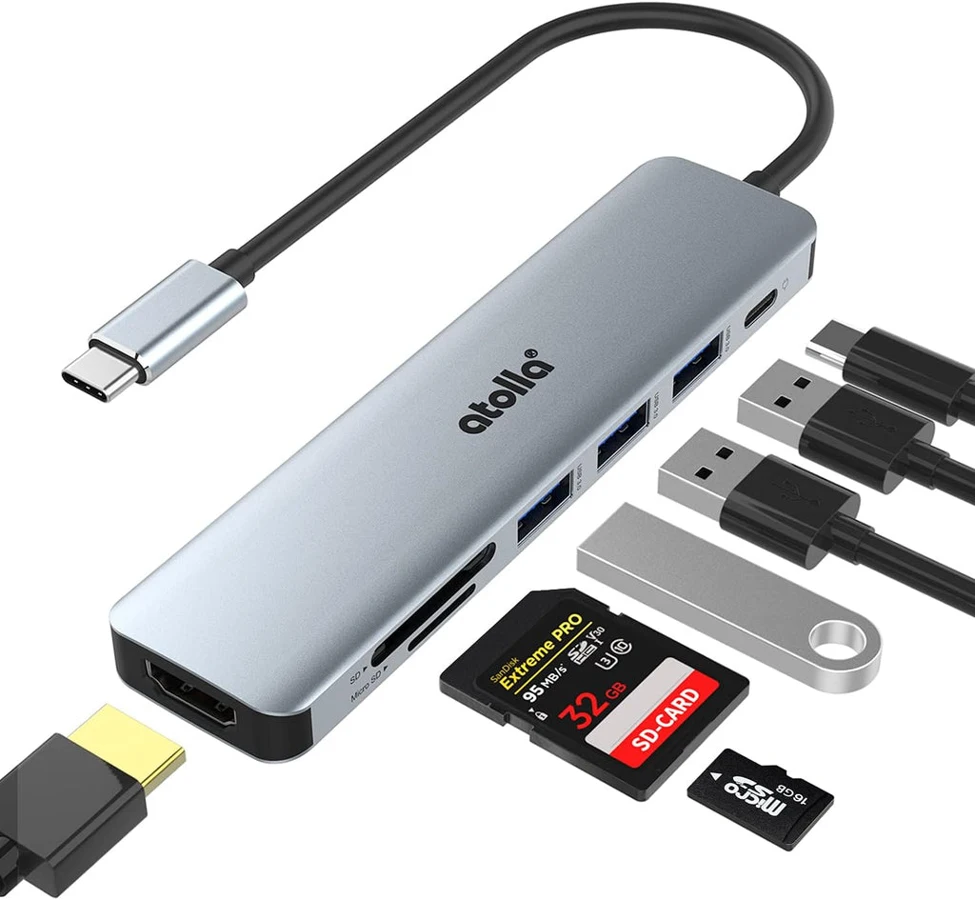
The exact layout has three Type-A data sockets plus full-size SD and microSD openings. Both formats being present does not establish simultaneous card reading.
Explore this need in the finder →Does the 100W input rating satisfy a need for 100W available to the laptop?
No. The original power diagram labels 85W at the computer, so a minimum 100W host-output requirement selects another documented arrangement.
Explore this need in the finder →A mixed everyday layout with a defined power distinction
The Atolla C108 combines three USB-A data sockets, one HDMI output, SD and microSD openings and a dedicated USB-C PD input on an attached Type-C host lead. It can suit a laptop setup that needs one external display and several ordinary peripherals without a large desktop dock.
The useful power figure is more specific than the 100W headline. Atolla's original diagram labels 100W at the input and 85W at the laptop output. Compare the documented computer-side figure with your charging requirement, using the appropriate power source and cable.
One external screen at the documented 4K30 mode
The original description supports mirrored and extended display operation through the HDMI connection, with a stated 4K30 mode. That can be a useful single-screen arrangement for a compatible host, but it is not a documented 4K60 or multi-monitor configuration.
The computer must supply native video through its USB-C connection. A data-only Type-C port does not gain video simply by accepting the hub's plug. The finder keeps the data route separate from the video-capable route, and it does not invent an exact DisplayPort revision when the source does not provide one.
The PD input stays separate from the data connections
The USB-C socket on the hub is the power input, not another downstream data socket. This leaves three Type-A data connections for your peripherals. If a spare Type-C data output is essential, compare a different layout rather than counting the PD input twice.
The original 100W-input/85W-output diagram describes a supported charging arrangement with suitable equipment. A smaller charger or an unsuitable cable does not automatically reproduce it. Check the actual source and package, and compare the laptop's requirements with the documented output rather than with the adapter headline alone.
Three USB data outputs share the available path
Atolla advertises 5Gbps USB 3.0 data capability for the three Type-A ports. The devices share the upstream connection; three rated sockets are not three independent full-speed links to the computer. This is an interface specification rather than a copying benchmark from our own testing.
Consider which devices will operate at the same time. A keyboard and receiver beside a drive are a different workload from several busy storage devices. The mixed connection layout is useful only when it matches the ports and simultaneous work you actually need.
Two card formats, with simultaneous use left unpromised
The exact layout includes both an SD slot and a microSD slot. That provides access to either format without choosing a separate hub for each one. The source does not establish that both cards can be read simultaneously, however.
If copying between two mounted cards is essential, choose a reader with an explicit simultaneous-reading specification. Having both openings, or showing cards inserted in a product photograph, does not by itself establish that workflow.
Placement and supported systems
The original size diagram shows a 124.3 ×39 ×10mm body and a 130mm attached host lead. The aluminum enclosure is described as portable, but the short lead keeps the hub near the computer. Allow room for the HDMI plug, power cable and peripheral connections around it.
Atolla lists Windows, MacOS, iPadOS and Linux within its stated version scope, with ChromeOS also named in the original gallery. Check the actual host's video and charging functions as well as its operating system. Shortlist the C108 for three Type-A devices, one documented 4K30 display and the illustrated 85W charging arrangement; choose another dock for extra Type-C data, confirmed simultaneous cards or a higher documented display or host-power limit.
Key details at a glance
| USB-A downstream data ports | 3 |
|---|---|
| USB-C downstream data ports | 0 |
| HDMI outputs | 1 |
| Full-size DisplayPort outputs | 0 |
| USB-C video outputs | 0 |
| Full-size SD slots | 1 |
| microSD slots | 1 |
| Advertised Ethernet link ceiling | 0Gbps |
| Maximum stated power available to host | 85W |
| Maximum PD input | 100W |
| Detachable host cable | No |
| Individual port switches | No |
| Included host-cable length | 5.12 in |
| Host requirements | Attached USB-C host lead,130mm in the original size diagram. Native HDMI requires a video-capable host; USB-C shape alone does not establish it. |
| Power and charging | Original charging illustration explicitly shows 100W input and 85W output to the laptop. That configuration requires a suitable source/cable and compatible host; source inclusion is not established. |
| Data and device limits | Three USB 3.0 Type-A data sockets at advertised 5Gbps, sharing the upstream link. The extra Type-C socket is for PD input rather than data. |
| Installation | Portable aluminum enclosure; original diagram 124.3 ×39 ×10mm with 130mm attached lead. Both SD/microSD slots exist; no simultaneous-reading guarantee. |
Use the exact model’s instructions for operating limits, supplied equipment and version differences.
Sources for this assessment
Find a hub or dock for your desk.
Match the computer, screens, devices and charging routine, then check the exact supported arrangement.