
Your needs, this model
Does it fit your priorities?
Does the US kit give a USB-A computer four 5Gbps data sockets?
Yes. Four switched USB 3.0 data sockets are documented. The separate Smart Charging socket is not included in that data count, and the upstream link is shared.
Explore this need in the finder →Can I use the documented Mac data-hub arrangement without extra hub drivers?
The maker lists MacOSX 10.x and driver-free hub use. Check the actual computer and peripheral software requirements rather than assuming every future chip/version is covered.
Explore this need in the finder →Does the five-port label provide five data connections?
No. The fifth socket is the separate Smart Charging output. A minimum of five Type-A data ports selects another model.
Explore this need in the finder →A powered kit with four data ports and one charging socket
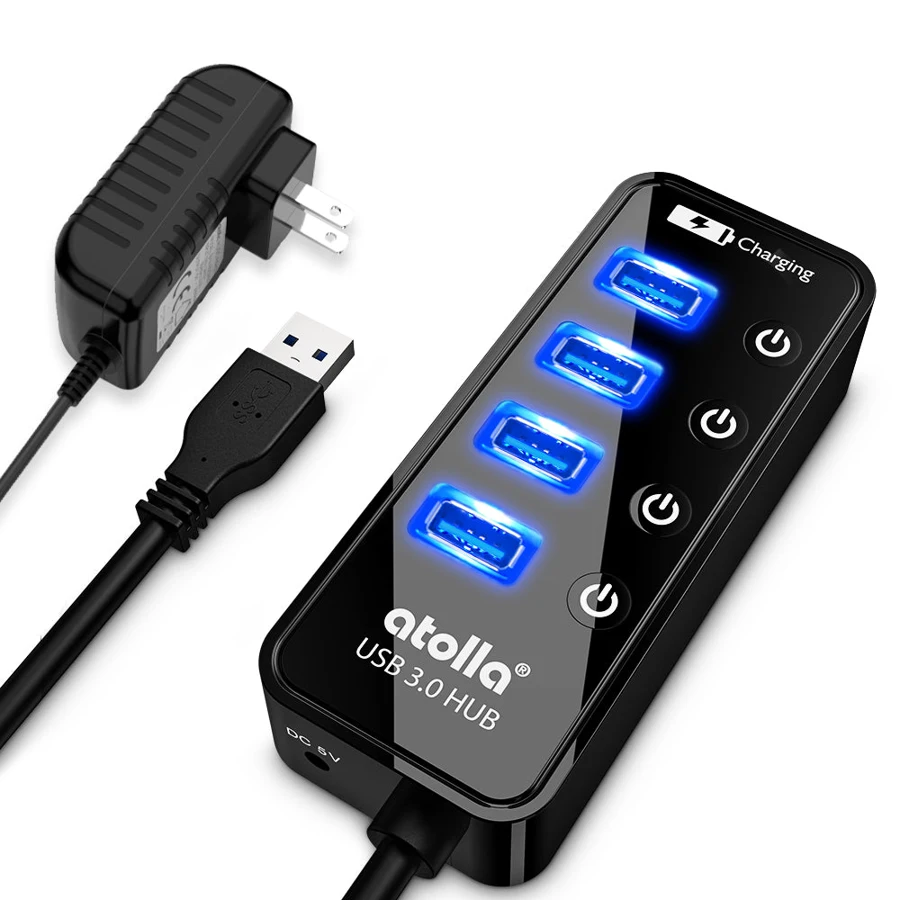
The Atolla CH-204U3-K US kit is useful when a USB-A computer needs four additional data connections and the hub should arrive with its own suitable regional power adapter. The fifth physical output has a separate job: it is the SmartCharging socket for a phone, tablet or other compatible charging device.
That distinction is more useful than the five-port headline. Four data peripherals can connect to the four switched USB 3.0 sockets. The charging-only output does not create a fifth data connection, and the supplied adapter does not turn the hub into a laptop Power Delivery dock.
The original controls are more specific than an on/off label
Atolla's original Quick Start describes tapping a data-port button to turn it on and pressing for about two seconds to turn it off. The English diagram identifies the four data connections separately from the charging socket. These instructions help explain the controls without assuming a brief press always toggles both ways.
Use the controls after finishing file operations and following the normal removal procedure for an attached drive. Cutting a device's connection is not a substitute for completing a transfer. The individual buttons are convenient for occasional peripherals, rather than a reason to interrupt storage activity.
Data capability and charging current are different specifications
The maker advertises a 5Gbps interface for the four USB 3.0 data ports. They share the connection back to the computer. This is not a copying result from our own tests or a promise of four separate full-speed upstream links.
The original guide also labels up to 1.5A charging at a data socket and up to 2.4A at SmartCharging. Those per-socket figures should not be added into a fictional guaranteed simultaneous output. The supplied 5V/3A adapter provides a 15W input rating for the hub arrangement as a whole, before considering the hub's own operation and the actual connected devices.
Choose the powered US package deliberately
The exact maker page identifies the American-standard CH-204U3-K kit and lists the hub, power adapter and setup guide. The original guide shows US, UK and EU adapter forms across the family. Match the actual regional kit instead of treating every similar Atolla hub name as an identical supplied package.
The computer lead is attached, and the maker gives approximately 65cm including the connector, also rounded to about 26in in its description. Plan that reach around the actual desk and computer position. It is a different placement choice from a detachable lead that can simply be exchanged.
System support and the compact body
Atolla lists Windows XP/Vista/7/8/8.1/10, MacOSX 10.x and Linux within its stated version scope, with no additional hub driver required. Connected peripherals can still need their own software. An older general Mac support line is not verification of every current chip or operating-system release.
The compact glossy case is described as suitable for carrying, although a powered setup also means accommodating the adapter and its cable. Consider the whole set of items you will actually use, especially when choosing between a travel data hub and a fixed powered arrangement.
Who should shortlist this kit
Choose it for four controlled Type-A data outputs, the documented US hub-power package and a separate small-device charging socket. Compare a larger data hub for a fifth data peripheral, or a different dock for laptop charging, Type-C data, monitors, Ethernet or cards. Those functions do not follow from the extra charging socket.
Key details at a glance
| USB-A downstream data ports | 4 |
|---|---|
| USB-C downstream data ports | 0 |
| HDMI outputs | 0 |
| Full-size DisplayPort outputs | 0 |
| USB-C video outputs | 0 |
| Full-size SD slots | 0 |
| microSD slots | 0 |
| Advertised Ethernet link ceiling | 0Gbps |
| Maximum stated power available to host | 0W |
| Included supply rating | 15W |
| Power adapter included | Yes |
| Detachable host cable | No |
| Individual port switches | Yes |
| Included host-cable length | 25.59 in |
| Host requirements | Attached USB-A computer lead, approximately 65cm including connector according to the US maker page. |
| Power and charging | The reviewed US kit includes a 5V3A hub supply. Original guide lists up to 1.5A at a data socket and 2.4A Smart Charging, not those maxima guaranteed simultaneously across all sockets. |
| Data and device limits | Four USB 3.0 Type-A data sockets at advertised 5Gbps. The fifth Smart Charging socket is not a fifth data output. |
| Installation | Compact glossy body with four independent data-port buttons. Original guide: tap to turn on, hold about 2 seconds to turn off. Match the CH-204U3-K US kit, not a similarly named bare hub. |
Use the exact model’s instructions for operating limits, supplied equipment and version differences.
Sources for this assessment
Find a hub or dock for your desk.
Match the computer, screens, devices and charging routine, then check the exact supported arrangement.