
Your needs, this model
Does it fit your priorities?
Can the documented full-featured Windows USB-C setup run three independent HDMI screens at 1080p60?
Yes, subject to the computer graphics limit; the built-in display may need to stop outputting. This is not triple 4K.
Explore this need in the finder →Will an Intel Mac get three independent external desktops through these HDMI sockets?
No. The documented Mac external outputs repeat one independent external workspace.
Explore this need in the finder →Can it read SD and microSD at the same time?
No. Baseus explicitly excludes simultaneous reading of the two cards.
Explore this need in the finder →Baseus WKSP020013: choose by the actual three-screen mode
The WKSP020013 is a desk docking station for a full-featured USB-C computer connection. Its useful distinction is three HDMI outputs, but three sockets do not mean three independent 4K desktops on every computer. Baseus documents a single-display ceiling of 4K at 30Hz and Windows multi-display operation at 1080p at 60Hz. On the documented Mac arrangement, the external screens repeat one external desktop rather than creating three different workspaces.
Verify the exact seventeen-in-one layout
The model-specific text identifies three HDMI outputs, five USB-A data sockets, two downstream USB-C data sockets, Gigabit Ethernet, SD and microSD readers, a 3.5mm audio connection and separate power inputs. The computer-facing USB-C connection and the USB-C PD input are different roles from the downstream data sockets. Count the accessories you need on the outward ports, leaving those upstream and power connections out of the total.
The current page also contains generic gallery images of a different two-HDMI-and-VGA layout. Match the actual WKSP020013 three-HDMI specification and product label before ordering; a similar upright Baseus enclosure is not enough to identify the edition. This assessment uses the exact-SKU-named operating diagrams and model-specific text, and does not add VGA from those inconsistent generic pictures.
Windows and Mac have different screen arrangements
On a suitable Windows computer, the original diagram shows three independent 1080p/60Hz external screens. Baseus cautions that the Intel graphics arrangement described on its page supports three interfaces, so using all three external outputs can leave the laptop panel or another display without a signal. Confirm the computer's own display limit before planning to keep its built-in panel active alongside three external desktops.
A single HDMI output can reach 4K/30Hz on a qualified computer and monitor. Do not combine that single-screen maximum with the three-screen headline to promise triple 4K output. The text specifies 1080p/60Hz for two or three connected screens. Use that documented lower mode when the workstation depends on multiple independent displays.
Baseus explains that macOS does not support the dock's MST arrangement for separate external desktops. Its exact-SKU diagram shows a different laptop image and one repeated external image in extended mode. That is one independent external workspace displayed on multiple monitors, not three. The general MacBook wording establishes an Intel-era reference scope here; no precise Apple-silicon chip is added without a corresponding exact model statement.
The computer port and cable both matter
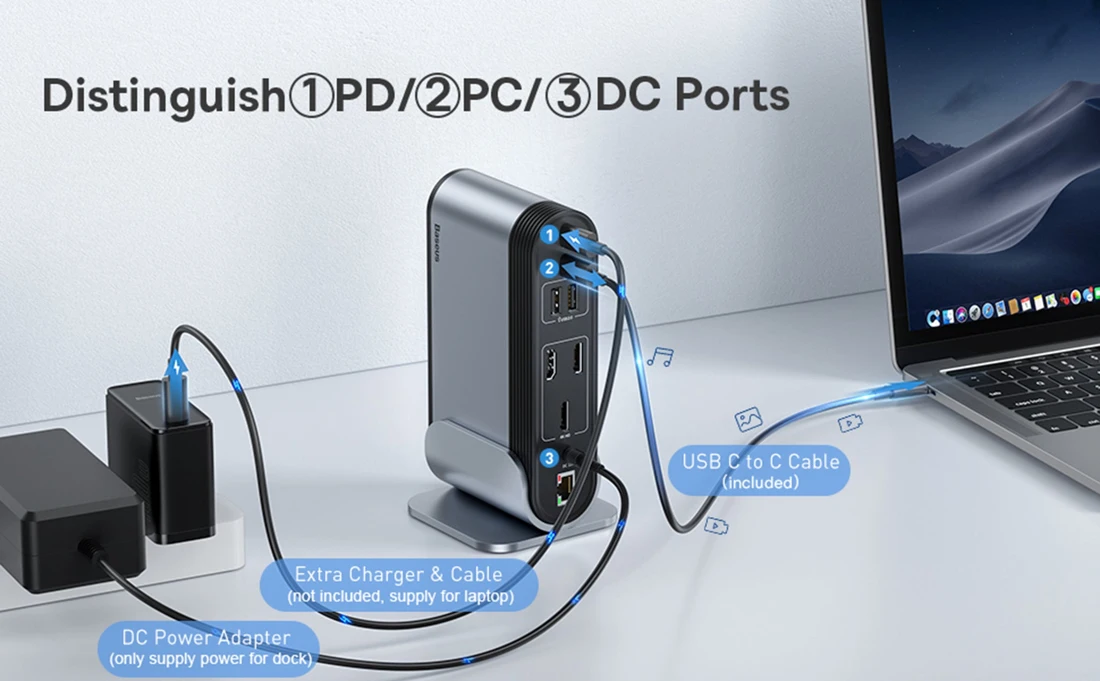
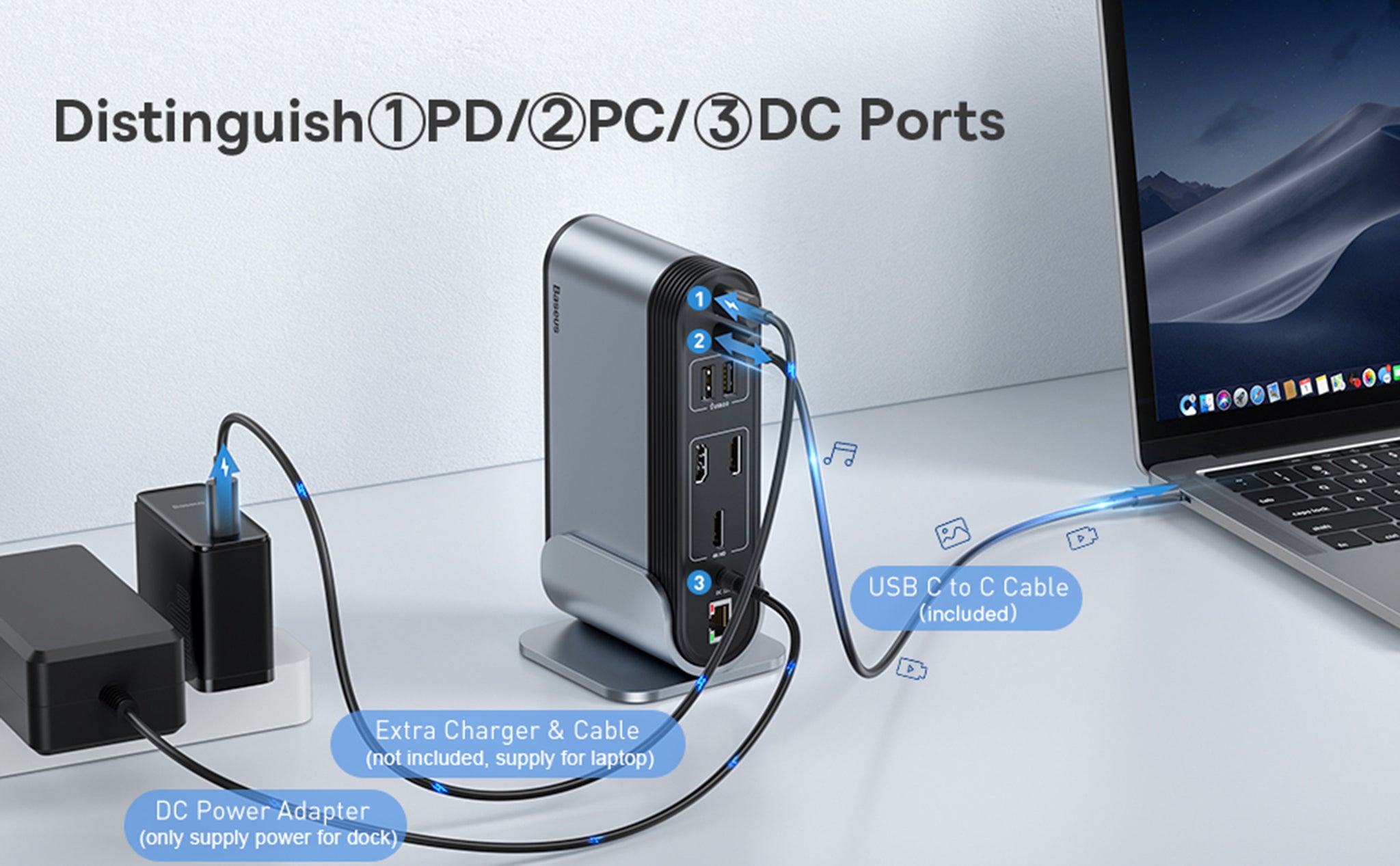
The host USB-C port must provide data, DisplayPort Alt Mode video and the required power functionality. A data-only USB-C port cannot run the native HDMI outputs. Baseus does not state an exact DisplayPort revision in the material used here, so a specific DP 1.2 or 1.4 tag is not invented. The included 3.3-foot USB-C-to-C cable is expressly full-featured; a charge-only replacement cable can prevent video from working.
The dock has a separate included 12V, 3A supply, rated 36W, with US, UK and EU plug arrangements listed in the package. Baseus says this supply powers the dock rather than the laptop. Charging the computer requires an additional suitable USB-C PD charger connected to the PD input. The page advertises a 100W input ceiling but does not establish the net wattage delivered to the host, so a selected numeric notebook-power requirement remains unconfirmed.
Plan data, networking and card use together
Three USB-A data sockets advertise 5Gbps, while the other two are USB 2.0 at 480Mbps. They are not five equally fast storage connections. The body text calls the two downstream USB-C sockets 5Gbps, while the comparison table labels them USB 2.0. Their physical data-port count is retained, but their rate remains unspecified rather than silently selecting the more favorable claim. All data activity shares the computer connection.
The wired network port advertises up to 1000Mbps. Baseus describes a macOS network-service setup step, so allow time to configure that connection. The SD and microSD readers accept cards up to the stated 2TB limit but cannot read two cards at once. Choose WKSP020013 for its documented Windows multi-screen desk arrangement and broad peripheral layout. Choose another dock for independent multi-screen Mac work, 4K/60Hz output, simultaneous card transfers or an established net laptop-charging wattage.
Key details at a glance
| USB-A downstream data ports | 5 |
|---|---|
| USB-C downstream data ports | 2 |
| HDMI outputs | 3 |
| Full-size DisplayPort outputs | 0 |
| USB-C video outputs | 0 |
| Full-size SD slots | 1 |
| microSD slots | 1 |
| Simultaneous card slots | No |
| Advertised Ethernet link ceiling | 1Gbps |
| Maximum PD input | 100W |
| Included supply rating | 36W |
| Power adapter included | Yes |
| Detachable host cable | Yes |
| Included host-cable length | 39.6 in |
| Host requirements | Included 3.3 ft full-featured C-to-C host cable; computer USB-C must provide data/DP Alt Mode/PD. Exact DP revision unspecified; no generic USB-A video route. |
| Screen arrangement | Exact WKSP020013 three-HDMI edition. Windows single 4K30, dual/triple 1080p60 independent; Intel graphics total-interface caveat. Mac external outputs mirror one workspace. Generic page photos show a different two-HDMI/VGA version and are excluded. |
| Power and charging | Included 12V 3A 36W DC supply powers dock only; US/UK/EU package plugs listed. Extra 60–100W/65–100W PD charger required for laptop; 100W input headline does not establish net host watts. |
| Data and device limits | A ports: three 5 Gbps plus two 480 Mbps. Two downstream C data ports retained with rate unknown because body 5 Gbps conflicts with comparison USB2.0. SD/microSD cannot read simultaneously. Shared computer link. |
| Installation | Detachable U-shaped desk stand included. Correctly distinguish PD input, PC host and DC input. Mac wired networking may require creating/applying a USB LAN service. Verify actual SKU/three-HDMI connector map. |
Use the exact model’s instructions for operating limits, supplied equipment and version differences.
Sources for this assessment

Find a hub or dock for your desk.
Match the computer, screens, devices and charging routine, then check the exact supported arrangement.