

Your needs, this model
Does it fit your priorities?
Can I connect four ordinary USB-A data peripherals to the documented host route?
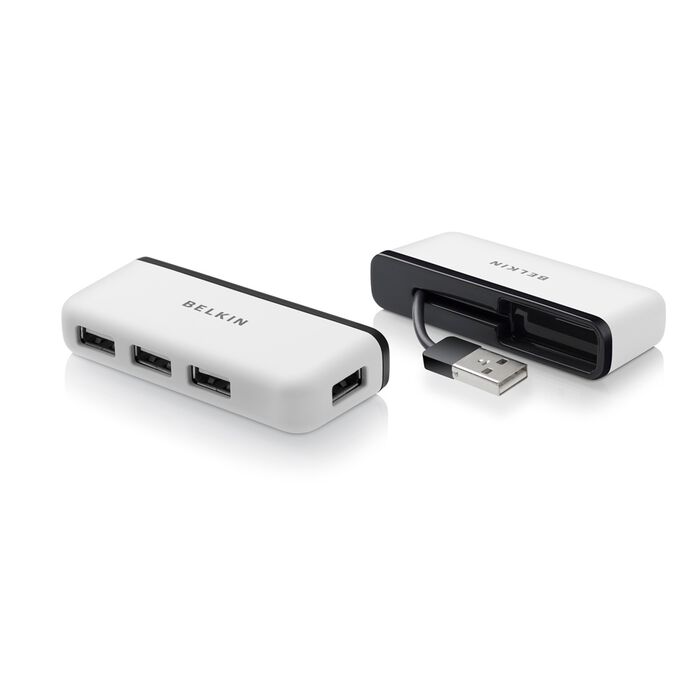
Four downstream USB-A sockets and the USB-A host plug are visible in the exact maker image. This is an earlier USB 2.0 configuration with a shared host connection.
Explore this need in the finder →Does it meet a 5 Gbps data-interface requirement?
No. Belkin specifies Hi-Speed USB 2.0 rather than a 5 Gbps USB 3.x connection.
Explore this need in the finder →Does it provide laptop charging through the hub?
No USB-C PD-input route is present in the complete four-port data layout. Choose a different type of adapter for that job.
Explore this need in the finder →A travel hub for ordinary USB-A peripherals
The F4U021bt Four-Port Travel Hub is an earlier USB 2.0 design with a practical transport feature: its attached computer cable stores in the back of the body. The exact manufacturer photograph shows four downstream USB-A sockets and a USB-A host plug. It suits a supported computer that needs several familiar peripheral connections without carrying a separate loose host cable.
The deciding limitation is the interface generation. Belkin calls these Hi-Speed USB 2.0 connections. This is not a SuperSpeed USB 3.x hub, a native USB-C laptop dock or an accessory that provides modern display and laptop-charging functions.
Check the actual host plug first
The rectangular USB-A plug in the maker’s photograph is the computer-side connection. A laptop with only USB-C does not receive a direct USB-C cable just because the product is described as a travel hub. If a separate adapter is being considered, check that supported arrangement rather than assuming it is supplied.
The manufacturer lists specific older MacBook examples. Some named computers may themselves need a separate connection arrangement depending on their physical ports. Begin with the sockets on the actual computer and the offered package, not only a broad compatibility label.
Four sockets do not change the USB 2.0 speed class
The four USB-A outputs can be useful when a keyboard, mouse receiver and other ordinary peripherals need to remain connected. List the devices you actually use together. Four narrow cable plugs and several wide receivers create different physical arrangements even when the numerical socket requirement is the same.
Hi-Speed USB 2.0 has a 480 Mbps interface ceiling. That is a link capability, rather than a measured copying speed. The computer connection is shared, and adding more sockets does not turn an older host connection into a faster storage interface.
Choose the hub around the workload
For a collection of low-bandwidth peripherals, connector availability may be the main consideration. Frequent large file transfers or several busy storage devices make the data generation more important. If a 5 Gbps or faster interface is essential, keep that requirement in the finder and compare a different hub.
A USB 3.x peripheral connected through this older route should not be expected to retain its faster interface performance. Its own backward compatibility and operating requirements still need checking. The hub’s port count alone does not establish that every connected peripheral is supported.
The stored lead helps packing, not desk reach
The rear cable-storage arrangement is visible in the exact maker image. It can keep the attached host plug with the hub when the accessory is packed away. The inspected maker text does not give a precise lead length, so do not choose it on the assumption that it can move a collection of cables far across a desk.
Check where the computer’s USB-A port sits, how much clearance surrounds it and whether the hub can rest sensibly with the devices attached. Cable storage is a carrying feature; it is not the same as a detachable host lead that can be replaced with any preferred length.
Keep power and display requirements separate
The documented layout contains four USB-A data sockets and the host lead. It does not provide an HDMI output, a built-in card reader or a USB-C laptop PD-input path. If the computer must charge or drive a screen through the same accessory, this is the wrong type of expansion device.
The inspected material also does not establish a detailed shared peripheral-power budget. Check attached devices’ own power requirements instead of treating four sockets as unlimited power. Shortlist this earlier model for a supported USB-A computer and ordinary USB 2.0 peripherals when the stowable cable is useful. Choose a different arrangement for faster data, a directly supplied USB-C route, video or laptop charging.
Belkin’s exact F4U021bt page and manufacturer photograph establish its older interface generation, physical connections and stored-cable design.
Key details at a glance
| USB-A downstream data ports | 4 |
|---|---|
| USB-C downstream data ports | 0 |
| HDMI outputs | 0 |
| Full-size DisplayPort outputs | 0 |
| USB-C video outputs | 0 |
| Full-size SD slots | 0 |
| microSD slots | 0 |
| Detachable host cable | No |
| Host requirements | The exact manufacturer photo shows a USB-A host plug on an attached cable. A directly supplied USB-C connection is not established. |
| Screen arrangement | The complete photographed layout is a four-port USB data hub, without native display outputs. |
| Power and charging | No USB-C laptop charging path is present. A detailed peripheral-power budget and supplied external adapter are not established by the inspected maker text. |
| Data and device limits | Four USB-A Hi-Speed USB 2.0 sockets share the host connection. The 480 Mbps interface ceiling is not a measured copying result. |
| Installation | The attached host lead stores in the rear of the portable body. Its precise length is not established. |
Use the exact model’s instructions for operating limits, supplied equipment and version differences.
Sources for this assessment
Find a hub or dock for your desk.
Match the computer, screens, devices and charging routine, then check the exact supported arrangement.