
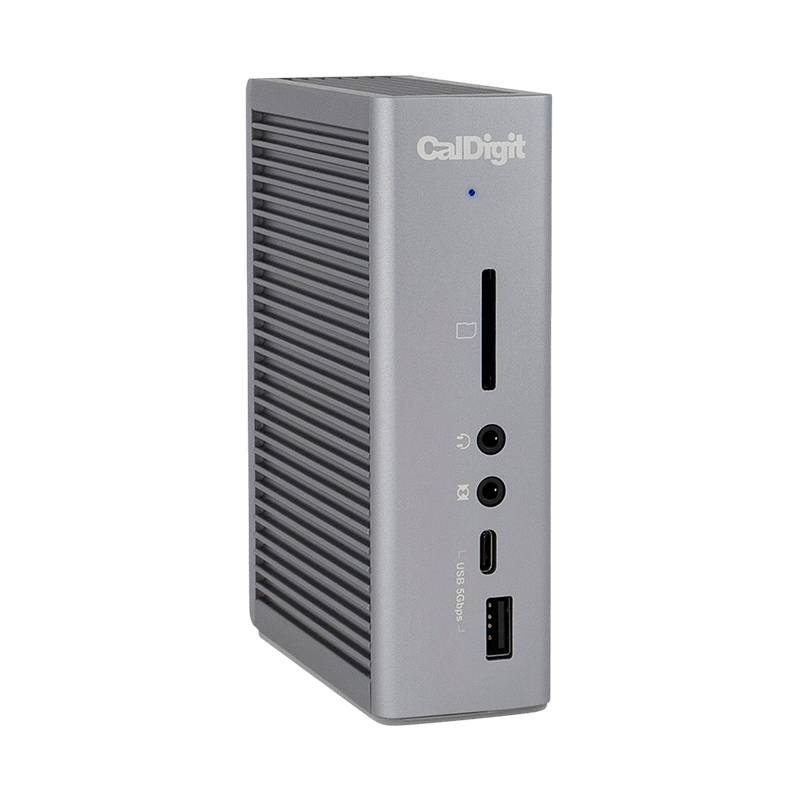
Your needs, this model
Does it fit your priorities?
Can a base M1 Mac use this dock for two independent external 4K 60 Hz displays?
No. The exact TS3 Plus FAQ limits base M1 and M2 Macs to one external display through the dock. Supported Intel, Pro and Max systems have separate display arrangements.
Explore this need in the finder →Does it provide five USB-A ports at up to 5 Gbps and an SD reader?
Yes. All five USB-A ports are specified at up to 5 Gbps, and the front SD reader supports UHS-II. There is no separate microSD slot.
Explore this need in the finder →Will the included supply deliver at least 100 W to the laptop through the dock?
No. The included supply is rated at 180 W, but the host allowance is up to 87 W with the applicable firmware. Those figures describe different sides of the power system.
Explore this need in the finder →The CalDigit TS3 Plus suits a Thunderbolt laptop desk that still needs five USB-A sockets, an SD reader and optical digital audio alongside up to two independent 4K 60 Hz monitors. Its useful distinction is the mixture of connections, rather than its age or a total-port headline. It is a poor match for an ordinary USB-C computer, a requirement for two native HDMI sockets, or a laptop that must receive more than 87 W through the dock.
Check the Thunderbolt host before planning the desk
CalDigit explicitly supports Thunderbolt 3 and Thunderbolt 4 Mac and Windows computers. A USB-C connector by itself is insufficient: the TS3 Plus is not a general USB-C fallback dock. That matters when a household or office intends to share one workstation between a Thunderbolt laptop and a cheaper USB-C laptop. The cable can fit both while only one provides the required connection.
The published system requirements name macOS 10.12 or later and Windows 10 or later. Windows users also need the appropriate computer firmware and Thunderbolt drivers. CalDigit says Mac users do not need dock drivers for ordinary operation, but its SuperDrive support is a separate exception requiring an installation. Do not turn that exception into either a promise that every accessory needs no software or a claim that the dock uses DisplayLink graphics.
Two screens require two appropriate routes
The practical dual-monitor arrangement is one display through the built-in DisplayPort 1.2 connector and another through the spare Thunderbolt 3 port. A compatible USB-C or Thunderbolt monitor can use that second port directly. An HDMI monitor needs the appropriate separate adapter; converting the built-in DisplayPort output to HDMI requires an active adapter. There are no HDMI sockets on the dock itself.
CalDigit documents dual extended 4K 60 Hz for suitable hosts. It also warns that some Windows Thunderbolt 3 computers provide only one DisplayPort stream, so the computer's implementation remains part of the purchase decision. A pair of compatible monitors does not repair a restricted source connection.
For Apple silicon, the exact product page confirms one external display through the dock on base M1 and M2 computers, and two on M1 Pro and M1 Max. Buying the TS3 Plus does not remove those limits. Keep the chip distinction when using the setup finder; a single “MacBook” answer is too broad to establish an independent two-screen arrangement.
Choose the right socket for each USB device
The five USB-A sockets are specified at up to 5 Gbps. The two dedicated USB-C data sockets differ: the rear connection is up to 10 Gbps, while the front one is up to 5 Gbps. Put a suitable faster USB SSD on the rear data connection if that interface capability is important. The front USB-C connection offers convenience without the same ceiling.
Those two dedicated USB-C sockets do not carry display video. The spare Thunderbolt socket has a different role and can serve a display or another supported device. Map the connections before counting spare ports: using it for the second monitor leaves it occupied. None of the quoted interface rates is a measured file-copy result, and the 40 Gbps Thunderbolt link does not make each ordinary USB socket a 40 Gbps connection.
The SD reader supports UHS-II, but the dock has no microSD slot. A camera workflow built around microSD therefore needs an adapter or another reader. Gigabit Ethernet and separate analog audio connections join the optical S/PDIF output, which makes this layout relevant to a desk with an existing digital-audio receiver. Check that actual connection requirement rather than assuming newer docks preserve it.
Allow for the power brick and the charging ceiling
The current package lists a 180 W power adapter, a power cord and a certified Thunderbolt cable. The adapter's rating is not the laptop's allowance: CalDigit specifies up to 87 W to the host. Its download notes identify the firmware update needed by older units for that charging level and say it is unnecessary for units purchased after November 2020. A used unit deserves that check.
CalDigit recommends the laptop's own charger for demanding CPU or GPU workloads when the computer's normal supply exceeds 87 W. That is a sensible reason to choose a different power arrangement even if every data port fits. The compact dock body also does not eliminate the separate brick or the cable space behind it.
Shortlist TS3 Plus for a confirmed Thunderbolt host, the required screen routes and a useful combination of USB-A, SD and optical audio. For a portable USB4 arrangement with built-in HDMI plus DisplayPort and different charging requirements, compare the separately documented Anker 556 A83A8. These are different desk designs, so compare the connections you will actually use.
Sources: CalDigit TS3 Plus specifications and FAQ; official TS3 Plus operating manual; CalDigit firmware and manual download notes. This assessment uses documented specifications and setup constraints; it does not report hands-on performance or durability testing.
Key details at a glance
| USB-A downstream data ports | 5 |
|---|---|
| USB-C downstream data ports | 3 |
| HDMI outputs | 0 |
| Digital DVI outputs | 0 |
| Analog VGA outputs | 0 |
| Full-size DisplayPort outputs | 1 |
| Mini DisplayPort outputs | 0 |
| USB-C video outputs | 1 |
| Full-size SD slots | 1 |
| microSD slots | 0 |
| Advertised Ethernet link ceiling | 1Gbps |
| Maximum stated power available to host | 87W |
| Included supply rating | 180W |
| Power adapter included | Yes |
| Detachable host cable | Yes |
| Stated product weight | 470g |
| Host requirements | Use a supported Thunderbolt 3 or Thunderbolt 4 Mac or Windows computer. Ordinary USB-C hosts are expressly excluded. Windows requires the appropriate current system firmware and Thunderbolt drivers. |
| Screen arrangement | One DisplayPort 1.2 output and one spare Thunderbolt 3 port provide the documented display routes. The two dedicated USB-C data ports do not carry video. Dual 4K 60 Hz depends on the host; base M1 and M2 Macs support one external display through the dock. DisplayPort-to-HDMI conversion requires an active adapter. |
| Power and charging | The current host ceiling is 87 W. Older units may need the documented firmware update for that allowance. The included 180 W supply powers the complete dock; its rating is not the power delivered to the laptop. Desktop Macs use their own supplies. |
| Data and device limits | All five USB-A ports support up to 5 Gbps. The rear dedicated USB-C port supports up to 10 Gbps and the front one up to 5 Gbps. The spare Thunderbolt port supports data and video, but its ordinary USB line rate is not established in these exact sources. No USB 20 Gbps Gen 2x2 mode is assumed. |
| Installation | The dock requires its supplied AC adapter and a separate certified host cable. The manual rates the supply for 100–240 V at 50/60 Hz. The reviewed US package and its regional power cord are recorded separately from older optional-cable packages. |
Use the exact model’s instructions for operating limits, supplied equipment and version differences.
Sources for this assessment
Find a hub or dock for your desk.
Match the computer, screens, devices and charging routine, then check the exact supported arrangement.