
Your needs, this model
Does it fit your priorities?
Can an M2 Ultra desktop use two independent 4K 60 Hz displays, five fast USB-A ports and 2.5 Gb Ethernet?
Yes. The exact TS4 page names M2 Ultra support. Use the documented DisplayPort plus Type-C arrangement through the supported Thunderbolt connection. The desktop uses its own power supply.
Explore this need in the finder →Can a base M3 MacBook use the documented two-screen exception with its lid open?
No. That particular two-screen arrangement requires a compatible base M3 MacBook in clamshell mode. A single external display is a separate arrangement.
Explore this need in the finder →Can an ordinary DP 1.4 USB-C host use the built-in Ethernet and both card readers?
The card readers can be available in the documented fallback, but CalDigit expressly excludes the built-in PCIe Ethernet function on ordinary USB-C hosts. That combined requirement does not qualify the fallback arrangement.
Explore this need in the finder →The CalDigit TS4 is a strong candidate for a supported Thunderbolt desk that needs five USB-A sockets, several USB-C connections, simultaneous SD and microSD access, and 2.5 Gb Ethernet. Its 98 W host allowance also makes it useful for a charging laptop setup. Choose it for the connections you will use together: an ordinary USB-C host loses capabilities, and the dock does not contain native HDMI outputs.
Separate the three kinds of Type-C connection
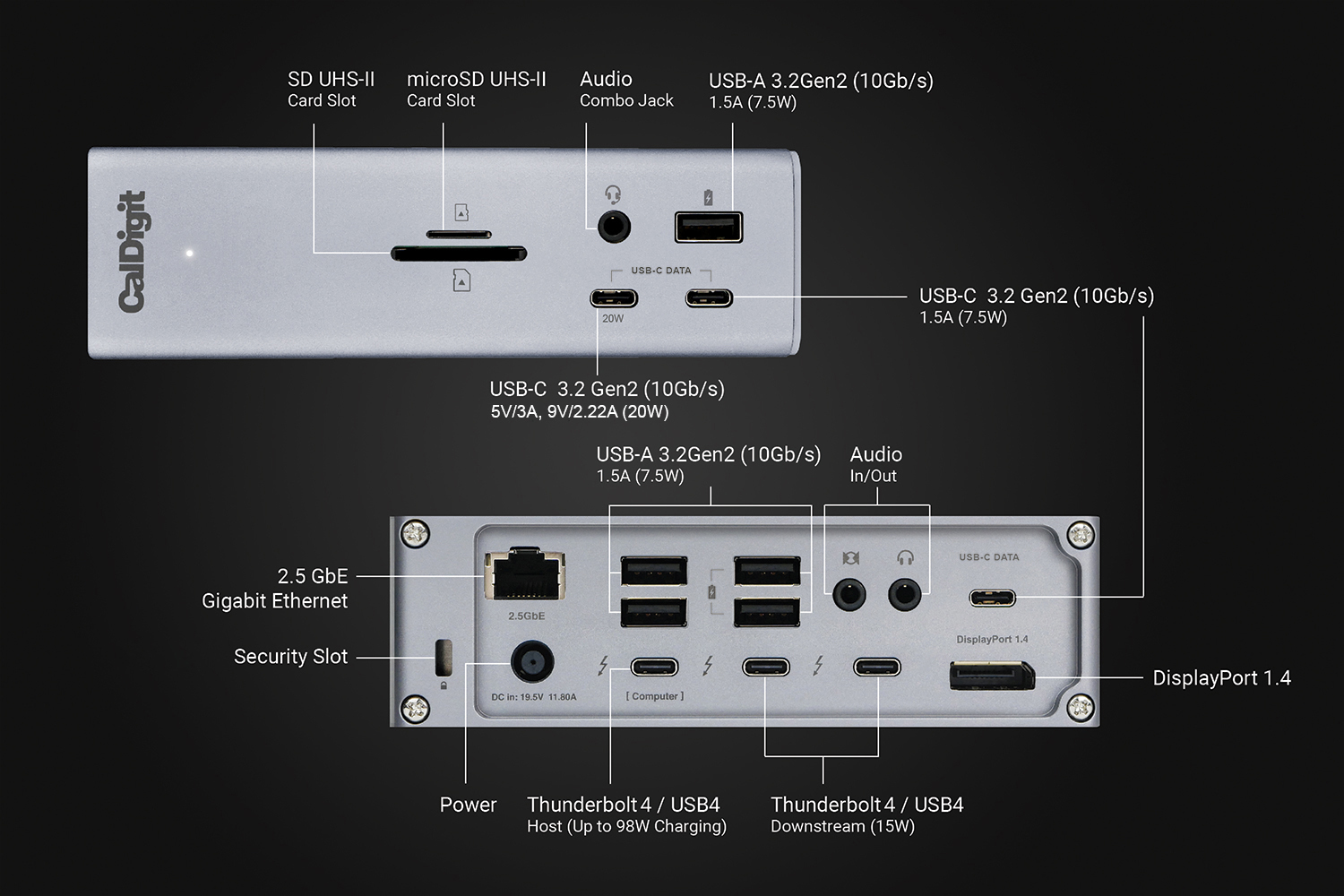
The rear socket marked for the computer is the upstream connection. Two other Thunderbolt 4 sockets remain for supported devices or displays. Three additional USB-C sockets are dedicated data connections rated at up to 10 Gbps; they do not carry video. This distinction prevents a familiar mistake: plugging a monitor into a convenient front USB-C socket and expecting it to behave like a downstream Thunderbolt port.
There are also five 10 Gbps USB-A sockets. That is an unusually useful mix for a desk with older peripherals and newer USB-C accessories. The quoted rates describe interface ceilings, not measured simultaneous copying speeds. All traffic still depends on the computer link and connected devices, and the 40 Gbps Thunderbolt rating does not establish ordinary USB 20 Gbps Gen 2x2 support.
One front USB-C socket can supply up to 20 W to an accessory; the other dedicated USB-C sockets have a different power allowance. Keep accessory charging separate from the 98 W host output. Choosing a phone's charging socket does not change which socket connects the dock to the laptop.
Plan the screens around the computer and occupied sockets
The TS4 offers one built-in DisplayPort 1.4 output. A second monitor can use a downstream Thunderbolt socket, or two compatible USB-C or Thunderbolt monitors can use both downstream sockets. HDMI monitors need suitable separate adapters. Converting the built-in DisplayPort output requires an active adapter. Two native HDMI sockets are not part of this hardware.
For a suitable dual-display computer, CalDigit documents two 4K 60 Hz external displays. Higher-resolution arrangements require the specific GPU, display and compression support described in its documentation. It is more useful to establish the ordinary dual-screen route first than to treat a single-monitor 8K headline as a promise for every attached screen.
Base M1 and M2 Macs remain limited to one independent external display through the dock. CalDigit separately describes a closed-lid dual-screen arrangement for compatible base M3 MacBooks, including the MacBook Air, and supports dual displays on the named Pro, Max, Ultra and newer base M4/M5 families. The exact chip and lid condition therefore belong in the setup finder. A TS4 cannot convert a base M1 into a two-external-screen system.
Also count the sockets consumed by those screens. A DisplayPort screen plus one USB-C screen leaves one downstream Thunderbolt socket available; two USB-C screens use both. The dedicated data sockets remain separate, but an occupied display socket should not also be promised to another directly connected storage device.
USB-C fallback does not preserve the network connection
The dock supports ordinary USB-C hosts with reduced functionality. CalDigit's own FAQ explicitly says its Ethernet connection depends on PCIe and does not function on ordinary USB-C computers. The manual likewise restricts the 2.5 Gb Ethernet function to the appropriate host arrangement. A cable fitting the computer does not establish that this particular network port works.
That limitation matters for a shared desk. A Thunderbolt laptop may use the built-in network jack while a USB-C laptop needs a separate compatible USB Ethernet adapter. Record that second adapter as another component and occupied port, rather than quietly assigning the Thunderbolt network capability to both computers. USB4 host details also deserve a positive compatibility check where PCIe support is material.
The SD and microSD readers provide a different convenience: CalDigit explicitly supports using both at the same time, with UHS-II readers. For a workflow that repeatedly imports both card formats, that removes the need to disconnect one reader to use the other.
Use the supplied power system and assess the 98 W limit
The package includes a 230 W supply, power cord, rubber feet and a detachable 0.8 m Thunderbolt 4 cable. The dock requires external power. Its body can stand vertically or lie horizontally, but the supply and rear cable space remain part of the desk arrangement.
The host receives up to 98 W, not the full supply rating. CalDigit recommends the laptop's own charger for particularly demanding workloads on systems whose normal supply exceeds that allowance. Desktop Macs are another case: they use their own power and do not receive charging through the dock. Windows networking may also involve the manufacturer's driver package, so confirm software requirements before selecting a no-installation setup.
Shortlist TS4 when its documented host mode, card readers and many ordinary data sockets solve the actual desk problem. For a smaller USB4 hub with a different charging arrangement and built-in HDMI plus DisplayPort, compare the Anker 556 A83A8. The more suitable choice depends on the supported simultaneous arrangement, rather than the largest number of ports.
Sources: CalDigit TS4 specifications and FAQ; official TS4 manual; current MacBook display support chart. This assessment does not claim hands-on transfer, thermal or durability measurements.
Key details at a glance
| USB-A downstream data ports | 5 |
|---|---|
| USB-C downstream data ports | 5 |
| HDMI outputs | 0 |
| Digital DVI outputs | 0 |
| Analog VGA outputs | 0 |
| Full-size DisplayPort outputs | 1 |
| Mini DisplayPort outputs | 0 |
| USB-C video outputs | 2 |
| Full-size SD slots | 1 |
| microSD slots | 1 |
| Simultaneous card slots | Yes |
| Advertised Ethernet link ceiling | 2.5Gbps |
| Maximum stated power available to host | 98W |
| Included supply rating | 230W |
| Power adapter included | Yes |
| Detachable host cable | Yes |
| Included host-cable length | 31.5 in |
| Stated product weight | 640g |
| Host requirements | Thunderbolt 3 and Thunderbolt 4 hosts are supported, with separately documented USB4 and USB-C fallback. The current exact product page names Pro, Max, base and M1/M2/M3 Ultra families. USB4 networking requires positive PCIe tunneling support. |
| Screen arrangement | One DisplayPort 1.4 output and two downstream Thunderbolt 4 ports provide the display routes. Dedicated USB-C data ports do not carry video. Every recorded mode reserves its occupied Type-C display ports. The compatible base M3 closed-lid exception is separate from the base M1 and M2 single-display limit. |
| Power and charging | The included 230 W supply is required. A suitable laptop can receive up to 98 W. The Ultra desktop arrangement provides no host charging, and a demanding laptop may still need its factory charger for heavy workloads. |
| Data and device limits | Five USB-A ports and three dedicated USB-C data ports are specified at up to 10 Gbps. The two downstream Thunderbolt ports also accept supported USB-C devices, but no ordinary USB 20 Gbps mode is inferred from their transport rating. |
| Installation | The body supports vertical or horizontal desktop placement with the supplied feet. The package includes a detachable 0.8 m Thunderbolt 4 cable and a 230 W supply rated for 100–240 V at 50/60 Hz. The exact US package is preserved in the research record. |
Use the exact model’s instructions for operating limits, supplied equipment and version differences.
Sources for this assessment
Find a hub or dock for your desk.
Match the computer, screens, devices and charging routine, then check the exact supported arrangement.