
Your needs, this model
Does it fit your priorities?
Do both USB-A ports satisfy a 10 Gbps requirement?
No. One is specified at up to 10 Gbps; the other is USB 2.0 for a lower-speed peripheral such as a keyboard or mouse.
Explore this need in the finder →Can a supported Windows Thunderbolt 4 laptop use two independent 4K 60 Hz Type-C displays and 2.5 Gb Ethernet?
Yes, in the documented two-stream Windows 11 arrangement with the specified platform, firmware and host capability. This does not add a third native display or support a Thunderbolt 3 Windows host.
Explore this need in the finder →Can SD and microSD operate together while the included supply supports a 140 W laptop allowance?
Yes, in a suitable supported Thunderbolt laptop arrangement. Both UHS-II readers can operate together. The 140 W figure is the dock host ceiling, not its 240 W total supply rating or a promise that every laptop accepts that amount.
Explore this need in the finder →The CalDigit TS5 suits a supported Thunderbolt workstation that needs three downstream Thunderbolt connections, simultaneous SD and microSD readers, 2.5 Gb Ethernet and up to 140 W of laptop charging. It favors flexible Type-C display and peripheral routes over a large bank of fast USB-A sockets. Check that tradeoff carefully: the TS5 has two USB-A ports, but only one is rated at 10 Gbps; the other is USB 2.0.
Three downstream Thunderbolt ports define the layout
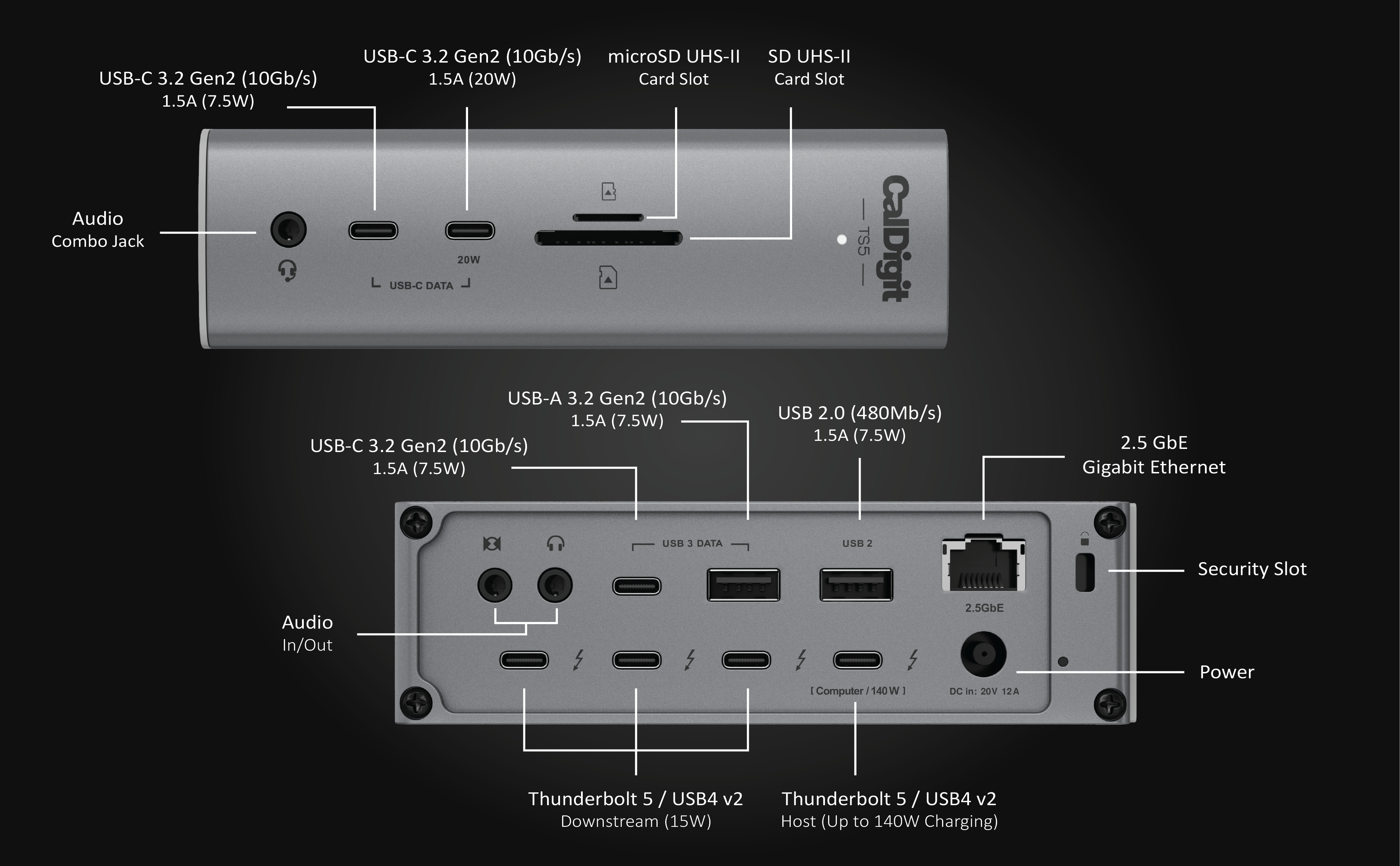
One Thunderbolt 5 socket connects to the host computer, leaving three for supported downstream devices. The TS5 also contains three dedicated 10 Gbps USB-C data sockets. Those dedicated data sockets do not output video. Monitors must use the downstream Thunderbolt sockets, either directly with suitable USB-C or Thunderbolt displays, or through the appropriate separate video adapters.
There is no built-in HDMI or DisplayPort output. A desk with three USB-C displays can benefit from the flexible layout, while an existing HDMI-only desk needs adapters and their cable space. Each directly attached screen also occupies a downstream socket. Three directly connected screens leave none of those three sockets free for another directly connected Thunderbolt device, although the dedicated USB data sockets remain available.
The ordinary USB-A layout is particularly important for storage. One socket supports up to 10 Gbps, and the second is explicitly described as USB 2.0 for a keyboard or mouse. The specification table contains an inconsistent unit beside that slower socket; the clear USB 2.0 description establishes its class. Do not treat the two USB-A connections as an identical high-speed pair.
Match the host before choosing the monitor count
CalDigit documents Thunderbolt 5 and Thunderbolt 4 Windows hosts, Thunderbolt 3 Macs, and supported USB4 arrangements. It expressly excludes Thunderbolt 3 Windows PCs. That asymmetry matters when upgrading an older Windows desk: a Thunderbolt label and a fitting Type-C plug are not enough to establish this model's compatibility.
The stated minimums include macOS 15 or newer and Windows 11 or newer, with further Windows platform and firmware conditions in the specifications. Ordinary USB-C fallback is also documented with reduced functionality. Use the exact host row, rather than applying the Thunderbolt 5 feature list to every machine that accepts the cable.
For displays, base M1 and M2 Macs retain one external screen through the dock. Compatible base M3 MacBooks have a documented closed-lid exception, while the named Pro, Max, Ultra and newer base M4/M5 families have their own limits. Current CalDigit documentation adds three external displays on supported M5 Pro systems and up to four on M5 Max. The fourth requires a compatible daisy-chainable Thunderbolt display arrangement; it is not a fourth free physical display socket on the TS5.
Supported Thunderbolt 5 Windows computers can use a documented triple-display arrangement, while Thunderbolt 4 Windows hosts do not gain native triple-display support. CalDigit's display matrix gives the relevant simultaneous modes and qualifications. Enter the actual computer and screen requirements in the setup finder, and verify any higher-resolution or high-refresh arrangement against the complete manufacturer notes.
Networking and camera cards follow different rules
The 2.5 Gb Ethernet connection uses PCIe. CalDigit restricts it to Thunderbolt hosts and USB4 hosts that support PCIe tunneling. Ordinary USB-C fallback therefore does not preserve the built-in network function. A shared desk moving between Thunderbolt and ordinary USB-C laptops needs that distinction recorded before assuming one network cable serves both.
Both front card readers support UHS-II, and CalDigit explicitly allows SD and microSD operation at the same time. That is useful if the desk routinely imports media from both formats. The network link ceiling and card interface specifications remain advertised capabilities, rather than measured transfer guarantees.
The dock also has front and rear audio connections. CalDigit says the front combination jack takes priority if both front and rear outputs are connected; these are not a promise of two simultaneous independent audio outputs. Check the actual listening routine if speakers and a headset normally stay attached.
140 W for the laptop is separate from the supply rating
The current package includes a 240 W supply, power cord, rubber feet and a detachable 1 m braided Thunderbolt 5 cable. External power is required. CalDigit specifies up to 140 W to a suitable host, which is distinct from the supply's total rating and from the power available to downstream accessories. A self-powered desktop Mac does not receive laptop charging through this connection.
The manual describes approving a newly connected device in the computer's security prompt or settings. Its optional macOS ejection utility and separate SuperDrive driver serve specific purposes; do not confuse them with a DisplayLink requirement. Assess any managed-computer installation restrictions before building the desk around the dock.
Shortlist TS5 when its three downstream Thunderbolt sockets, card readers and charging allowance match your supported host. If the requirement is a portable USB4 hub with native HDMI and DisplayPort instead, compare the separately documented Anker 556 A83A8. Its different supply, port and Mac display constraints make it a different arrangement, not a direct substitute.
Sources: CalDigit TS5 current specifications and FAQ; official TS5 manual; current display support charts. This assessment uses documented configuration limits and does not claim hands-on speed or reliability testing.
Key details at a glance
| USB-A downstream data ports | 2 |
|---|---|
| USB-C downstream data ports | 6 |
| HDMI outputs | 0 |
| Digital DVI outputs | 0 |
| Analog VGA outputs | 0 |
| Full-size DisplayPort outputs | 0 |
| Mini DisplayPort outputs | 0 |
| USB-C video outputs | 3 |
| Full-size SD slots | 1 |
| microSD slots | 1 |
| Simultaneous card slots | Yes |
| Advertised Ethernet link ceiling | 2.5Gbps |
| Maximum stated power available to host | 140W |
| Included supply rating | 240W |
| Power adapter included | Yes |
| Detachable host cable | Yes |
| Included host-cable length | 39.37 in |
| Stated product weight | 640g |
| Host requirements | Thunderbolt 5 and 4, Thunderbolt 3 Macs, USB4/v2 and the documented ordinary USB-C fallback have separate arrangements. Thunderbolt 3 Windows hosts are expressly excluded. Exact chip, OS, display streams and PCIe-dependent networking conditions matter. |
| Screen arrangement | Displays use three downstream Thunderbolt 5 ports. Dedicated USB-C data ports do not carry video. Base M1 and M2 Macs retain a single display; compatible base M3 MacBooks have a closed-lid exception. Triple and quadruple displays require specifically supported hosts, and four screens require a qualifying Thunderbolt monitor chain. |
| Power and charging | The included 240 W supply is required. The host charging ceiling is 140 W. Desktop Ultra systems use their own supplies. Each downstream Thunderbolt port offers up to 15 W, while the designated front USB-C accessory port offers up to 20 W. |
| Data and device limits | One USB-A port supports up to 10 Gbps and the other is USB 2.0. Three dedicated USB-C data ports support up to 10 Gbps. Ordinary USB rates on the downstream Thunderbolt ports remain unassigned. Neither the 80/120 Gbps transport rating nor aggregate USB data-path wording proves a USB Gen 2x2 socket. |
| Installation | The US package includes a detachable 1 m braided Thunderbolt 5 cable, rubber feet, a power cord and the 240 W supply. The body supports vertical or horizontal desktop placement. |
Use the exact model’s instructions for operating limits, supplied equipment and version differences.
Sources for this assessment
Find a hub or dock for your desk.
Match the computer, screens, devices and charging routine, then check the exact supported arrangement.