
Your needs, this model
Does it fit your priorities?
Can a named base-M1 MacBook use one 4K30 HDMI screen, two USB-A devices and a 5 Gbps USB-C device while charging?
Yes, within the exact two-socket chassis fit and with a suitable separate PD source. USB-A numeric rates are not required by this answer.
Explore this need in the finder →Can I require two independent external screens from this hub?
No. Separate HDMI and USB-C video headlines do not establish their combined independent-desktop arrangement.
Explore this need in the finder →Will one ordinary USB-C data port at 20 Gbps qualify?
No. The dedicated socket is 5 Gbps; the multifunction 40 Gbps headline does not establish a 20 Gbps ordinary USB mode.
Explore this need in the finder →CharJenPro MacBar CJ0414: a fitted MacBook adapter with a useful separate data port
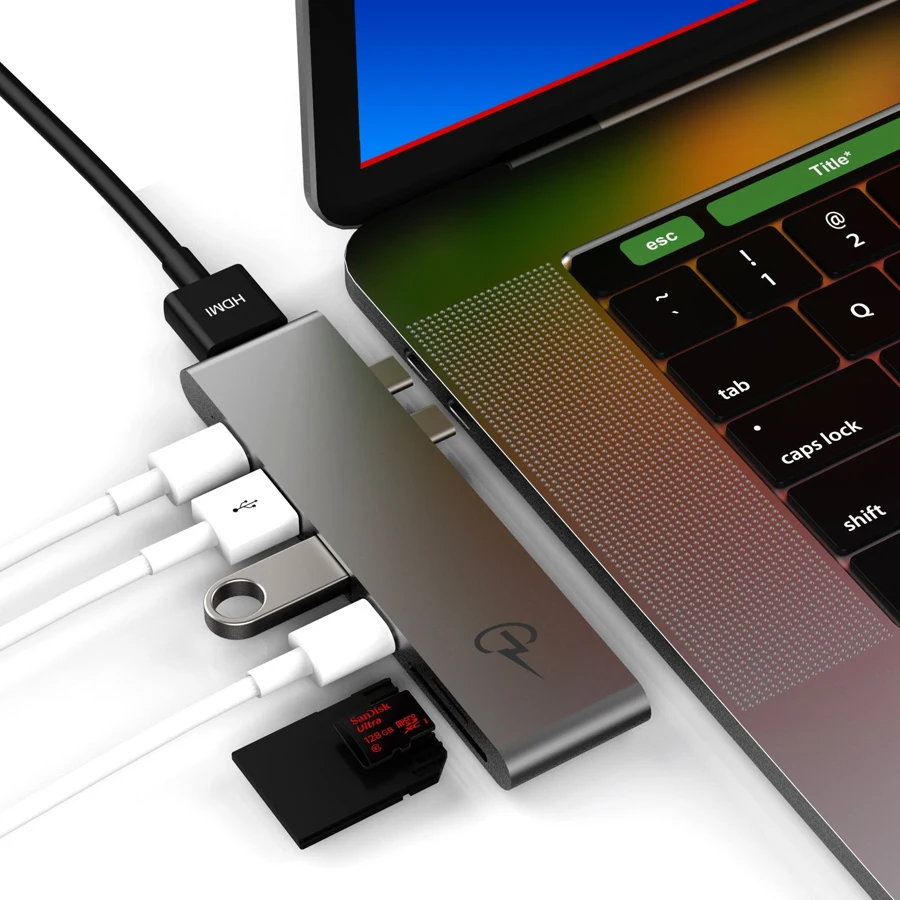
The MacBar is a compact way to put familiar connections beside a compatible MacBook: HDMI, two USB-A accessories, camera cards and USB-C. Its most useful distinction is the dedicated USB-C data connection alongside the multifunction charging connection. That can preserve a place for a USB-C accessory while a charger is connected. The first buying check, however, is physical fit. This adapter has two fixed host plugs and is designed to sit against the side of particular MacBook models.
Check the MacBook and the printed model
This review covers MacBar CJ0414. CharJenPro's own page identifies CJ0414 in its product and variant data for both space gray and silver. The original gallery shows two male USB-C plugs entering adjacent MacBook sockets. This is a fitted adapter, so a generic USB-C connection on another computer does not establish compatibility. Confirm that the two sockets line up and that a protective case leaves sufficient clearance for the adapter to seat completely.
The maker lists MacBook Air models from 2018 through the named 2020/2021 M1 scope, and MacBook Pro models from 2016 through its named 2020/2021 M1 scope. This provides Intel and explicitly named base-M1 references. It does not establish M2, M3, M4, M5 or every Pro, Max and Ultra variation. The year ranges should also be checked against the actual chassis rather than read as a promise about any MacBook released in a calendar year.
One documented HDMI desktop
The HDMI connection is advertised up to 4K at 30Hz. It is useful when the task is one external reference screen, a presentation or a television connection within that limit. It is not a 4K60 HDMI arrangement. The manufacturer also advertises video up to 5K at 60Hz through the multifunction USB-C connection. That is a separate output claim, not evidence that HDMI and USB-C can run two independent external desktops together on every listed computer.
Our supported arrangement therefore stays with one HDMI external display. The source does not give a simultaneous HDMI-plus-USB-C desktop table or a required lid position, so neither becomes an extra compatibility promise. Check the monitor connection as well as its resolution: a USB-C display and an HDMI display are different socket requirements. A separately purchased video adapter is not counted as an additional supplied output.
Keep the two USB-C roles distinct
The dedicated USB-C data port is advertised at 5Gbps. It is the clearly specified ordinary USB connection for a compatible USB-C drive or another data accessory. The other USB-C connection is marketed for charging, video and a 40Gbps transfer headline. That larger number does not establish a 20Gbps USB 3.2 Gen 2x2 mode for an ordinary USB drive. We leave the ordinary USB rate of that multifunction connection unspecified instead of converting the headline into a faster drive claim.
Its physical roles also matter. A charging cable occupies the multifunction socket, leaving the separate 5Gbps data socket available. If the multifunction socket is instead used for a data device, that adds a physical connection but removes that same charging-cable position. The two USB-A sockets accept legacy peripherals. The original maker's port diagram explicitly marks the two USB-A ports and the dedicated USB-C data port at 5Gbps. None of these interface claims is a measured file-copy result.
Charging and cards need their own checks
CharJenPro states that the MacBar can charge the laptop up to 100W. This is the maker's advertised charging ceiling, not a measurement with a particular charger or laptop. A suitable separate PD supply and cable are still needed; the reviewed page does not establish a wall charger included with the hub. A computer may negotiate less power than the advertised maximum. Do not read that ceiling as a guarantee of the same charging behavior under every workload.
Separate SD and microSD slots provide convenient access for different card sizes, but the original wording does not expressly establish simultaneous transfers. A strict requirement to read both at once therefore remains unresolved. The complete MacBar port list contains no Ethernet connection; the similarly named MacBar E is a different layout. Choose CJ0414 when its exact side fit, one 4K30 HDMI screen and separate USB-C data position solve the job. Seek a model with a documented multi-screen arrangement or another mounting style when those needs take priority.
Key details at a glance
| USB-A downstream data ports | 2 |
|---|---|
| USB-C downstream data ports | 2 |
| HDMI outputs | 1 |
| Full-size DisplayPort outputs | 0 |
| USB-C video outputs | 1 |
| Full-size SD slots | 1 |
| microSD slots | 1 |
| Advertised Ethernet link ceiling | 0Gbps |
| Maximum stated power available to host | 100W |
| Detachable host cable | No |
| Host requirements | Fixed dual USB-C male side connection for named MacBook Air/Pro chassis; confirm adjacent socket spacing and case clearance. No generic Windows/iPad fit. |
| Screen arrangement | HDMI up to 4K30. Separate multifunction USB-C video headline up to 5K60; no combined two-independent-screen mode or exact host protocol established. |
| Power and charging | Maker advertises laptop charging up to 100W through multifunction USB-C. Separate source required; suitable wall-supply inclusion unknown. Charging occupies that multifunction socket. |
| Data and device limits | Dedicated USB-C data port up to 5 Gbps plus multifunction USB-C data role with ordinary USB rate unknown.40 Gbps headline does not establish USB 20 Gbps. Two USB3.0 Type-A sockets up to 5 Gbps per original manufacturer diagram. Two physical card slots; simultaneous use unknown. |
Use the exact model’s instructions for operating limits, supplied equipment and version differences.
Sources for this assessment


Find a hub or dock for your desk.
Match the computer, screens, devices and charging routine, then check the exact supported arrangement.