
Your needs, this model
Does it fit your priorities?
Can my 2023 M3 iMac use two 5 Gbps USB-A ports, one USB-C data port and both card formats together?
Yes, this qualifies in the named M3 iMac arrangement. The remaining two USB-A ports have a lower 480 Mbps rating and all activity still shares the host connection.
Explore this need in the finder →Can I require four USB-A data ports all advertised at 5 Gbps?
No. It has four USB-A ports, but only two carry the 5 Gbps claim. The two USB 2.0 ports cannot satisfy that combined minimum.
Explore this need in the finder →Does the iMac-specific fit also qualify it for a base M4 iMac?
No. The original maker page explicitly limits this edition to the 2021 M1 and 2023 M3 24-inch iMacs. M4 is not established by that source.
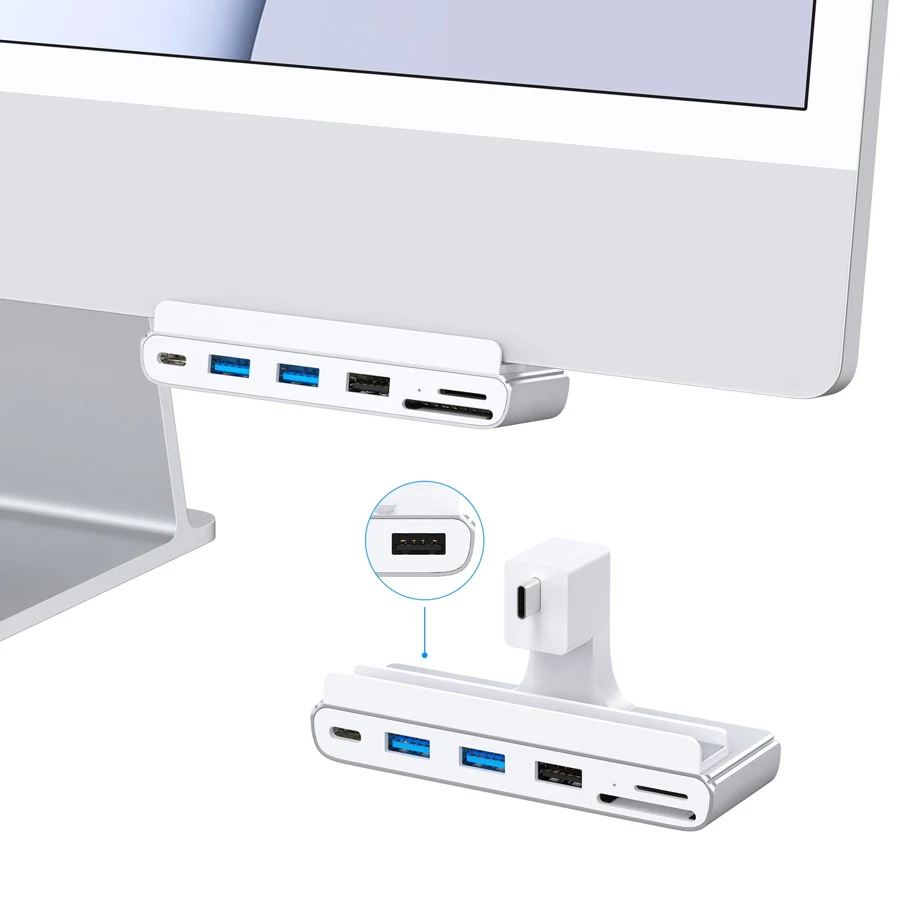
Explore this need in the finder →GEWOKLIY's seven-function iMac hub is useful when the computer itself is the deciding constraint. The reviewed edition is designed specifically for the 2021 24-inch M1 iMac and the 2023 24-inch M3 iMac. It adds a mixed set of USB data connections and two card formats; choose it around those named computers and the devices you actually connect.
The iMac generation comes first
The manufacturer's compatibility statement is unusually narrow: it expressly excludes other models. That makes the exact year, screen size and chip more useful than a broad promise of Mac compatibility. A similarly colored iMac, another 24-inch generation or an older Intel machine should not be treated as the same installation. Check the computer information before comparing prices or ordering the accessory.
The original page's address contains IMC02, while its visible product name is simply the seven-in-one iMac USB hub at 5 Gbps. Match the complete M1/M3 layout and fit description when looking at an offer. The brand's six- and eight-function iMac products have different identities; their additional ports and newer computer claims do not belong to this edition.
Four USB-A ports have two different jobs
There are two USB 3.0 Type-A ports advertised at up to 5 Gbps, plus two USB 2.0 Type-A ports advertised at up to 480 Mbps. A keyboard and mouse can occupy the slower pair while faster storage uses the other connections. That is a practical allocation of sockets, provided your peripherals and their power needs suit the actual arrangement.
Four rectangular sockets therefore do not mean four equally fast storage connections. If your essential requirement is four USB-A ports each supporting a 5 Gbps data mode, this model falls short. If you need two such ports and two additional basic USB connections, its layout is more relevant. Advertised port capability also remains different from the speed of several simultaneous file copies over one shared host link.
The extra USB-C port carries data
The downstream Type-C port has a stated data capability of up to 5 Gbps. It gives a USB-C device a direct place to connect without consuming either of the faster USB-A sockets. Keep that role separate from the USB-C host connection used by the hub itself. Counting the host plug as another available peripheral port would overstate what remains for your devices.
This is a USB-and-card expansion package. Its listed functions do not establish an HDMI output, a second independent desktop or pass-through laptop charging. If your real task includes a monitor or charging a portable computer through the same dock, choose an accessory with that complete arrangement documented. A Type-C-shaped socket by itself cannot supply those missing roles.
Both memory cards can stay accessible
The maker expressly states that the full-size SD and microSD readers can operate simultaneously. This matters when a camera and another device use different card sizes, or when you want both cards available without swapping them. The slots count as separate supported reading roles rather than two openings that merely select between one card and the other.
The page also promotes a 5 Gbps card-reading capability. Treat that as a stated interface claim, not a measured result for your camera card. Real copying depends on the card, files, destination and shared connection. A faster USB headline cannot remove a slow card's own limit, and this assessment does not assign a benchmark speed to either slot.
Choose the specific accessory, not the largest function count
The listed package contains the hub and its instruction manual. Follow those instructions for the actual iMac installation and check access to the computer's remaining connections. The available material does not establish a universal clamp dimension or support for another enclosure. For a confirmed M1 or M3 iMac needing mixed USB ports and simultaneous cards, the purpose is clear. For another computer, a general-purpose hub with positively documented fit is the more sensible comparison.
Key details at a glance
| USB-A downstream data ports | 4 |
|---|---|
| USB-C downstream data ports | 1 |
| Full-size SD slots | 1 |
| microSD slots | 1 |
| Simultaneous card slots | Yes |
| Host requirements | Designed only for the 2021 24-inch M1 iMac and 2023 24-inch M3 iMac. Other iMac models are expressly excluded by this manufacturer page. |
| Screen arrangement | The documented seven functions are USB data and card reading. No external-display arrangement is established. |
| Power and charging | Package lists the hub and instruction manual. The USB-C downstream port is described as a data port; laptop pass-through charging is not established. |
| Data and device limits | Two USB-A ports and the USB-C data port are advertised at 5 Gbps; two other USB-A ports are 480 Mbps. These share the host link. |
| Installation | iMac-specific accessory; verify the exact 24-inch computer and supplied instructions. The page does not establish a universal desk clamp or another iMac fit. |
Use the exact model’s instructions for operating limits, supplied equipment and version differences.
Sources for this assessment

Find a hub or dock for your desk.
Match the computer, screens, devices and charging routine, then check the exact supported arrangement.