
Your needs, this model
Does it fit your priorities?
On the exact 2021 24-inch M1 iMac fit, can I use one 4K60 HDMI screen, two USB-A and two USB-C data devices at least 5 Gbps, plus both cards?
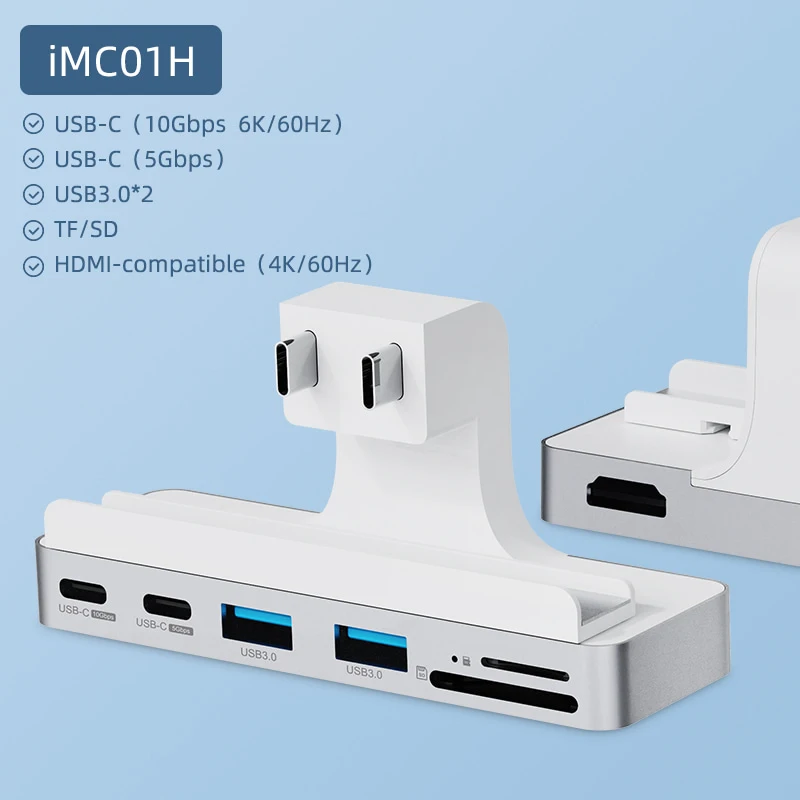
Yes, with the documented fixed dual plugs and supplied iMac clip; one C data port is 10 Gbps and the other 5 Gbps.
Explore this need in the finder →Can both USB-C data devices require 10 Gbps?
No. Only one USB-C data socket is specified at 10 Gbps; the other is 5 Gbps.
Explore this need in the finder →Does dual-screen wording qualify for two independent external screens?
No. The maker diagram includes the iMac built in screen; Apple establishes one external display for this exact M1 iMac.
Explore this need in the finder →Hagibis IMC01H: front connections for the 2021 24-inch iMac
The IMC01H is a purpose-fitted hub for the 2021 24-inch iMac. Its value is front access: two USB-A sockets, two different USB-C sockets and both card sizes can stay within reach, while a rear HDMI connection can serve one external screen. The fit is inseparable from that usefulness. Its two fixed USB-C host plugs and lower-edge mounting clip need the specific iMac arrangement shown by the manufacturer. This is not a general side adapter for every computer using the M1 chip.
Confirm the HDMI-equipped model and the physical fit
The original Hagibis regional product diagram distinguishes iMC01 from iMC01H. The H version has the HDMI connection; the otherwise similar non-H version does not. Check the actual model marking and socket map, especially when a retailer shortens the name to “iMac clamp hub.” Adding the H version's video capability to the non-H body would change the product being assessed.
The manufacturer names the 2021 24-inch iMac and illustrates the paired rear USB-C connection. Apple's own specification identifies that exact computer as the base-M1 model. That precise model cross-reference supports the M1 profile here; it does not expand compatibility to an M1 MacBook, another iMac chassis or a later processor. Match the rear socket pair, mounting edge and actual hub before installation.
Install the supplied clip as shown
The original instructions show attaching the fixing clip beneath the iMac, positioning the hub and inserting its host plugs, then sliding the clip from the front to secure the assembly. The clip is for this computer installation. It is not a general adjustable desk clamp. Do not substitute a rough estimate of screen thickness for the actual fit shown in the instructions, or force the paired plugs against a differently spaced socket arrangement.
Hagibis lists a 104 by 35 by 12mm body made from aluminum alloy and ABS. The original package diagram shows the product and manual/warranty material, without a separate wall supply. This documented setup does not provide a PD input or laptop-charging arrangement. It draws its connection through the iMac's rear ports and moves frequently used interfaces to the front, while the computer retains its own power connection.
The two USB-C outputs have different capabilities
One downstream USB-C socket is specified at 10Gbps and also carries the maker's video claim up to 6K at 60Hz. The other is a 5Gbps data connection. The two USB-A sockets are each marked 5Gbps. Those distinctions matter for a drive list: two USB-C-shaped sockets do not give two 10Gbps drive positions. Likewise, a 10Gbps requirement for both USB-A devices is beyond their documented rate.
The 10Gbps USB-C socket also has only one physical opening. Using it for a display removes that same socket from the data-accessory allocation; the separate 5Gbps USB-C data position remains. The figures are advertised interface ceilings, rather than our measured copying results or independent upstream bandwidth guarantees. The specification also establishes separate SD and microSD slots and explicitly says both can be read together.
Count the external screen, rather than the iMac's own display
The HDMI output advertises up to 4K at 60Hz. The manufacturer's “dual-screen” illustration shows the iMac's built-in screen and one external monitor. That is one external display for the finder, not two independent external desktops. Apple's original specification for this M1 iMac likewise supports its built-in display plus one external display. Separate HDMI and USB-C video sockets therefore must not be combined into a two-external-screen promise.
HDMI and USB-C display connections are kept as alternative arrangements here. The USB-C video headline does not supply exact 6K pixel dimensions in the hub material, and no numeric DisplayPort revision or confirmed extra-software requirement is provided. A reader choosing a strict numeric HDMI mode can use the documented 4K60 arrangement; a specific USB-C display should be checked against the exact source and cable requirements.
Choose the IMC01H when the actual 2021 24-inch iMac, supplied clip and paired host plugs fit the desk, and one external screen is enough. Its front card access and mixed-rate USB-C allocation are useful specific features. Choose another documented model when the computer chassis differs, both USB-C drives need 10Gbps or two independent external screens are essential.
Key details at a glance
| USB-A downstream data ports | 2 |
|---|---|
| USB-C downstream data ports | 2 |
| HDMI outputs | 1 |
| Full-size DisplayPort outputs | 0 |
| USB-C video outputs | 1 |
| Full-size SD slots | 1 |
| microSD slots | 1 |
| Simultaneous card slots | Yes |
| Advertised Ethernet link ceiling | 0Gbps |
| Maximum stated power available to host | 0W |
| Maximum PD input | 0W |
| Power adapter included | No |
| Detachable host cable | No |
| Host requirements | 2021 24-inch M1 iMac-specific fixed dual-USB-C plugs and lower-edge mounting clip; not ordinary M1 MacBook compatibility. Apple exact model crosswalk retained. |
| Screen arrangement | H model HDMI4K60; other C socket 6K60 video headline lacks exact pixels. One external display only; dual-screen illustration includes iMac built-in display. C video occupies C10 data socket; host DP version unspecified. |
| Power and charging | Original package product/manual material; no included wall source or PD charging input. iMac uses own computer power; no host charging route. |
| Data and device limits | Two A 5 Gbps, one C10 Gbps and one C5 Gbps. C10 socket alternatively video, not duplicated as data when occupied by display. SD/microSD expressly simultaneous read. No Ethernet in map. |
| Installation | 2021 24-inch iMac-specific: attach fixing clip under the iMac, insert paired host plugs, slide clip from front to secure hub. Original body 104×35×12 mm; Aluminum alloy+ABS. Not generic desk clamp. |
Use the exact model’s instructions for operating limits, supplied equipment and version differences.
Sources for this assessment

Find a hub or dock for your desk.
Match the computer, screens, devices and charging routine, then check the exact supported arrangement.