
Your needs, this model
Does it fit your priorities?
Can the 2021 M1 iMac gain three USB-A and two USB-C5Gbps data ports?
Qualifies for the named 24-inch iMac with its documented clamp fit.
Explore this need in the finder →Can I use a built-in SD reader to import camera cards?
Fails: the exact specification has no SD or microSD reader.
Explore this need in the finder →Does the 2021 fit establish support for a later M3 iMac?
Fails: the documented mounting scope names the 2021 iMac only.
Explore this need in the finder →Choose it to bring the iMac's connections forward
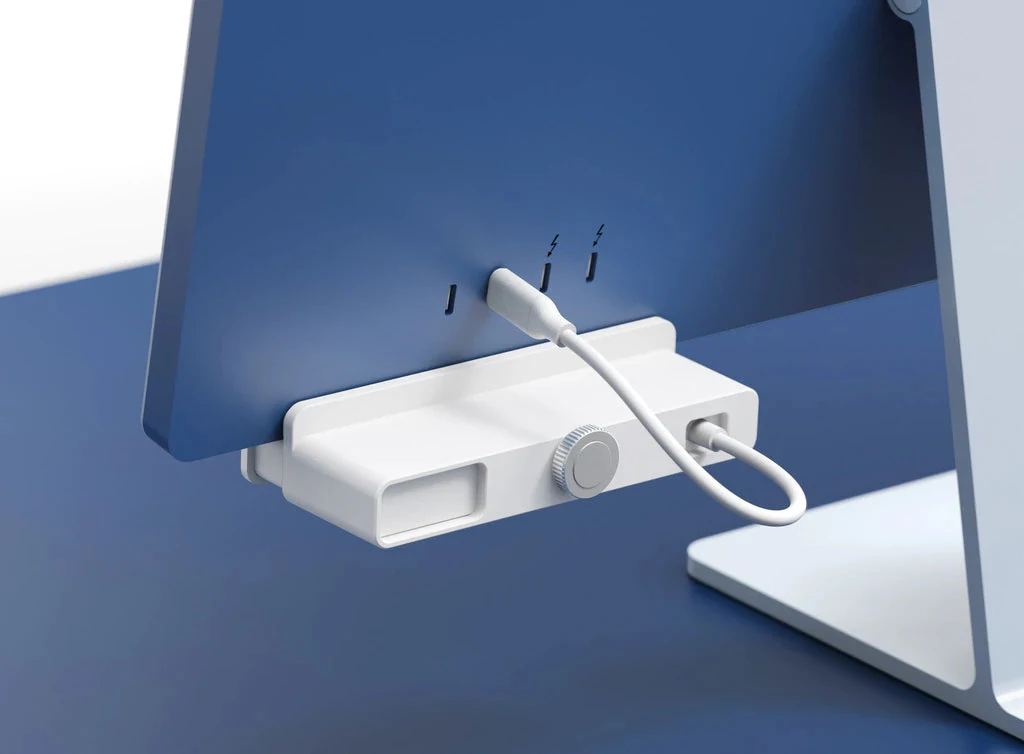
The HyperDrive HD34A6 addresses access to USB ports on the 2021 24-inch iMac. It clamps to the bottom edge of the computer and presents peripheral connections at the front, where inserting a drive or charging cable is easier than reaching behind the display. Its value is that physical arrangement, combined with ordinary 5Gbps USB data expansion.
Targus specifically limits the fit to the 2021 24-inch iMac and says it is incompatible with earlier iMac models. Apple's technical specification identifies that 2021 computer as the M1 iMac. This supports the exact named desktop, not a universal clamp for every M1 computer or automatic fit to later iMac generations. Check the computer's year as well as its screen size.
The clamp is part of the product
The installation uses a twist-and-clamp system without tools. A soft interior is intended to protect the iMac's finish, while the clamp holds the hub beneath the display edge. It is a more specific installation than placing a portable hub on a desk. The manufacturer's illustration shows the rear connection lead returning toward the iMac, so the computer still needs a suitable available USB-C connection.
Seven color-matching faceplates are included. Those allow the white hub assembly to coordinate with the different 2021 iMac finishes without buying a different electrical hub for each color. A faceplate choice changes appearance; it does not add another data port or establish compatibility with an otherwise unsupported computer.
Count the five data ports correctly
The full specification lists three USB-A data ports and two USB-C data ports, all with an advertised 5Gbps capability. Two USB-A ports are ordinary data connections; the third is described as 5Gbps plus 7.5W charging. It remains a data port and should not disappear from the count simply because it has an additional power function.
These connections share the hub's upstream link. Five sockets do not provide five independent 5Gbps channels to the iMac. That distinction matters when several drives transfer files together. The advertised number is the USB interface capability, not a measurement of sustained copying speed or an assessment of performance under simultaneous load.
7.5W is for an accessory
The charging description names a phone, tablet, AirPods or watch as examples for the 7.5W USB-A port. It is peripheral charging, not power sent back to the iMac. The source's phrase about pass-through charging should therefore not qualify this model for a notebook charging requirement. The iMac retains its own normal power arrangement.
The two USB-C data sockets are not documented as notebook PD charging inputs. If another device's charging rate is the deciding requirement, check that device's actual connection and power needs. A convenient front-facing socket is useful, but it is not equivalent to a dedicated high-power USB-C charger.
No hidden reader or display dock
The exact interface table lists zero HDMI, Ethernet, SD, microSD and Mini DisplayPort connections. Although a general overview sentence mentions memory cards, there is no card slot in this model's complete port table. Importing a camera card therefore needs an appropriate separate reader or a hub that actually includes one.
The 80g body measures 120 ×40 ×26.2mm. It is a tidy solution for the specified iMac when front USB access is the missing convenience. Choose a different hub for card readers or networking, and a suitable display adapter for video. Most importantly, verify the 2021 iMac fit before choosing the clamp: that physical restriction can determine the purchase even when the USB data requirements look straightforward.
Check the exact iMac generation before choosing a matching faceplate. A color match cannot establish that a different enclosure accepts the clamp. The original rear connection still carries the upstream data for the new front-facing ports, so the hub improves access rather than creating independent additional host bandwidth for every accessory.
Key details at a glance
| USB-A downstream data ports | 3 |
|---|---|
| USB-C downstream data ports | 2 |
| HDMI outputs | 0 |
| Mini DisplayPort outputs | 0 |
| Full-size SD slots | 0 |
| microSD slots | 0 |
| Advertised Ethernet link ceiling | 0Gbps |
| Maximum stated power available to host | 0W |
| Stated product weight | 80g |
| Power and charging | One USB-A5Gbps port also supports 7.5W peripheral charging. This does not charge the iMac. |
| Installation | Tool-free twist clamp fits the bottom edge of the named 2021 24-inch iMac. Soft interior and seven matching faceplates included. Previous iMacs are excluded; later-generation fit is not established. |
Use the exact model’s instructions for operating limits, supplied equipment and version differences.
Sources for this assessment
Find a hub or dock for your desk.
Match the computer, screens, devices and charging routine, then check the exact supported arrangement.