

Your needs, this model
Does it fit your priorities?
Can I use Gigabit Ethernet, an SD card and one 4K30 HDMI screen together?
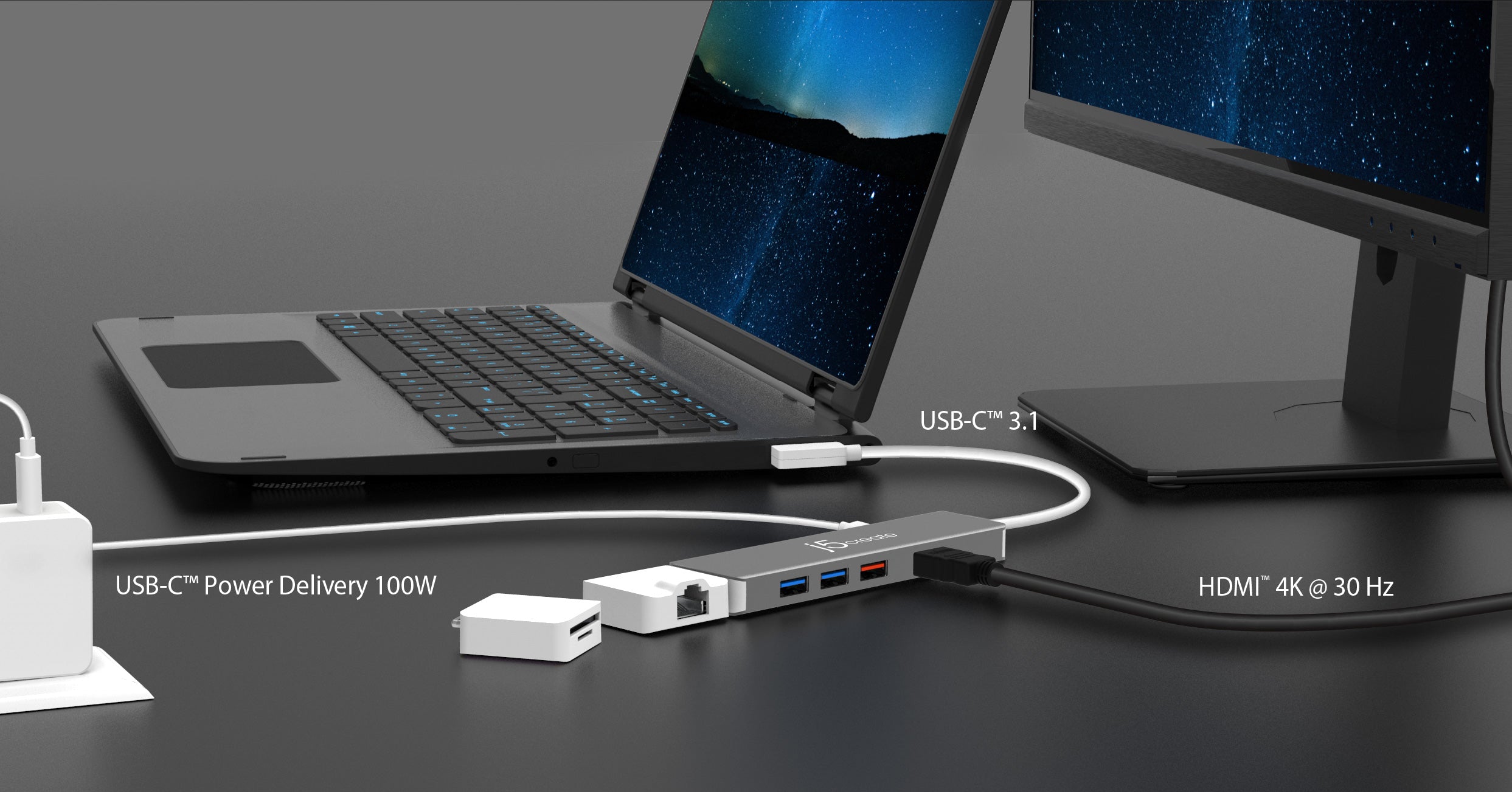
Yes. The maker shows the network and card-reader modules connected in series to the main body. The C data socket is occupied by that assembly.
Explore this need in the finder →Can I keep three 10 Gbps USB-A ports and one 10 Gbps USB-C data connection when I leave the modules disconnected?
Yes. The main-body plan documents those data sockets together; a suitable Gen2 host is needed to use that capability.
Explore this need in the finder →Can the two card slots read SD and microSD at the same time?
No. The exact manufacturer Taiwan specification states that the two formats cannot be read simultaneously.
Explore this need in the finder →The j5create JCD375 suits a traveler whose accessory needs change from day to day. Its main body supplies HDMI, three USB-A data ports, a USB-C data port and a separate charging input. Two supplied modules add Ethernet and SD/microSD access. The attraction is that you can carry or connect the parts needed for a particular job. The qualification is that the headline port count describes a modular arrangement: attaching the modules uses the main body's USB-C data connection.
Choose the layout that matches the task
The main unit is an aluminum adapter with a 200mm lead and a right-angle USB-C host plug. It weighs 90g before adding the modules. On its own, it gives a laptop three rectangular USB-A connections and one USB-C data socket, all advertised for USB 3.1 Gen 2 operation up to 10Gbps. HDMI and the separate USB-C PD input remain available. That is the useful arrangement for someone connecting several existing USB-A accessories plus a USB-C drive.
The Ethernet and card-reader modules each have a USB-C host plug and can operate as standalone mini adapters on an appropriate computer connection. They can also attach to the dock. Importantly, j5create's actual connection illustration shows the Ethernet module attached to the main body and the reader attached to the Ethernet module, so wired networking and card access can be used together. In that assembled arrangement, do not count the original USB-C data socket as an additional free connection for a drive. The three USB-A ports remain the practical peripheral connections.
This flexibility works well if a card reader is an occasional requirement, or if you want the Ethernet adapter to travel separately from the HDMI hub. It also introduces two small pieces to keep track of. Someone who leaves a desk permanently wired may prefer an integrated dock whose sockets are always present, particularly if a spare USB-C data connection must remain available alongside networking and cards.
The screen requirement is straightforward
The JCD375 supports one HDMI display up to 3840 × 2160 at 30Hz, with 1920 × 1080 at 60Hz also documented. It is a native DisplayPort Alternate Mode adapter, so the computer's USB-C port must supply the video signal. The maker states that no extra driver is required. The US product page lists Windows, macOS and Chrome OS; it does not individually establish every later Apple chip or operating-system release.
The 4K30 ceiling should influence the buying decision. It can be appropriate for a presentation or occasional large screen, but a buyer requiring a 4K60 desktop should choose another dock. There is no second HDMI, DisplayPort or USB-C monitor output to create an additional independent desktop. The USB-C data socket and the charging socket do not become video outputs because they have the same physical shape as the computer connection.
Fast USB and cards have different limits
The Gen 2 data-port specification is useful for a compatible external SSD enclosure. It is not a claim that several attached drives will each copy at 10Gbps simultaneously. They share the host connection, and j5create specifically notes that a suitable older USB 3.0 or USB 3.1 Gen 1 host limits transfers to 5Gbps. Check the computer's data capability separately from its ability to send video.
The reader module supports UHS-II SD/microSD cards, with the US page advertising a card-interface ceiling of 312MB/s. That is a format capability rather than our measured card performance. The manufacturer's Taiwan specification explicitly says the two formats cannot be read simultaneously. Choose it for accessing either card format; choose a reader with documented independent slots if copying directly between an SD card and a microSD card is essential. The Ethernet module supports 10/100/1000Mbps links, which adds Gigabit networking without requiring the card reader to be removed.
Power comes from your own adapter
The separate PD input allows the data arrangement to remain connected while a suitable USB-C adapter powers the laptop. j5create advertises charging up to 100W and lists PD 2.0/3.0 host support among its requirements. That maximum still depends on compatible power equipment and the computer's negotiation; it is not an included 100W power supply. The US package lists the adapter, both modules and the installation guide. A wall charger is an additional item.
For power-hungry USB devices, the maker recommends connecting the PD adapter. Its operating guidance also warns against removing external power during data transfers. The JCD375 is therefore most convincing as a flexible one-screen kit with several fast USB-A connections and optional networking or cards. Its modular design adds useful choices, provided you accept 4K30 video, one-card-at-a-time access and the loss of a free USB-C data socket when the modules are attached.
Key details at a glance
| USB-A downstream data ports | 3 |
|---|---|
| USB-C downstream data ports | 1 |
| HDMI outputs | 1 |
| Full-size DisplayPort outputs | 0 |
| Mini DisplayPort outputs | 0 |
| USB-C video outputs | 0 |
| Full-size SD slots | 1 |
| microSD slots | 1 |
| Simultaneous card slots | No |
| Advertised Ethernet link ceiling | 1Gbps |
| Maximum stated power available to host | 100W |
| Maximum PD input | 100W |
| Power adapter included | No |
| Detachable host cable | No |
| Included host-cable length | 7.87 in |
| Stated product weight | 90g |
| Host requirements | The fixed 200 mm USB-C lead has a right-angle host plug. Native DisplayPort Alternate Mode is required; the maker does not specify its version. General macOS support does not establish every later Mac chip. |
| Screen arrangement | One HDMI output supports 3840 × 2160 at 30Hz or 1080p60. The maker requires no additional display software. No second independent output is documented. |
| Power and charging | A separate PD input supports the maker's advertised charging maximum of 100W. A suitable PD adapter and computer are required; no wall charger is listed in the package. Do not remove PD power during transfers. |
| Data and device limits | Three USB-A and one USB-C data port advertise 10 Gbps. Attaching modules occupies the USB-C data socket. The exact maker diagram permits Ethernet and reader modules in series, leaving three USB-A ports. The UHS-II 312MB/s figure is an interface ceiling; SD and microSD cannot be read simultaneously. The 90g weight is the main body only. |
Use the exact model’s instructions for operating limits, supplied equipment and version differences.
Sources for this assessment
Find a hub or dock for your desk.
Match the computer, screens, devices and charging routine, then check the exact supported arrangement.