

Your needs, this model
Does it fit your priorities?
Can I use three USB-A peripherals while reading one SD card?
Yes. The exact maker description supports three USB devices alongside one active card, with USB-A data capability advertised up to 5 Gbps.
Explore this need in the finder →Can I read SD and microSD cards at the same time?
No. The model-specific instructions explicitly limit the readers to one card at a time.
Explore this need in the finder →Does the described setup need extra hub software?
No extra hub drivers are required for the actual maker-listed systems. Connected peripherals can still have their own requirements, and the named device restrictions remain.
Explore this need in the finder →Three USB-A devices and occasional camera-card access
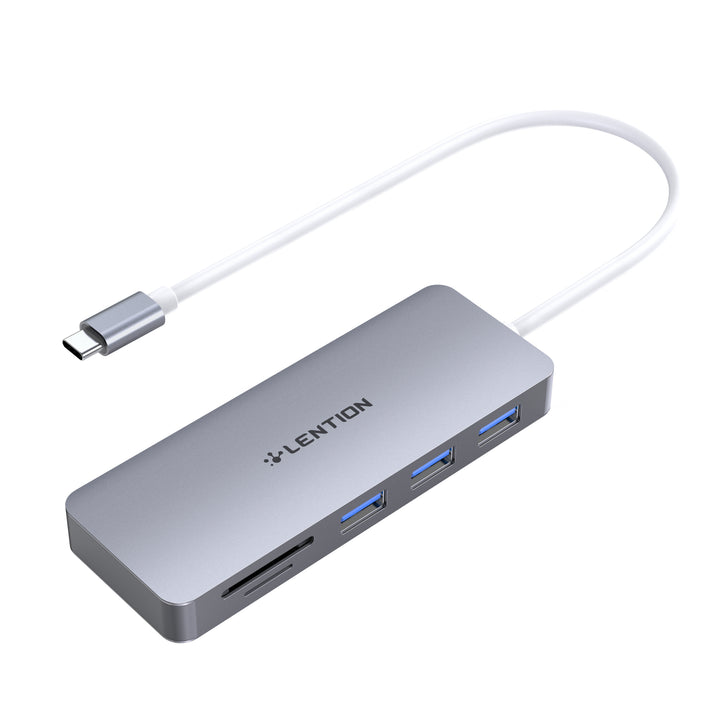
The CB-C15 is useful when a USB-C computer needs a small group of familiar data peripherals and convenient access to SD or microSD media. Its exact maker feature list and photograph identify three USB-A data sockets plus the two card slots. The layout suits a compact data kit without adding a video output or laptop-charging connection.
The deciding restriction is explicit: only one card operates at a time. This is a hub with access to either card format, rather than a simultaneous two-card copying station. That distinction matters more than the five-in-one label if your workflow depends on keeping both cards mounted together.
Start with what stays connected
LENTION says up to three USB devices can connect while the hub reads or writes a card. A keyboard, a mouse receiver and a flash drive are examples of a different workload from several busy storage devices. Count the devices you actually use together instead of choosing a larger hub solely because it advertises more sockets.
The downstream data connections are USB-A. The USB-C end is the computer-side host connection, rather than another downstream port for a USB-C drive. If your main storage device only has a USB-C connection, compare a different data-port mix or a separately supported cable arrangement.
The card slots are alternatives, not concurrent readers
The model-specific description says “One Card at a time” while discussing SD and TF, the latter referring to microSD. You can choose the appropriate slot for the media in use, but the second slot does not create independent concurrent access.
For example, importing photographs from one camera card can fit the intended use. Copying directly between an inserted SD card and an inserted microSD card needs a reader whose documented arrangement supports both together. A second slot in a photograph is not enough evidence for that task.
Keep interface claims separate from measured results
The three USB-A sockets are advertised up to 5 Gbps, with UHS-I card-reader capability described separately. Those are interface specifications. They do not guarantee a particular copying result for your drives, cards or files, and every active function still shares the computer connection.
The product page uses slightly different numerical card-reader ceilings in different feature passages. This assessment therefore relies on the stated UHS-I class rather than using one number as a reason to rank it above another reader. Your card and the work being done still matter.
No separate hub driver, but real device restrictions remain
LENTION explicitly says no extra hub drivers or external power are required for the described ordinary use. Its “Stable Driver 3.0” wording names the company’s product standard; it should not be mistaken for an extra program the reader must install.
The maker nevertheless excludes Apple SuperDrive and lists actual computer examples and connection limitations. A no-driver claim does not remove a connected device’s own operating requirements. Check the power needs and compatibility of the peripherals you intend to use, particularly storage.
Choose it for a simple data kit
The complete CB-C15 map does not include HDMI, Ethernet or a USB-C PD input. Comparison columns on the same page show other LENTION products with those functions, but they are not features of this model. Laptop charging through the hub needs a different adapter.
Check the actual computer-side USB-C connection and where the tethered hub can rest with its plugs attached. The source excludes older MacBook generations without the required Type-C connection and excludes Thunderbolt 2 as the physical route.
Shortlist the CB-C15 when three USB-A data peripherals and single-card access fit a documented host. Choose another hub for simultaneous SD and microSD use, downstream USB-C data, native video or laptop charging. Those requirements provide a clearer decision than simply comparing how many functions appear in a product title.
LENTION’s exact CB-C15 specifications, single-card instruction and connection notes support the configuration discussed here.
Key details at a glance
| USB-A downstream data ports | 3 |
|---|---|
| USB-C downstream data ports | 0 |
| HDMI outputs | 0 |
| Full-size DisplayPort outputs | 0 |
| USB-C video outputs | 0 |
| Full-size SD slots | 1 |
| microSD slots | 1 |
| Simultaneous card slots | No |
| Detachable host cable | No |
| Host requirements | USB-C host connection for the actual named computer examples. Older MacBooks without Type-C and Thunderbolt 2 connections are excluded. |
| Screen arrangement | The complete exact-model map contains USB data and card access, without a built-in display output. |
| Power and charging | The maker says no external power is required for ordinary data use and excludes Apple SuperDrive. There is no documented laptop PD-input route. |
| Data and device limits | Three USB-A 3.0 sockets are advertised up to 5 Gbps. Both card formats are present, but only one card may operate at a time. Slightly different numerical card-rate statements are not treated as comparative performance results. |
| Installation | Portable external hub with a tethered USB-C lead. Stable Driver 3.0 is described as a maker standard; the separate explicit text says no extra hub drivers are required. |
Use the exact model’s instructions for operating limits, supplied equipment and version differences.
Sources for this assessment
Find a hub or dock for your desk.
Match the computer, screens, devices and charging routine, then check the exact supported arrangement.