
Your needs, this model
Does it fit your priorities?
Does the high-speed title establish 5Gbps USB-A ports?
No. The accepted operating text identifies the USB interface as USB 2.0.
Explore this need in the finder →Can I request one 4K60 HDMI output?
That mode is explicitly listed, with a suitable USB-C video host.
Explore this need in the finder →Is 65W actually delivered to the laptop confirmed?
No. The PD rating and host-charging function are documented, but not a separate net host ceiling.
Explore this need in the finder →The MasVidia MV7868 is a light USB-C adapter for one HDMI screen, memory cards and a small set of USB peripherals. Its original manual provides a useful correction to the broad “high-speed” wording: the operating instructions identify the USB interface as USB 2.0. Choose it around the documented functions rather than assuming that every compact HDMI hub also provides USB 3.0 storage speed.
Use the original port and speed description
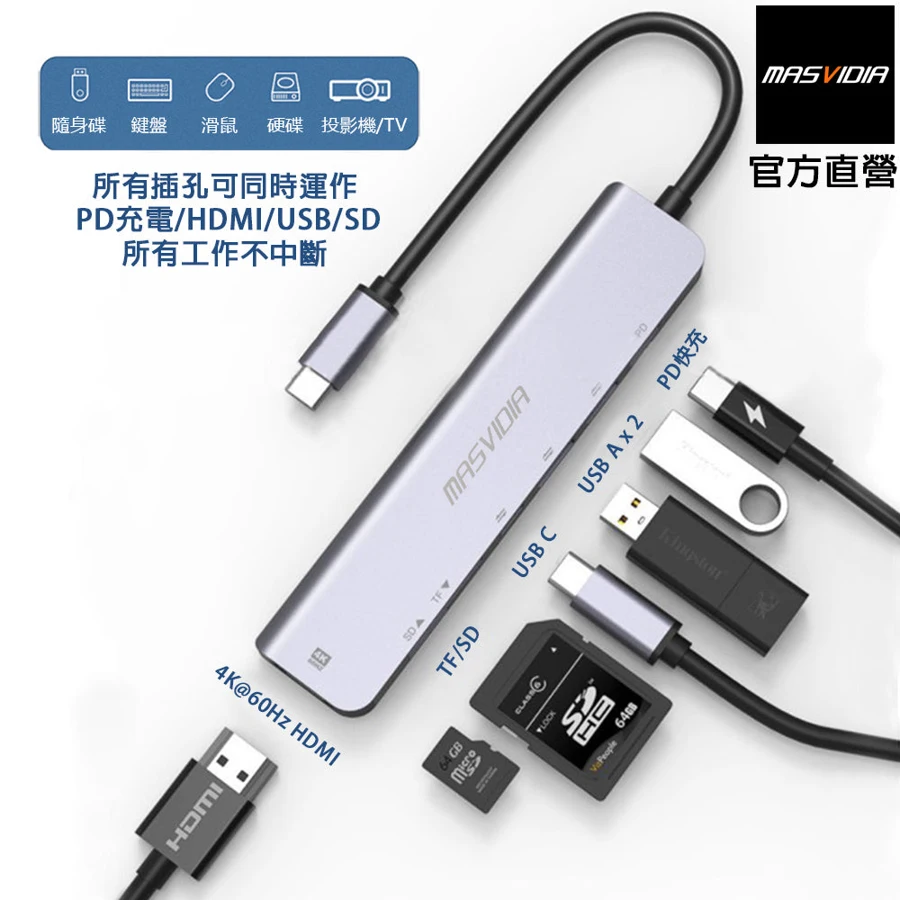
The manual’s specification graphic identifies two USB-A connections, one USB-C connection and SD/micro SD readers. Its connection diagram shows the attached USB-C host lead and a separate PD power input. The USB-C power socket should not be counted as an additional downstream USB-C storage port. That distinction keeps the seven-in-one label from becoming an inflated data-port count.
The text’s USB 2.0 description sets a 480Mbps interface ceiling for the two USB-A connections in this review. It supports ordinary peripherals such as keyboards, mice, cameras and compatible storage, but it does not establish 5Gbps capability. Large file transfers from a fast SSD can therefore be a poor reason to choose it. The ports also share the upstream connection, so no per-port speed label promises isolated bandwidth to simultaneous devices.
One HDMI monitor at a stated 4K60 mode
MasVidia explicitly lists HDMI 4K at 60Hz and 1080p at 60Hz in the manual. That makes a single 4K60-capable external screen a documented use, subject to a suitable computer video output,HDMI cable and display. It is a manufacturer specification rather than a result from our own monitor testing.
The host connects by USB-C, but the source does not specify a DisplayPort Alternate Mode version. The actual laptop port must provide native video; a USB-C socket that supports only ordinary USB data cannot create the HDMI signal. There is one direct HDMI output, so a requirement for two independent external monitors needs a different documented arrangement.
The manual’s compatible-device images name several Intel-era MacBook s and Windows laptops, plus iPad Pro 11-inch/12.9-inch and iPad Air 4. They do not identify individual newer Apple Silicon chips. Use those real examples to check the intended host context, without expanding a broad Mac or USB-C label into a promise for every future machine.
Charging is supported, with a separate limit
The manual describes passing the notebook’s power source through the USB-C PD connection. Its specification graphic gives PD 2.0 at 65W, and the manufacturing-information section lists a 20V,3.25A maximum rating. Those establish a power-input rating and a host-charging function. They do not separately state a guaranteed net 65W delivered to the laptop after the hub’s own needs.
Use a suitable charger and cable and confirm that the computer accepts USB-C charging. A laptop whose ordinary working demand approaches its original power-brick rating may need a dock with a clearly stated host output. The reviewed manual does not establish that a wall charger is supplied, so check the actual package rather than assuming that the PD headline includes one.
Cards and a small travel body
Both SD andmicro SD reading are listed. The original material does not clearly establish simultaneous access to the two slots, so a card-to-card workflow remains unconfirmed. Safely eject storage before removing it or changing the power arrangement. A separate concurrent reader is the more direct choice when both cards must stay active.
The specification graphic lists 43g and an aluminum-alloy body. That makes the product’s intended portable role clear, while claims about heat dissipation remain manufacturer descriptions rather than our measured temperature results. Support the hub and connected cables instead of leaving them hanging from the laptop port.
Choose MV7868 for its documented single HDMI mode and basic peripheral connections when USB 2.0 is sufficient. Choose a faster data hub for storage-heavy work, or a dock with a stated net charging ceiling when laptop power is an essential purchase requirement.
Key details at a glance
| USB-A downstream data ports | 2 |
|---|---|
| USB-C downstream data ports | 0 |
| HDMI outputs | 1 |
| Full-size DisplayPort outputs | 0 |
| Full-size SD slots | 1 |
| microSD slots | 1 |
| Maximum PD input | 65W |
| Stated product weight | 43g |
| Screen arrangement | The original manual explicitly lists HDMI4K60 and 1080p 60; it does not name a host DP version. |
| Power and charging | The graphic states PD2.0 at 65W and the rating is 20V3.25A input. Host charging is documented, with no separate net output ceiling. |
| Data and device limits | Section 4 identifies USB 2.0, with two USB-A sockets in the actual diagram. No 5Gbps data claim is accepted. The USB-C socket is PD input. |
Use the exact model’s instructions for operating limits, supplied equipment and version differences.
Sources for this assessment
Find a hub or dock for your desk.
Match the computer, screens, devices and charging routine, then check the exact supported arrangement.