
Your needs, this model
Does it fit your priorities?
Can it connect one 4K30 HDMI screen and three 5Gbps USB-A accessories?
Yes, those functions are documented together on the exact UCH801-N page, from a suitable USB-C computer.
Explore this need in the finder →Does the 100W headline mean 90W is available to the laptop?
The manufacturer separately states 100W input and up to 90W laptop output. The 90W output claim is the documented ceiling used for matching, with a suitable source and cable.
Explore this need in the finder →Can I attach a USB-C drive to the PD socket?
No. Minisopuru explicitly says that socket does not support data or video, so a downstream USB-C data-port requirement excludes it.
Explore this need in the finder →A conventional laptop adapter with a useful power distinction
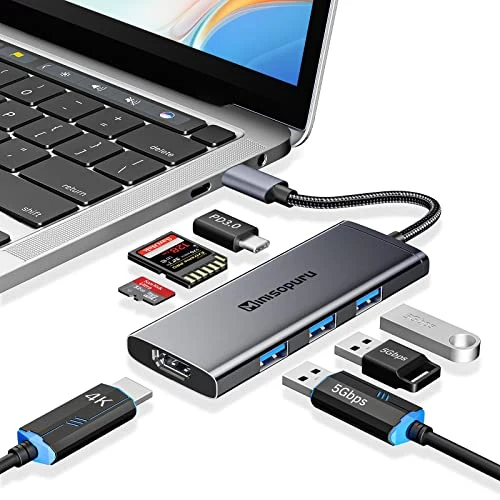
The Minisopuru UCH801-N combines one HDMI output, three USB3.0 data ports, SD and microSD readers, and a dedicated USB-C charging input. Its most useful role is a portable laptop adapter for a single screen and familiar accessories, while receiving power from a suitable external charger.
The manufacturer separates100W input from90W output to the computer. That distinction is more useful than treating every100W PD headline as a100W laptop budget. It gives the power requirement a specific stated ceiling, while leaving the actual charger, cable and computer negotiation as necessary parts of the setup.
Choose between4K30 and1080p60
The documented HDMI modes are4K at30Hz or1080p at60Hz. For a4K desktop, decide whether30Hz is acceptable before choosing it. A buyer who requires4K60 should select a different adapter rather than assuming that an HDMI connector alone establishes the higher refresh rate.
There is one HDMI output. It does not provide multiple independent external screens, and the USB-C PD socket cannot be used as a second video connection. The laptop must itself provide the required video signal over the host USB-C connection; a charging-only or data-only port does not gain that capability from the adapter.
The maker names MacBook Pro/Air, Surface Pro, XPS and HP laptop examples. That describes the intended computer context without establishing every current Apple-chip family or every USB-C port on those product ranges. Verify the computer's actual video-capable port where compatibility is uncertain.
Three USB-A sockets for ordinary accessories
All three documented USB3.0 accessory ports are in the5Gbps class. They can accommodate traditional peripherals while leaving the laptop's other connections free. The advertised rate describes the interface, rather than our measured transfer performance or a separate5Gbps upstream channel for every device.
Data traffic shares the connection with the adapter's other active functions. A keyboard, mouse and occasional drive are a different workload from several continuously active storage devices. Consider simultaneous use and device power needs instead of choosing entirely by the number of sockets.
The additional USB-C socket does not add a fourth general-purpose data port. Minisopuru explicitly says the PD port does not transmit data or video. If a USB-C drive must connect directly, choose a dock that provides a separate downstream USB-C data socket.
Charging uses an external source
The manufacturer states up to100W PD input and90W output for charging the laptop. Those are stated maxima, not a guarantee that any charger or cable will deliver90W. The computer must accept the negotiated power, and the external source and cable must support the necessary arrangement.
The product's broader fast-charging text includes a charging-time claim, but that is not our measurement and is not used to predict your laptop's battery time. The relevant buying detail is the documented input/output distinction. Keep the computer's own power requirement within the supported budget rather than relying on an optimistic charging-time headline.
Cards and the portable kit
SD and microSD slots support card access without a separate reader. The reviewed product text does not establish simultaneous operation of both slots. If copying between two inserted cards or keeping both mounted is essential, choose a reader with independent operation explicitly documented.
The listing includes package dimensions, which should not be substituted for exact bare-hub measurements. Its portable aluminum design is the intended form, but we do not infer a cable length, product weight or a supplied mounting fixture from neighboring models.
Choose the UCH801-N when one4K30 or1080p60 screen, three USB-A accessories, occasional cards and stated90W host charging match the actual laptop setup. Choose differently for4K60, multiple independent displays, a downstream USB-C drive or confirmed simultaneous cards. The dedicated charging socket keeps its role separate, and the power figures remain tied to the correct input and output.
Key details at a glance
| USB-A downstream data ports | 3 |
|---|---|
| USB-C downstream data ports | 0 |
| HDMI outputs | 1 |
| Full-size DisplayPort outputs | 0 |
| USB-C video outputs | 0 |
| Full-size SD slots | 1 |
| microSD slots | 1 |
| Advertised Ethernet link ceiling | 0Gbps |
| Maximum stated power available to host | 90W |
| Maximum PD input | 100W |
| Power adapter included | No |
| Host requirements | USB-C computer connection; no exact host DP version or current Apple-chip guarantee is established. |
| Screen arrangement | The exact maker HDMI modes are 4K30 or 1080p 60, with one external display. |
| Power and charging | The maker distinguishes 100W PD input from 90W laptop charging output. An appropriate charger and cable are separate. The PD socket carries no data or video. |
| Data and device limits | Three USB3.0 data ports at 5Gbps plus SD/microSD readers. Simultaneous card operation is not confirmed. |
Use the exact model’s instructions for operating limits, supplied equipment and version differences.
Sources for this assessment
Find a hub or dock for your desk.
Match the computer, screens, devices and charging routine, then check the exact supported arrangement.