
Your needs, this model
Does it fit your priorities?
Can it connect four USB-C data accessories?
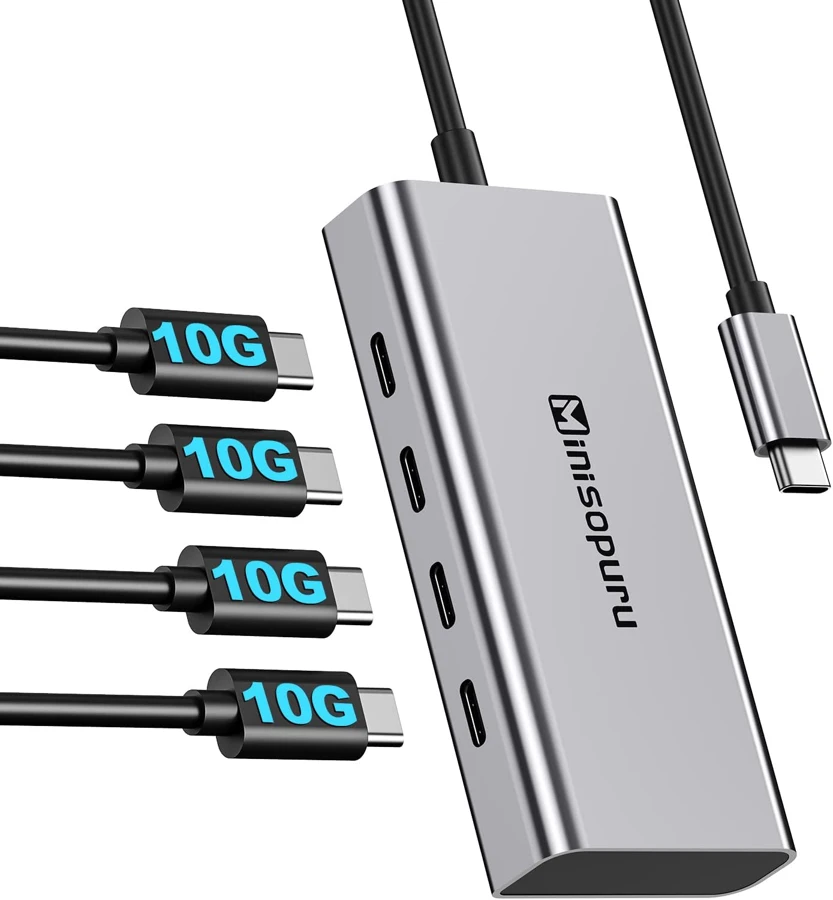
Yes. Four downstream USB-C data sockets are explicitly documented on the exact UCH803 page.
Explore this need in the finder →Will it connect a USB-C monitor and charge the laptop?
No. The manufacturer explicitly limits it to data and excludes both monitor output and laptop charging.
Explore this need in the finder →Is a 10Gbps minimum verified for all four ports?
No. The same manufacturer page mixes 10Gbps claims withUSB3.2 Gen 1 wording. Four sockets are confirmed, but the precise speed minimum is not assigned from that conflict.
Explore this need in the finder →For USB-C data accessories, with screens kept separate
The Minisopuru UCH803 expands one USB-C computer connection into four downstream USB-C data sockets. It is useful when your accessories increasingly use Type-C plugs but the computer has too few convenient data ports. Its intended role is deliberately narrower than a multifunction dock.
The manufacturer explicitly says the UCH803 does not support laptop charging or monitor output. That is the first distinction to make before purchase. Four USB-C openings do not mean four video outputs, four charging connections or a substitute for a Thunderbolt display dock.
What the four data sockets do
The maker names external drives, flash drives, mice and other USB-C data accessories as intended devices. The hub is described as plug-and-play, without additional hub drivers. Your actual accessory and operating system can still have their own normal support requirements.
All of the accessories share the computer connection. Even a clearly specified per-port rate would not give four devices four independent upstream channels. Think about which devices will be busy at the same time, rather than assuming that a larger port count alone solves a demanding storage workflow.
Minisopuru recommends connecting only one or two external hard drives at a time. That is a useful practical boundary for planning the setup. The hub should not be selected on the assumption that four demanding bus-powered drives are a confirmed supported combination.
The exact speed claim needs clarification
The product title and several feature paragraphs advertise10Gbps. The same page also calls the four ports USB3.2Gen1, wording normally associated with a different advertised speed class. These claims are inconsistent within the exact manufacturer's product page.
We preserve the clear physical function—four USB-C data sockets—without assigning a verified maximum line rate from the conflict. If a strict10Gbps requirement determines the purchase, obtain edition-specific confirmation rather than treating the largest number in the title as settled evidence. An appropriate host and cable would also be required to reach any supported interface maximum.
This uncertainty does not make the product a nonexistent model or erase its documented port count. It changes which question it can answer confidently. It is a candidate for a connection-count need, while a precise speed-sensitive storage need requires clearer evidence.
Charging and video are explicitly excluded
The manufacturer's no-charge statement concerns computer charging through the hub. It should not be interpreted as a complete electrical specification for every attached accessory, nor as proof of an external power arrangement that the page does not establish. Keep the laptop's normal charger separate.
The no-video statement is equally direct. Connecting a USB-C monitor or a USB-C-to-HDMI cable to one of the data sockets does not create a supported native display output. If video is part of the required setup, choose a product with an actual documented display path for the computer.
There are also no native USB-A ports, Ethernet socket or memory-card readers in the described layout. A separately purchased converter may address a particular accessory, but it is not the supplied native arrangement reviewed here.
Check the exact computer context
The manufacturer lists USB-C MacBook and iMac examples, selected iPad Pro models, Surface and other Windows computers, Chromebooks and several other devices. Those examples establish a broad USB-data role. They do not justify inferring every current Apple-chip family from a year range or assuming that all device functions work identically.
Choose the UCH803 when several USB-C data connections are the real shortage and displays and computer charging are already handled elsewhere. Choose a more clearly specified data hub if a numerical speed minimum is essential, or a different dock if the same cable must also supply video or laptop power. Those distinctions make the four-port layout useful without promising functions it expressly lacks.
Key details at a glance
| USB-A downstream data ports | 0 |
|---|---|
| USB-C downstream data ports | 4 |
| HDMI outputs | 0 |
| Full-size DisplayPort outputs | 0 |
| USB-C video outputs | 0 |
| Full-size SD slots | 0 |
| microSD slots | 0 |
| Advertised Ethernet link ceiling | 0Gbps |
| Maximum stated power available to host | 0W |
| Host requirements | USB-C data computer connection, with named Mac/iPad/Windows/Chromebook examples; no exact current Apple-chip profile inferred from model years. |
| Screen arrangement | Manufacturer expressly excludes monitor/video output. A USB-C-to-HDMI cable does not create a supported video port here. |
| Power and charging | Manufacturer expressly excludes laptop charging through the UCH803 and recommends only one or two external hard drives at a time. |
| Data and device limits | Four USB-C data sockets are explicit. Maker repeatedly claims 10Gbps but also labels them USB3.2 Gen 1; exact maximum rate remains null pending edition-specific clarification. |
Use the exact model’s instructions for operating limits, supplied equipment and version differences.
Sources for this assessment
Find a hub or dock for your desk.
Match the computer, screens, devices and charging routine, then check the exact supported arrangement.