
Your needs, this model
Does it fit your priorities?
Does it provide three USB-A data ports on the documented Windows USB-A desktop setup?
Yes, with the supplied computer cable and separate stand supply; the fourth outward socket is for charging.
Explore this need in the finder →Will a requirement for four USB-A data connections qualify?
No. Only three outward ports are documented for data.
Explore this need in the finder →Can it charge the laptop through the hub?
No. The 15W stand supply and accessory charging function are not host laptop charging.
Explore this need in the finder →MONITORMATE miniS: a monitor riser with three data connections
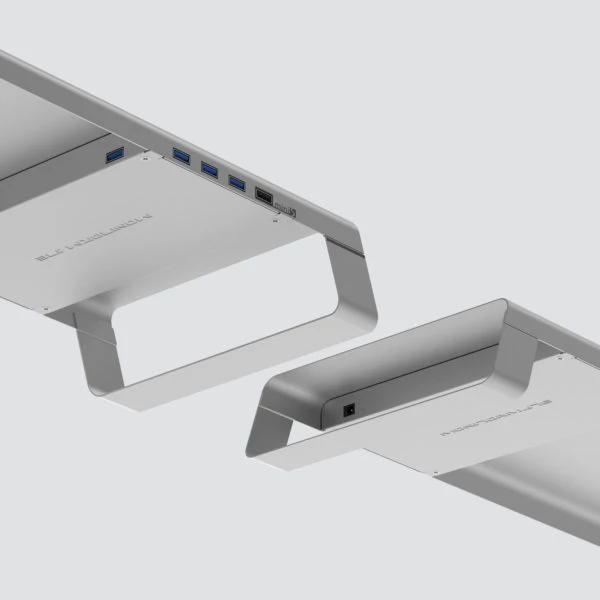
The miniS combines a steel monitor stand, keyboard storage and a small powered USB hub. It is useful when the desk needs easier accessory access and a fixed place to raise a screen. Its four outward USB sockets do not all have the same job: three are USB data connections and one is a dedicated phone or tablet charging connection. Choose it as a piece of desktop furniture with a three-device data allocation, and check its dimensions before thinking about the electronics.
Measure the stand and the space beneath it
MONITORMATE lists the miniS at 590 by 210 by 66mm and approximately 2kg. The stated load limit is 15kg. Compare both the weight and base footprint of the monitor with the stand; a load rating alone does not establish that a wide or awkward base fits safely. The original product description identifies steel construction and a space under the stand for storing a keyboard and mouse.
The specified keyboard-storage space is 489 by 210 by 44mm. That is the useful measurement when deciding whether a keyboard can slide underneath. A tall keyboard, a cable exiting in the wrong direction or a larger footprint may change how much space is actually recovered. The stand's top elevation is fixed in the reviewed design. It is not a documented adjustable monitor arm, clamp or universal cure for an uncomfortable screen position.
Three data ports plus a different charging socket
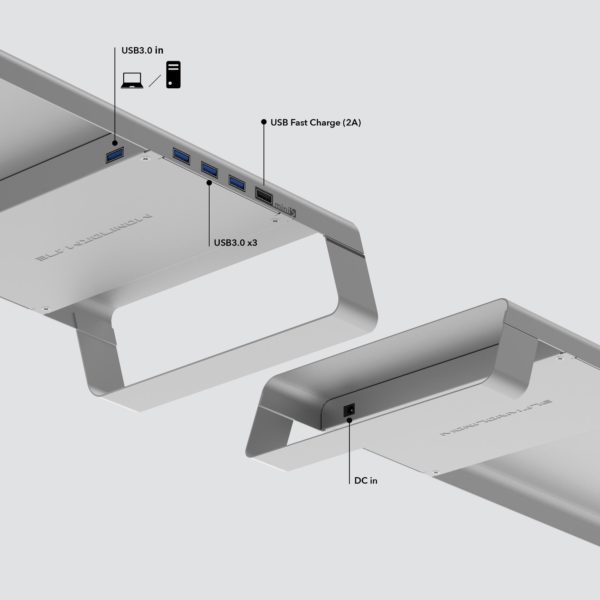
The maker's detailed specification states three USB 3.0 outputs and one fast charging output. Its original port diagram labels those same roles. That is more precise than the short headline calling it a four-port hub. Three peripherals can use the data side; putting a drive into the dedicated charging socket does not create a fourth data connection. The original pages reviewed here do not give an explicit numeric data-rate claim, so the matcher does not promise a particular gigabit figure.
The charging socket is rated up to 2A for a compatible phone or tablet. The manufacturer also says all four outward connections can provide USB charging without the computer being connected or switched on, when the stand has its external supply. That is accessory charging. It does not turn the miniS into a USB-C laptop charger, nor establish simultaneous fast charging at the stated maximum from all four sockets.
The supplied adapter powers the stand
The package list includes the miniS, a USB 3.0 computer cable, a user guide and an external supply rated 5V at 3A. The published input range for that adapter is 100–240V AC. Its nominal DC output is 15W by arithmetic. That figure describes the stand's supply, not power delivered back to a laptop. A reader who needs the computer to charge through the hub must use a different documented arrangement.
Connect the supplied computer cable to the stand's marked USB 3.0 input and the appropriate computer port, and connect the separate DC supply for the powered setup. The original input diagram distinguishes the computer connection from the three data outputs. Check the actual cable and regional mains plug in the package before installation. The maker states a voltage range, but the reviewed material does not identify the precise wall-plug version for every sale.
A desktop USB hub, rather than a display dock
The original compatibility list names macOS and Windows 8/10 computers with USB 3.0. This provides an Intel-era Mac and named Windows reference; no specific later Mac processor or driver-free guarantee is inferred. The complete connection map provides no HDMI, USB-C video, Ethernet or memory-card reader. The screen sitting on top still uses its own video cable to the computer. Raising a monitor and driving that monitor are separate jobs.
The silver and black miniS pages publish the same dimensions, load limit, three-data-plus-charge arrangement and package. This assessment treats them as those documented color options, while keeping historical retailer identifiers unverified. The miniS is a sensible fit when the stand's measurements work and three USB data accessories are enough. Choose a different design when an additional screen connection, four data sockets, USB-C peripherals or laptop charging is part of the requirement.
Key details at a glance
| USB-A downstream data ports | 3 |
|---|---|
| USB-C downstream data ports | 0 |
| HDMI outputs | 0 |
| Full-size DisplayPort outputs | 0 |
| USB-C video outputs | 0 |
| Full-size SD slots | 0 |
| microSD slots | 0 |
| Advertised Ethernet link ceiling | 0Gbps |
| Maximum stated power available to host | 0W |
| Maximum PD input | 0W |
| Included supply rating | 15W |
| Power adapter included | Yes |
| Detachable host cable | Yes |
| Stated product weight | 2000g |
| Host requirements | Supplied USB3.0 computer cable and marked USB3.0 in socket; original Windows 8/10/macOS scope. No USB-C host route established. |
| Screen arrangement | The complete miniS map has no video outputs. A monitor on the stand retains its own direct computer video cable. |
| Power and charging | Included 100–240V AC to 5V 3A supply provides nominal 15W for stand/accessories, not laptop charging. Separate phone/tablet charge socket up to 2A; all four outlets may charge without computer. Exact regional plug unknown. |
| Data and device limits | Three USB3.0 Type-A data outputs plus one separate charging-only socket. Four physical outputs do not mean four data ports. Numeric gigabit rate and combined output-current allocation unspecified. |
| Installation | Steel stand 590×210×66 mm, 2 kg, 15 kg load rating; keyboard storage 489×210×44 mm. Check actual monitor base/weight and under-stand clearance; no desk clamp or adjustable height documented. |
Use the exact model’s instructions for operating limits, supplied equipment and version differences.
Sources for this assessment
Find a hub or dock for your desk.
Match the computer, screens, devices and charging routine, then check the exact supported arrangement.