
Your needs, this model
Does it fit your priorities?
Can a documented DP1.4 Intel-Mac arrangement combine one 4K60 HDMI screen, two USB-A and one USB-C device at 10 Gbps, both cards and at least 85W laptop charging?
Yes, with the exact supported host and a suitable separate 100W PD source; 85W is the documented net maximum.
Explore this need in the finder →Will a 90W net laptop charging minimum qualify?
No. The maker explicitly limits net host power to 85W with 100W input.
Explore this need in the finder →Can it qualify for two independent external HDMI screens?
No. Only one HDMI output is documented.
Explore this need in the finder →MONITORMATE ProBASE Gen2: a fixed stand with a genuinely faster data allocation
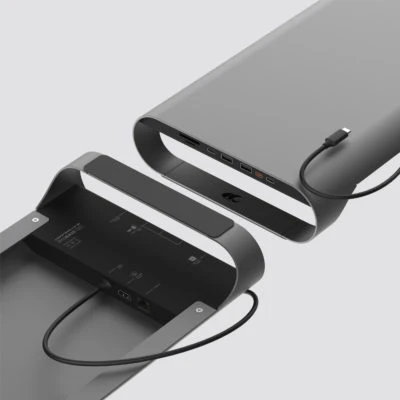
The ProBASE Gen2 is suited to a desk that needs both a monitor platform and a USB-C docking arrangement. It adds two USB-A data ports, one USB-C data port, HDMI, cards and Gigabit Ethernet, while leaving storage space and a side drawer beneath the display. Its most consequential limits are the host's video capability and the charging reserve. A 4K60 screen needs the documented DisplayPort 1.4 route, and a 100W PD source leaves at most 85W for the computer.
Measure the furniture as carefully as the ports
The maker lists the stand at 530 by 225 by 66mm, approximately 1.3kg, with a maximum load of 15kg. Its keyboard-storage space is 420 by 210 by 40mm. Check the monitor base footprint as well as its weight, then check the actual keyboard and cables you want to store below. The stated load capacity does not guarantee that every heavy or unusually shaped monitor base sits appropriately on the top.
The stand uses aluminum, steel and ABS plastic, with a side drawer included in the package. Its USB-C host cable is attached and listed at 80cm, or 31.5 inches. That gives a specific cable-routing distance to plan around. A fixed lead cannot be positioned as freely as an arrangement using an independently selected longer detachable cable. This is a desktop stand, rather than a small portable dongle or an included desk clamp.
Three 10Gbps data ports, with a separate PD input
MONITORMATE explicitly specifies both USB-A data sockets and the downstream USB-C data socket at up to 10Gbps under USB 3.1 Gen 2. These are ordinary USB data claims, so the USB-C drive socket does not rely on a Thunderbolt headline for its rate. The computer, cable path and device must still support the relevant mode. The figures describe interface capability; they are not independent bandwidth allocations or our measured simultaneous copy results.
The PD socket is a different connection. The maker expressly says that it supports neither video nor data. A USB-C drive belongs in the data socket, while the separate power source goes into the PD socket. This allocation can preserve a USB-C accessory while the computer charges. The two UHS-II card slots are also explicitly documented for simultaneous use, which is useful when a workflow involves both SD and microSD media rather than alternating between them.
Choose the screen mode by the exact host
The single HDMI output supports up to 3840 by 2160 at 60Hz on the stated DisplayPort 1.4 Alt Mode route. The original page names particular Intel-era MacBook models for this full arrangement and gives older MacBook examples a 4K30 or 1080p60 arrangement. It is important to keep those modes separate. The word “MacBook” alone does not make every model a 4K60 source, and this original page does not establish later M-series chips.
The FAQ also supports Windows 10 laptops with a full-function USB-C/Thunderbolt 3 port, but the separate DP 1.4 requirement still governs 4K60. There is only one HDMI socket, with no USB-C monitor output or documented pair of independent external screens. For an iPad Pro, the maker says the functions work with an external USB-C power source; it does not establish an independent external-desktop mode for every iPadOS configuration.
Budget 85W to the computer, rather than the input headline
The power specification is unusually clear. The stand accepts up to 100W through its PD input and reserves 15W for its devices, leaving a maximum 85W to the MacBook from a suitable 100W source. A lower-rated supply leaves less available. MONITORMATE supports PD 2.0/3.0 chargers and specifically warns that a 30W MacBook Air charger is insufficient for the intended simultaneous charging and peripheral arrangement. The listed package does not include a wall charger.
The Ethernet socket supports 10/100/1000Mbps links; it does not provide 2.5GbE. Combined with the three fast data connections and simultaneous cards, that makes a useful fixed desk allocation. Choose the ProBASE Gen2 when its measurements, attached cable and exact host requirements fit the workspace. Choose another design when the laptop requires more than 85W through the dock, the screen needs a different output or two independent external displays are essential.
Key details at a glance
| USB-A downstream data ports | 2 |
|---|---|
| USB-C downstream data ports | 1 |
| HDMI outputs | 1 |
| Full-size DisplayPort outputs | 0 |
| USB-C video outputs | 0 |
| Full-size SD slots | 1 |
| microSD slots | 1 |
| Simultaneous card slots | Yes |
| Advertised Ethernet link ceiling | 1Gbps |
| Maximum stated power available to host | 85W |
| Maximum PD input | 100W |
| Power adapter included | No |
| Detachable host cable | No |
| Included host-cable length | 31.5 in |
| Stated product weight | 1300g |
| Host requirements | Attached 80 cm/31.5 in USB-Clead; original named Intel MacBooks/Windows 10 full-function USB-C scope. iPad Pro data functions require external PD source. No M chips inferred. |
| Screen arrangement | One HDMI4K60 requires DP1.4 Alt Mode; older named MacBooks separately 4K30 or 1080p60. No USB-C monitor output or second independent external display. |
| Power and charging | Separate PD2.0/3.0 source required; 100W input minus 15W reserve gives 85W max host explicitly.30W MacBook Air source insufficient for intended simultaneous setup. Package contains stand/drawer, not wall charger. |
| Data and device limits | Two A and one C data ports each up to 10 Gbps; PD socket does not carry data/video. UHS-II SD/microSD expressly simultaneous. Gb Ethernet 10/100/1000 Mbps; shared host bandwidth not benchmarked. |
| Installation | Desktop stand 530×225×66 mm, 1.3 kg, 15 kg load rating; keyboard space 420×210×40 mm. Check monitor base and attached cable reach; included side drawer. |
Use the exact model’s instructions for operating limits, supplied equipment and version differences.
Sources for this assessment
Find a hub or dock for your desk.
Match the computer, screens, devices and charging routine, then check the exact supported arrangement.