
Your needs, this model
Does it fit your priorities?
Can it provide one 5 Gbps USB-A connection from a USB-C host?
Yes, the documented layout has one Type-A socket advertised at 5 Gbps. The other two are USB 2.0, and all attached devices still share the host connection.
Explore this need in the finder →Can I use all three Type-A data ports if their speeds do not matter?
The physical layout supplies three Type-A data sockets: one faster socket and two USB 2.0 sockets. This is a useful division for one faster peripheral and two less demanding devices.
Explore this need in the finder →Does it meet a requirement for three 5 Gbps USB-A sockets?
No. Only one socket has the advertised 5 Gbps mode. The two blue USB 2.0 sockets do not pass a requirement that all three counted ports support 5 Gbps.
Explore this need in the finder →One fast socket and two slower ones in a rigid bar
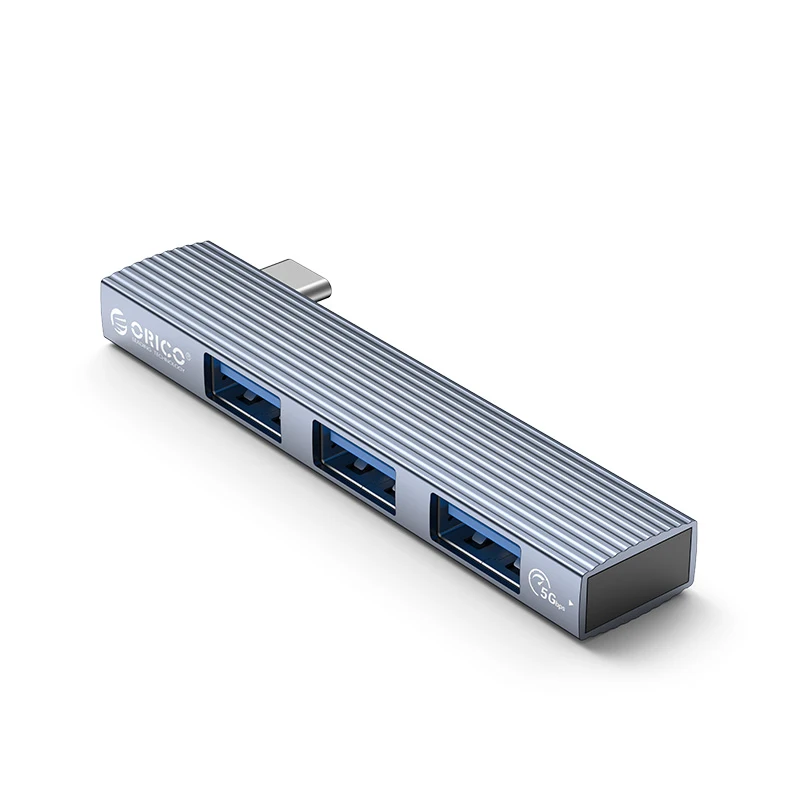
The ORICO AH-W13 is a small Type-C hub for adding three ordinary USB-A peripherals. Its most useful distinction is easy to miss: the manufacturer specifies one 5 Gbps USB 3.1 socket and two USB 2.0 sockets. All three inserts look blue in the original photographs. The color is not a reliable way to decide which connections have the faster data mode.
This arrangement can suit a computer with a single faster USB-A device alongside a keyboard, mouse receiver or other less demanding peripheral. It is a different choice from a hub that provides three equally fast sockets. Decide which devices you will use together before comparing the simple three-port headline.
Put the demanding device on the documented faster connection
The 5 Gbps figure is the advertised interface capability of one socket. It is not a copying speed we measured, and it does not turn the two USB 2.0 connections into faster ports. The devices also share the link back to the computer, so adding sockets does not create three independent computer connections.
If you want to attach several fast drives, choose a layout that documents the required capability for each counted port. The AH-W13 can satisfy a need for one 5 Gbps Type-A socket, or for three Type-A data sockets without that speed minimum. It cannot satisfy three Type-A sockets each operating in the advertised 5 Gbps mode.
The direct plug changes where it can sit
Unlike a hub on a short flexible cable, this model attaches as a rigid bar. The manufacturer gives the gray aluminum body dimensions as 75.5 × 15.2 × 8.5 mm. Consider the space around the computer's socket as well as the hub body: nearby ports, a protective case and the plugs on your peripherals can all affect access.
The compact shape can make sense for carrying a few small connections with a laptop. It is less suitable when you want the hub to sit independently on a desk or route its computer lead around an obstruction. Do not assume that the direct plug clears every laptop case simply because both products use USB-C.
The charging picture uses a separate laptop port
ORICO shows a laptop charging while the hub is attached, but the charger connects to another socket on the computer. The documented three-output hub layout does not supply a separate USB-C power input through which to charge the laptop. That is a practical distinction when your computer has very few available ports.
If charging through the same hub connection is essential, compare a model with a positively documented laptop Power Delivery path. The AH-W13's extra Type-A sockets do not provide that function. A photo containing a charger is not sufficient evidence that power travels through the pictured hub.
Check the computer and the peripherals together
The original product material establishes the Type-C host connection and the mixed-speed output arrangement. It does not provide a complete operating-system version or modern Apple-chip support matrix. Match your actual computer and any peripheral-specific software requirements rather than treating the compact plug as a universal compatibility guarantee.
This is a data hub, with no documented monitor connection, memory-card reader or wired network interface in its complete output map. Those functions should be supplied elsewhere when needed. Its attraction is a small, direct-attached arrangement for a specific mix of Type-A devices.
When it belongs on the shortlist
Choose the AH-W13 when the rigid attachment fits, one faster Type-A socket is enough and the other two devices can use USB 2.0. Choose a flexible cabled hub for more placement freedom, an equally rated multiport data hub for several faster devices, or a documented charging dock when one computer connection must also carry laptop power. The useful comparison is the actual working layout, not the color of the ports.
Key details at a glance
| USB-A downstream data ports | 3 |
|---|---|
| USB-C downstream data ports | 0 |
| HDMI outputs | 0 |
| Full-size DisplayPort outputs | 0 |
| USB-C video outputs | 0 |
| Full-size SD slots | 0 |
| microSD slots | 0 |
| Advertised Ethernet link ceiling | 0Gbps |
| Maximum stated power available to host | 0W |
| Detachable host cable | No |
| Individual port switches | No |
| Included host-cable length | 0 in |
| Host requirements | A rigid Type-C host plug, with no flexible lead. Check adjacent sockets and case clearance. |
| Power and charging | The source charging illustration connects a charger to a separate laptop port, not through a hub PD input. |
| Data and device limits | One Type-A USB 3.1 socket advertised at 5 Gbps and two USB 2.0 Type-A sockets; blue inserts do not make all three SuperSpeed. |
| Installation | Gray aluminum body 75.5 × 15.2 × 8.5 mm; a directly attached bar, not a cabled desktop dock. |
Use the exact model’s instructions for operating limits, supplied equipment and version differences.
Sources for this assessment
Find a hub or dock for your desk.
Match the computer, screens, devices and charging routine, then check the exact supported arrangement.