
Your needs, this model
Does it fit your priorities?
Can it add four Type-A data sockets to a USB-A computer?
Yes. The exact G11-H4-U3 table lists a USB-A host and four USB3.0 Type-A outputs. Match the host-lead package to the intended position.
Explore this need in the finder →Are all four data outputs in the USB3.0 interface class?
The manufacturer identifies all four as USB3.0, the nominal 5Gbps class. They share the host connection; this is not four independent measured copying rates.
Explore this need in the finder →Does the extra 5V2A power socket charge my laptop through the hub?
No. It is a Micro-B hub-power input, separate from the Type-A computer data route. It does not establish laptop Power Delivery.
Explore this need in the finder →Four Type-A data ports with a separate hub-power connection
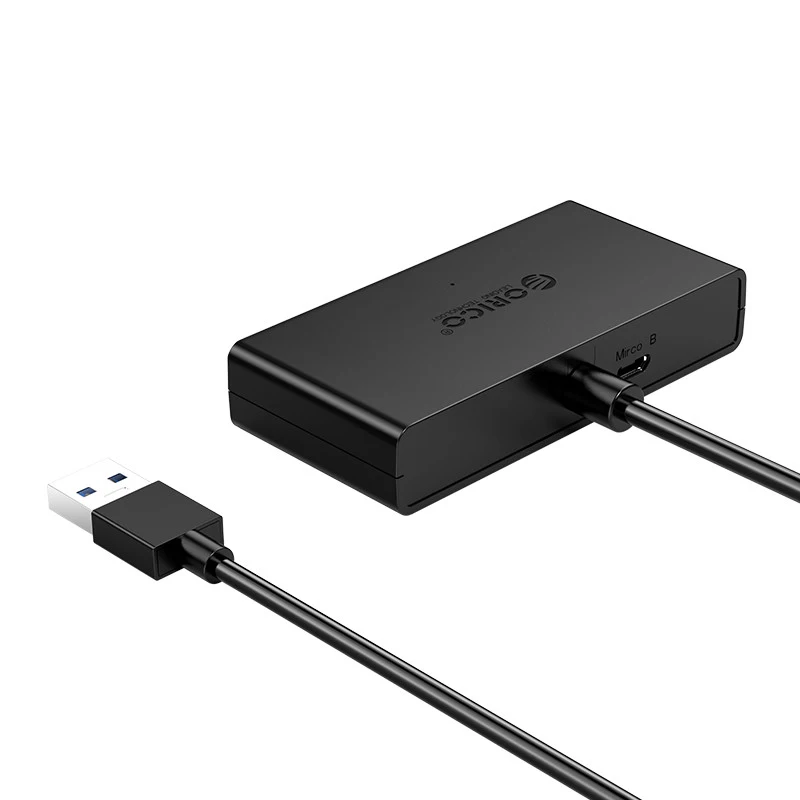
The ORICO G11-H4-U3 adds four USB-A data sockets through a USB-A computer lead. Its extra Micro-B socket is a power input for the hub, specified at 5V and 2A. That distinction is central: it helps describe how the accessory receives power, rather than making the hub a USB-C laptop-charging dock.
Consider this layout when your problem is connecting several Type-A peripherals. It is a simpler arrangement than a multi-display dock, and the manufacturer's complete output table does not provide monitor, card-reader or Ethernet functions. Those need their own connections elsewhere in the setup.
Four USB3.0 outputs share one upstream path
The exact model table identifies four USB3.0 Type-A outputs. That is the nominal 5Gbps interface class, not a transfer result from our own testing. The ports still share the connection back to the computer. Several active storage devices cannot each assume an independent full-speed upstream link.
For peripherals such as a keyboard, a receiver and a flash drive, physical port access may matter more than the headline rate. For a workload involving several busy drives, compare the combined connection and power needs. More sockets solve the connection-count problem; they do not multiply the computer port's bandwidth.
Check the Micro-B supply as part of the actual setup
ORICO explicitly lists Micro-B 5V2A power input. A suitable hub-power connection and the power available to attached peripherals need to be considered together, particularly with devices that draw their operating power from USB. The input specification alone does not prove an arbitrary combination of drives will receive enough power.
The original specification does not establish a supplied wall adapter, its regional plug or a per-output charging budget. Check the actual package rather than assuming that an auxiliary socket means a complete mains-powered kit is included. It also does not establish laptop Power Delivery through the Type-A host connection.
Cable length is a package choice
The core-family table lists 30cm, 100cm and 150cm data leads. These are materially different placement options: a short lead keeps the hub close to the computer, while a longer one may reach a more convenient position. Measure the routed distance, including bends and slack at both ends, before choosing.
The historical record included a five-foot child listing. The manufacturer reference establishes the core model and its metric cable choices, rather than a newly verified exact offer for that child. Match the seller's actual cable package to the manufacturer's model instead of treating every G11-H4-U3 reference as the same length.
Body size and connection requirements
The published body dimensions are 86 × 50 × 17mm, excluding the cable. Allow additional space for the plugs inserted into the four sockets and, when used, the auxiliary power lead. Black and white finishes, a blue indicator and a VL815 controller appear in the exact-model table; they do not add an operating-system guarantee.
The source establishes the USB-A host and four-output hardware arrangement, but not a complete current computer or operating-system support matrix. Check your actual host and any peripheral-specific requirements. A USB-C-only computer is a different direct-connection requirement from this documented Type-A lead.
Where this model fits
Shortlist the G11-H4-U3 when four Type-A data sockets are enough and you can choose a suitable cable and hub-power arrangement. Compare another product for a native Type-C host lead, a confirmed included mains supply, laptop charging, card readers or monitor outputs. Its value is the straightforward four-port data layout, with the auxiliary power input understood for what it actually supplies.
Key details at a glance
| USB-A downstream data ports | 4 |
|---|---|
| USB-C downstream data ports | 0 |
| HDMI outputs | 0 |
| Full-size DisplayPort outputs | 0 |
| USB-C video outputs | 0 |
| Full-size SD slots | 0 |
| microSD slots | 0 |
| Advertised Ethernet link ceiling | 0Gbps |
| Maximum stated power available to host | 0W |
| Detachable host cable | No |
| Host requirements | USB3.0 Type-A input on an attached lead; 30cm, 100cm and 150cm core-family options listed. |
| Power and charging | A separate Micro-B socket is specified for 5V2A hub power. No laptop-PD route or included mains adapter is established. |
| Data and device limits | Four USB3.0 Type-A outputs, nominal 5Gbps interface class, sharing the Type-A computer connection. |
| Installation | 86 × 50 × 17mm body excluding the cable; black/white family finishes, blue LED and VL815 controller listed. The historical five-foot child package is not independently mapped. |
Use the exact model’s instructions for operating limits, supplied equipment and version differences.
Sources for this assessment
Find a hub or dock for your desk.
Match the computer, screens, devices and charging routine, then check the exact supported arrangement.