
Your needs, this model
Does it fit your priorities?
Can I add four USB-A data sockets without extra hub software?
The maker documents four USB3.0 sockets and no hub driver/application under its listed systems. The faster route is advertised at 5 Gbps and shares the computer connection. Peripherals may still need their own software.
Explore this need in the finder →Will it work with an older USB2 computer connection?
USB2 backward compatibility is expressly listed. That fallback uses the slower USB2 data mode; it does not preserve 5 Gbps operation at the host.
Explore this need in the finder →Does the four-port layout include a USB-C data connection?
No. The reviewed connections are Type-A. Choose a model with a positively documented USB-C data socket when that connector is essential.
Explore this need in the finder →A desktop hub built around four ordinary USB-A connections
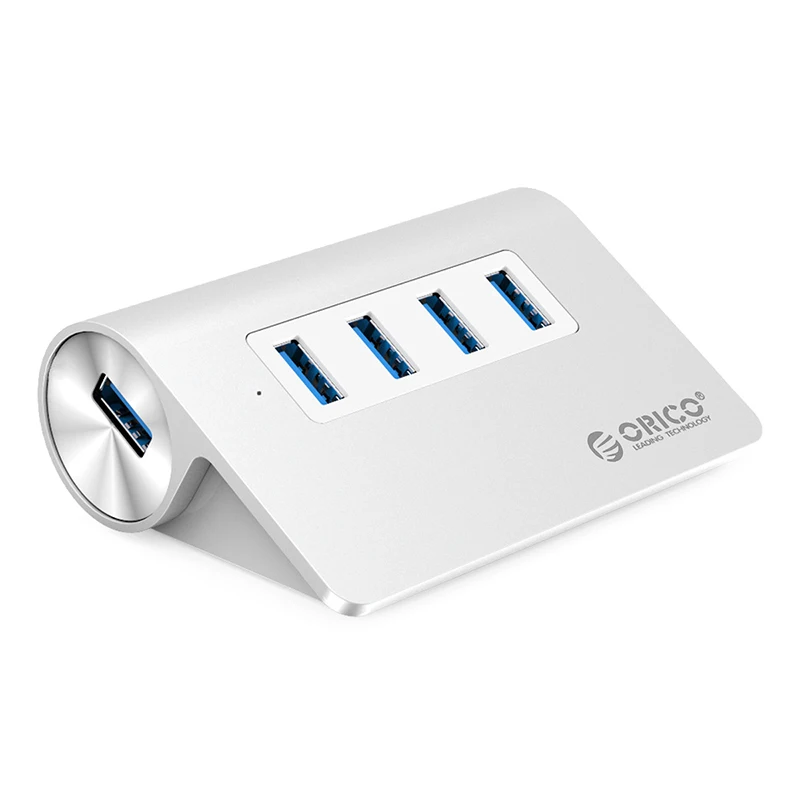
The ORICO M3H4-V1 makes sense when the problem is reaching four USB-A peripherals from a desktop position. Its distinguishing features are an aluminum body, an angled row of data ports and a manufacturer-listed one-metre computer cable. It is a simpler choice than a display dock when your monitor, network and laptop charger already have their own connections.
The important limit is equally specific: this assessment covers the M3H4-V1 four-port data hub. The manufacturer also shows other products beside it, including a ten-port model and an Ethernet adapter. Their extra connections do not belong to this four-port unit.
What the 32-degree shape changes
ORICO describes a 32-degree slope intended to make the ports easier to reach on a desk. The specification table gives 93 × 66 × 32 mm, while the original dimension drawing labels the side height as 34 mm. Allow for the larger depicted height when planning a tight space. Allow additional room for the plugs and the direction in which their cables leave the hub; those body measurements are not the complete occupied space.
This can be a useful arrangement for a frequently inserted flash drive beside a keyboard, receiver or other data peripheral. It is a desktop layout rather than a clamp or an internal computer part. Check where it will sit and whether the listed one-metre host lead reaches the computer without tension.
Four 5 Gbps sockets still share the computer connection
The maker identifies four SuperSpeed USB 3.0 ports and an advertised maximum transfer capability of 5 Gbps. That is an interface specification, not a copying result from our own testing. Four connected devices share the path back to the computer; the hub does not create four independent 5 Gbps computer links.
For two busy storage devices, think about their combined use as well as the number of available sockets. For a keyboard and a receiver, the physical arrangement may matter more than the headline rate. The relevant question is whether this particular set of four Type-A data connections solves the desk problem.
A USB 2.0 fallback is a slower arrangement
ORICO expressly lists backward compatibility with USB 2.0 and USB 1.1. That makes the older connection a documented fallback, rather than something inferred from the plug shape. It does not preserve the SuperSpeed operating rate when the host uses the older interface.
The finder therefore separates the USB 3.0 route from the USB 2.0 fallback. A requirement for 5 Gbps operation and a USB 2.0 host cannot be satisfied together by treating the faster downstream sockets as a new upstream capability. Use the supported faster host connection when that data mode is essential.
Bus power is different from a laptop charging package
The specification lists USB as the hub’s power supply. It does not establish a separately powered high-current arrangement for any arbitrary set of drives. Consider the power requirements of the actual peripherals, particularly when more than one device draws its operating power from USB.
This is not a documented USB-C laptop-charging dock. Its computer connection is Type-A, and the four-port layout does not provide a native monitor output or a USB-C data socket. Choose another arrangement when those functions are essential instead of trying to obtain them from an unrelated accessory pictured nearby.
Read the system list as a support scope
The manufacturer lists Windows XP, Vista, 7, 8, 8.1 and 10, alongside Mac OS and Linux, and says the hub needs no driver or application. Connected peripherals can still have their own software requirements. The retained list is not a promise about every future operating-system release or Apple chip.
Silver, black and pink appear on the same M3H4-V1 specification. Match the core model and the seller’s actual package when buying. Shortlist it for four Type-A data connections on an angled desktop hub; compare a different design for clamping, more ports, video or computer charging.
Key details at a glance
| USB-A downstream data ports | 4 |
|---|---|
| USB-C downstream data ports | 0 |
| HDMI outputs | 0 |
| Full-size DisplayPort outputs | 0 |
| USB-C video outputs | 0 |
| Full-size SD slots | 0 |
| microSD slots | 0 |
| Advertised Ethernet link ceiling | 0Gbps |
| Maximum stated power available to host | 0W |
| Maximum PD input | 0W |
| Included host-cable length | 39.37 in |
| Host requirements | USB3.0 Type-A host; one-metre listed cord. Exact supplied lead attachment/replacement arrangement is not established. |
| Power and charging | Maker lists USB power, not a separately verified high-current supply or computer PD output. |
| Data and device limits | Four USB 3.0 sockets advertised at 5 Gbps share the host path. The explicitly supported USB 2.0 fallback is represented separately at its slower data mode. |
| Installation | 32-degree desktop slope. Table:93 ×66 ×32mm; original dimension diagram labels 34mm side height, so allow the larger illustrated height for a tight space. Silver, black and pink core-family finishes. |
Use the exact model’s instructions for operating limits, supplied equipment and version differences.
Sources for this assessment
Find a hub or dock for your desk.
Match the computer, screens, devices and charging routine, then check the exact supported arrangement.