
Your needs, this model
Does it fit your priorities?
Can I keep a USB-C data device connected while the laptop charges through the hub?
Yes, the documented layout has separate Type-C data and PD-input sockets. A suitable charger is still needed, and its package inclusion is not established.
Explore this need in the finder →Can I connect two Type-A data devices and one Type-C data device in the 5Gbps class?
That is the original three-data-output arrangement. The advertised 5Gbps channel is shared, rather than three independent measured transfer links.
Explore this need in the finder →Does the 100W PD label prove 100W reaches my laptop?
No. It is the advertised PD-input capability. The source does not state net host power, so a requirement for 100W available to the computer is not confirmed.
Explore this need in the finder →Three data outputs and a separate charging input
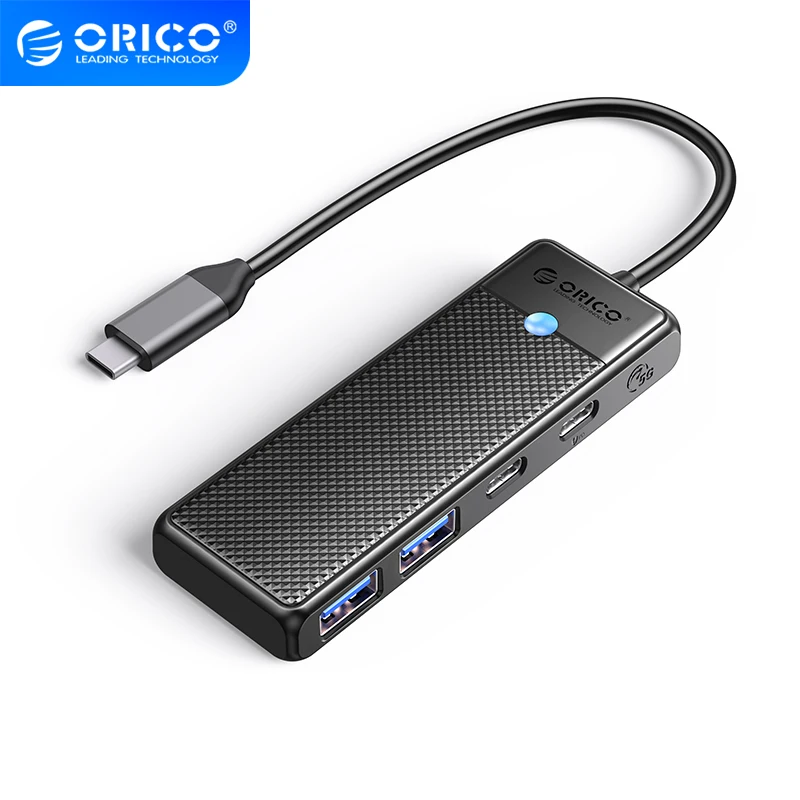
The ORICO PAPW2AC-C3 addresses a useful everyday combination: two USB-A data devices, one USB-C data device and a laptop charger connected through one Type-C host lead. The extra USB-C sockets have different jobs. One carries peripheral data; the other is the PD power input. Keeping those roles separate is the main reason to compare this layout with a simpler data hub.
The manufacturer advertises a 100W PD input, but does not state the net wattage delivered to the laptop. The documented charging function can be useful without turning that input headline into a promise of 100W available at the computer.
A Type-C data device does not consume the PD socket
The original specification and photographs show two USB3.0 Type-A outputs and one USB3.0 Type-C output beside the distinct PD input. Unlike a design that asks one socket to alternate between data and charging, this arrangement leaves the data socket available while a suitable power source uses the other connection.
This matters when the Type-C peripheral is an essential part of your setup rather than an occasional extra. It also prevents a common counting mistake: there are three downstream data connections, not four. The power-input socket is not another spare Type-C data output.
The data specification is a shared 5Gbps connection
ORICO lists 5Gbps for the USB data channel. The three outputs share the computer-facing connection, so they do not provide three independent 5Gbps upstream links. This is the advertised interface capability, not a copying benchmark from our own testing.
Consider both the socket mix and the simultaneous workload. A pair of ordinary peripherals beside one active drive is a different demand from several busy storage devices. Choose another documented data arrangement if your actual workload requires a higher ordinary USB mode, rather than reading a power headline as a data-rate improvement.
Work out the laptop power requirement separately
The original charging diagram shows a power source connected to the dedicated PD input and the laptop connected through the host lead. That establishes the intended laptop-charging route. The source does not give a usable net-host wattage or establish an included charger, however.
If the laptop has a firm power requirement, match the actual charger, cable and available host power before ordering. A 100W input figure alone cannot answer how much reaches the computer after the hub's own needs. The finder therefore distinguishes a basic documented charging function from a selected minimum charging wattage.
Check the lead length and the space beside the computer
The core-model table lists 0.15m, 0.5m, 1m and 1.8m cable options. The original short-cable diagrams show a 0.15m arrangement. Choose the package that reaches the intended position, allowing room for the attached lead and the plugs on both sides of the body.
The ABS body is specified as 98 × 34 × 12.6 mm, with black and white family finishes. ORICO describes the design as portable and shows drive-free operation for Windows, Mac OS and Linux. Connected peripherals can still need their own software, and the general system list is not a verified matrix for every current version or Apple chip.
Where this mixed-port layout makes sense
Shortlist the PAPW2AC-C3 when you need two Type-A data outputs and one Type-C data output while preserving a separate laptop-charging route. Compare another product for monitor outputs, Ethernet, card readers or a positively established net charging ceiling. Those functions are absent from this complete data-and-power layout, rather than hidden benefits of the four-in-one name.
Key details at a glance
| USB-A downstream data ports | 2 |
|---|---|
| USB-C downstream data ports | 1 |
| HDMI outputs | 0 |
| Full-size DisplayPort outputs | 0 |
| USB-C video outputs | 0 |
| Full-size SD slots | 0 |
| microSD slots | 0 |
| Advertised Ethernet link ceiling | 0Gbps |
| Maximum PD input | 100W |
| Detachable host cable | No |
| Individual port switches | No |
| Host requirements | Attached USB-C host lead. Core-model table lists 0.15/0.5/1/1.8m options; original short-cable diagrams show the 0.15m arrangement. |
| Power and charging | Separate USB-C input advertised for 100W PD; original diagram shows laptop charging through the hub, but net host watts and a supplied charger are not established. |
| Data and device limits | Two USB3.0 Type-A and one USB3.0 Type-C data output, advertised 5Gbps shared channel. The fourth downstream socket is PD input only. |
| Installation | Portable ABS body 98 × 34 × 12.6 mm in black/white family finishes. Host and peripheral cables need clearance beside the computer. |
Use the exact model’s instructions for operating limits, supplied equipment and version differences.
Sources for this assessment
Find a hub or dock for your desk.
Match the computer, screens, devices and charging routine, then check the exact supported arrangement.