
Your needs, this model
Does it fit your priorities?
Does it have four USB-A data sockets at the same advertised capability?
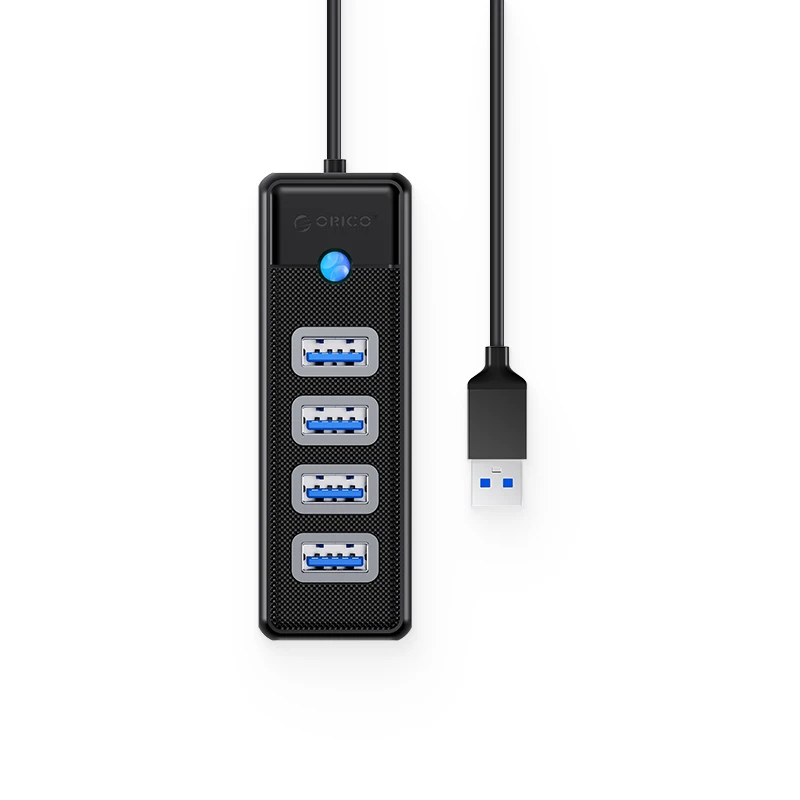
The manufacturer lists four USB 3.0 Type-A outputs at 5 Gbps. They share the computer connection, so the rating is not four independent measured transfer speeds.
Explore this need in the finder →Can I connect it directly to a USB-C-only computer?
The reviewed host connection is USB-A. A direct USB-C host requirement selects a different documented arrangement; any extra adapter needs its own compatibility check.
Explore this need in the finder →Is the included lead always one metre?
No. The core-family reference lists 15 cm, 50 cm, one metre and 1.8 metres. Match the actual package before ordering; cable length is not fixed by the core name alone.
Explore this need in the finder →Four Type-A data ports, with the cable length as a real choice
The ORICO PW4U-U3 is a straightforward way to add four USB-A data connections to a computer with a USB-A host port. Its practical distinction is the range of cable lengths in the manufacturer’s family specification: 15 cm, 50 cm, one metre and 1.8 metres. That lets the same basic layout address quite different positions around a computer.
A short lead may suit a hub beside a laptop, while a longer one may reach from a desktop tower to a more accessible surface. Choose the actual package for that job. The core model name alone does not tell you which length a seller will supply.
Match the host plug before counting the extra ports
The manufacturer specifies USB-A input and four USB 3.0 Type-A outputs. This is relevant when your peripherals and their existing cables use the familiar rectangular connector. It does not give a USB-C-only computer a direct host connection.
Check both ends of the intended arrangement: the port on the computer and the plug on each accessory. An extra connector adapter would be another component to verify, rather than something automatically supplied by this assessment. If you need a direct USB-C host or a downstream USB-C data socket, start with a model that documents those connections.
The 5 Gbps claim belongs to a shared data path
ORICO lists the four USB 3.0 data outputs with an advertised 5 Gbps capability. That figure is useful for distinguishing the layout from a hub that mixes a faster socket with slower USB 2.0 ports. It is not a measured copying speed or four independent full-speed links to the computer.
For everyday peripherals, having the right sockets within reach can be the deciding benefit. For storage work, consider the computer connection and the combined activity of the attached devices. A rated interface cannot guarantee the performance of a particular drive, cable or copying task.
Choose the lead for the complete desk arrangement
The family’s length options are worth checking before buying, especially if the computer sits under a desk. Measure the intended route rather than the straight-line distance. Leave enough slack for moving the computer and for connecting accessories without pulling on the host port.
The manufacturer lists a 92.9 × 30.6 × 19.5 mm ABS body in black, white, blue and pink. Those are core-family dimensions and finishes. They do not establish the exact cable-and-color suffix of every historical listing, so match the seller’s written model and package description as well as the photograph.
Use it as a data hub
The documented job is expanding Type-A data connections. The reviewed specification does not provide a native monitor output, Ethernet socket or card-reader layout. It is therefore a different purchase from a multiport display dock, even if both products are described as computer accessories.
The source also does not establish a separate high-current peripheral-power arrangement or a laptop PD charging function. Do not select it to replace a laptop charger, or assume that four physical sockets support any arbitrary combination of bus-powered equipment. Check the power needs of your actual accessories.
The sensible shortlist
ORICO lists Windows, Mac OS and Linux in its system-support field. That is the manufacturer’s stated scope; a particular peripheral or operating-system release can still have its own requirements. This assessment does not extend that general line into a named new Apple chip or a tested compatibility result.
Shortlist the PW4U-U3 when four Type-A data ports and the right host-lead length are the main requirements. Compare another layout for USB-C data, laptop charging or display expansion. Within this family, choosing the useful cable length is more consequential than treating every finish as a different technical product.
Key details at a glance
| USB-A downstream data ports | 4 |
|---|---|
| USB-C downstream data ports | 0 |
| HDMI outputs | 0 |
| Full-size DisplayPort outputs | 0 |
| USB-C video outputs | 0 |
| Full-size SD slots | 0 |
| microSD slots | 0 |
| Advertised Ethernet link ceiling | 0Gbps |
| Maximum stated power available to host | 0W |
| Host requirements | USB-A input and four USB-A outputs. Manufacturer core family lists 15 cm, 50 cm, 1 m and 1.8 m cable options; match the actual supplied package. |
| Power and charging | This specification does not establish a separate peripheral-power supply or a laptop PD charging route. |
| Data and device limits | Four USB 3.0 Type-A data outputs advertised at 5 Gbps, sharing the computer-facing connection. |
| Installation | Core-family ABS body 92.9 × 30.6 × 19.5 mm; black, white, blue and pink finishes listed. Exact historical cable/finish suffix is not mapped to an offer. |
Use the exact model’s instructions for operating limits, supplied equipment and version differences.
Sources for this assessment
Find a hub or dock for your desk.
Match the computer, screens, devices and charging routine, then check the exact supported arrangement.