
Your needs, this model
Does it fit your priorities?
Can a USB-A computer gain seven Type-A data sockets?
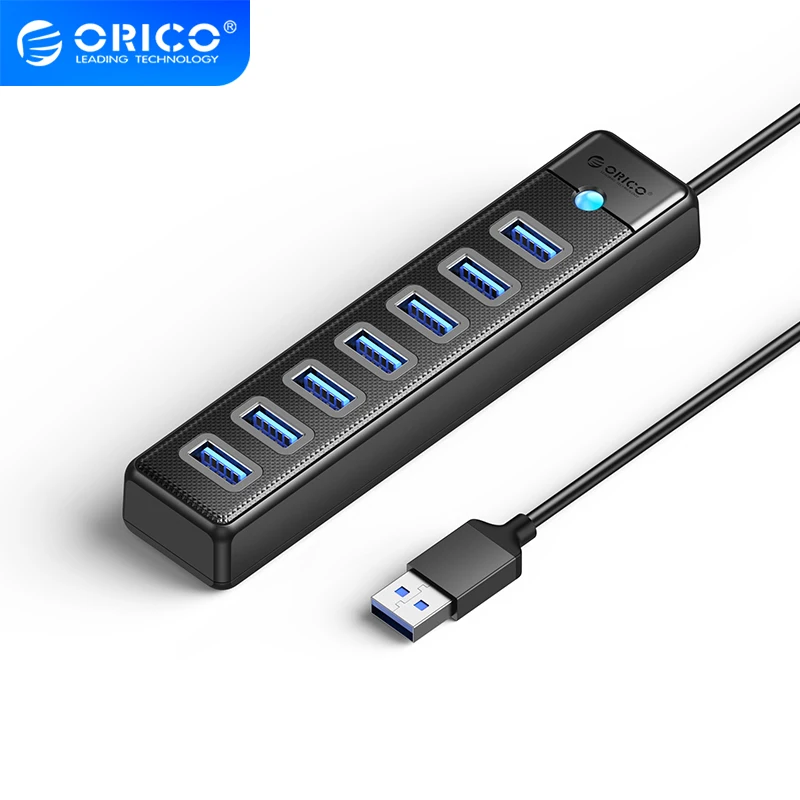
Yes. The PW7U-U3 exact-model table documents seven USB-A3.0 outputs through a USB-A computer connection. Check the actual power and cable package.
Explore this need in the finder →Are the seven data ports in the advertised 5Gbps class?
Yes, with an explicit shared-channel limit. The maker does not promise seven independent 5Gbps transfers; the whole set shares the computer connection.
Explore this need in the finder →Can I count the USB-C power socket as a Type-C data port?
No. The exact model specification identifies that socket as 5V/3A power input. It does not satisfy a requirement for a downstream USB-C data connection.
Explore this need in the finder →Seven Type-A connections, one shared data channel
The ORICO PW7U-U3 is useful when a computer needs considerably more USB-A sockets without adding display, network or card-reader functions. Its manufacturer specifies seven USB-A3.0 data outputs through a USB-A host connection. The separate USB-C socket supplies power to the hub; it is not an eighth data output.
The key limit is explicit in the original specification: the seven outputs use a shared 5Gbps channel. Choose it for connection count and a suitable peripheral layout, rather than expecting every attached drive to receive a separate full-speed computer link.
Match the port count to the real workload
Seven data sockets can keep several peripherals attached, reducing the need to exchange plugs whenever a receiver, controller or other device is needed. The advertised USB3.0 capability applies to the outputs, but connected devices still share the path back to the computer. It is not a transfer result from our own testing.
Several busy storage devices have different demands from a collection of low-bandwidth peripherals. Consider what will operate at the same time, not only what can be physically plugged in. A larger socket count solves one problem; it does not multiply the upstream bandwidth or establish a guaranteed power allocation for every device.
The USB-C socket supplies the hub
ORICO identifies the power input as USB-C5V/3A maximum. That is an input specification for the hub. It does not create laptop Power Delivery through the USB-A computer connection, and it should not be represented as a Type-C data socket in a comparison.
The original table does not establish a supplied mains adapter or an exact per-port current budget. Check the actual package and the requirements of the connected peripherals before depending on an externally powered arrangement. A maximum input figure alone is not a promise that any seven bus-powered devices can operate together.
Choose the cable package before planning the placement
The manufacturer lists 0.15m, 0.5m and 1m cable options for the core family. A 15cm version keeps the hub very close to the computer; a longer lead changes where it can be positioned. Measure the cable route with slack for movement and bends, rather than assuming that every listing for PW7U-U3 supplies the same reach.
The black ABS body is specified as 140.7 × 30.6 × 18.7 mm. Allow room around that narrow body for seven peripheral plugs and, when used, the power cable. Large plugs can occupy more practical space than the listed body measurements suggest.
System support is a scope, not a universal promise
The exact manufacturer table lists Windows, Mac OS and Linux without a full version or modern chip matrix. That general support line does not verify every future release or Apple-silicon configuration. Check your actual computer and any software requirements belonging to the connected devices.
The documented direct host route is USB-A. A computer with only Type-C sockets has a different supplied-connection requirement. The Type-C power socket on this hub does not solve that by becoming an alternative host data input.
When seven simple data outputs are the right answer
Shortlist the PW7U-U3 when seven Type-A data outputs are genuinely useful and you can select a suitable cable and power arrangement. Compare a different hub for downstream Type-C data, a positively documented included adapter or more specific host compatibility. Compare a dock for laptop charging or native video. Those are different functions from the large but straightforward shared data layout this model provides.
Key details at a glance
| USB-A downstream data ports | 7 |
|---|---|
| USB-C downstream data ports | 0 |
| HDMI outputs | 0 |
| Full-size DisplayPort outputs | 0 |
| USB-C video outputs | 0 |
| Full-size SD slots | 0 |
| microSD slots | 0 |
| Advertised Ethernet link ceiling | 0Gbps |
| Maximum stated power available to host | 0W |
| Host requirements | USB-A input. The manufacturer core family lists 0.15m, 0.5m and 1m leads; match the supplied length and regional bundle. |
| Power and charging | USB-C5V/3A maximum hub-power input; no laptop-PD function, per-output guaranteed current or supplied wall adapter established. |
| Data and device limits | Seven USB-A3.0 outputs, explicitly 5Gbps shared channel. The USB-C5V3A socket is power input, not an eighth data port. |
| Installation | Black ABS body 140.7 × 30.6 × 18.7mm. Cable/finish suffix PW7U-U3-015-BK-EP remains a historical lead, not a newly mapped offer. Original manufacturer diagram states plug-and-play hub use; peripherals can have their own software. |
Use the exact model’s instructions for operating limits, supplied equipment and version differences.
Sources for this assessment
Find a hub or dock for your desk.
Match the computer, screens, devices and charging routine, then check the exact supported arrangement.