
Your needs, this model
Does it fit your priorities?
Can this earlier hub provide two Type-A sockets and a full-size SD reader?
Yes, those connections are documented in the original RCC2A layout. Use the earlier-model option, and read either SD or microSD at a time.
Explore this need in the finder →Can it pass power to the laptop while I use two Type-A devices?
The original article documents laptop PD through the extra USB-C socket alongside the Type-A connections. The power ceiling is unspecified, and the charger is separate.
Explore this need in the finder →Can the extra USB-C socket remain a data port while it carries laptop charging?
No. These are alternative roles for the same physical socket. Requiring an extra USB-C data port and laptop charging together does not match a documented RCC2A arrangement.
Explore this need in the finder →A card-reader hub with two important shared resources
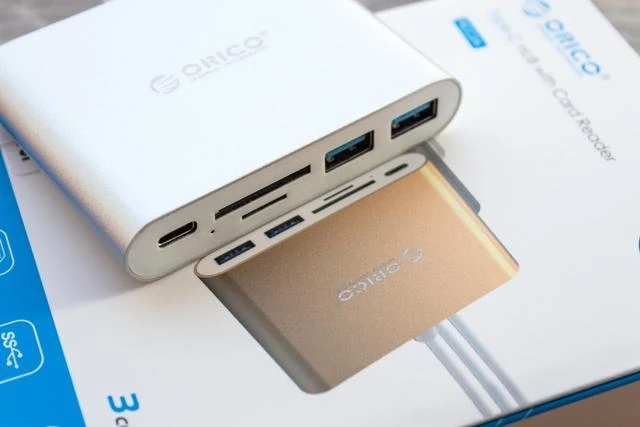
The ORICO RCC2A combines two USB-A data ports, an SD slot, a microSD slot and an extra USB-C socket on an attached Type-C computer lead. It is an earlier model documented in ORICO's August 2019 introduction. The useful question is whether that particular arrangement still solves your connection problem, rather than whether an older multiport headline sounds sufficiently comprehensive.
Two limitations decide the fit. The SD and microSD slots cannot read cards simultaneously. The extra USB-C socket also changes role between data and laptop PD power, so it should not be counted as an available data port while a charger occupies it.
Two Type-A devices can stay attached beside a card
The original material identifies both Type-A outputs as USB 3.0. That gives the familiar nominal 5 Gbps interface class, with the connected devices sharing the computer-facing path. It is not a copying benchmark from our own tests. A card transfer and other active peripherals also need to share the available connection.
The layout can be convenient for a pair of Type-A peripherals while you import material from one memory card. Think about the devices actually used together: a keyboard and receiver are a different workload from several busy storage devices. The number of sockets does not establish a separate full-speed upstream link for each one.
Two card openings do not mean two simultaneous readers
ORICO explicitly says the SD and TF cards cannot be read at the same time. TF is the microSD format in this context. The physical openings save you from changing the hub when you change card format, but they do not provide a documented two-card workflow.
If you want to copy between an SD card and a microSD card with both mounted together, choose a reader with positively documented simultaneous operation. The RCC2A is a possible match when either format is needed individually. It fails an essential requirement for both formats at once, even though the product has both slots.
Choose what the extra USB-C socket will do
The manufacturer describes the additional Type-C socket as supporting both data transfer and PD power. There is one such physical socket in the output layout. In a charging arrangement it connects the laptop's power source; in a data arrangement it is available to the peripheral instead. Those roles are alternatives rather than two extra simultaneous connections.
The original introduction does not state the PD input ceiling or the power available to the computer. It therefore supports the basic documented charging function, not a specific 60W, 85W or 100W claim. A laptop with a firm charging requirement needs a more exact package and power check than this earlier reference supplies.
The attached cable and supplied package
The roughly 15cm computer lead is integrated into the hub. That avoids carrying a separate host cable, but it also limits how far the hub can sit from the computer. Allow for the bend of the cable and the direction of attached peripheral plugs instead of expecting it to reach across a desk.
ORICO describes an aluminum body with ABS sections at the top and bottom, and gray, silver and gold finishes. The original package contained the hub without other accessories. A laptop charger is not supplied simply because the hub can accept PD power.
Who should consider this earlier model
The documented use case is an older, single-Type-C MacBook-style setup, before Apple-silicon models. It is not evidence of every current operating system or chip. Check the actual host and package when considering a surviving offer. Shortlist the RCC2A for two Type-A devices, one card at a time and an explicitly chosen extra USB-C role. Compare another design for simultaneous cards, a spare USB-C data port during charging, monitor outputs or a defined laptop power ceiling.
Key details at a glance
| USB-A downstream data ports | 2 |
|---|---|
| USB-C downstream data ports | 1 |
| HDMI outputs | 0 |
| Full-size DisplayPort outputs | 0 |
| USB-C video outputs | 0 |
| Full-size SD slots | 1 |
| microSD slots | 1 |
| Simultaneous card slots | No |
| Advertised Ethernet link ceiling | 0Gbps |
| Power adapter included | No |
| Detachable host cable | No |
| Included host-cable length | 5.91 in |
| Host requirements | Integrated approximately 15cm Type-C lead. Original 2019 material discusses the single-Type-C MacBook setup; no Apple-silicon matrix inferred. |
| Power and charging | The shared USB-C socket accepts PD supply for the laptop, but no wattage is established. The original package contains the hub without other accessories. |
| Data and device limits | Two USB 3.0 Type-A data outputs; one extra USB-C socket supports data or PD power. Its ordinary USB-C data rate is not specified. |
| Installation | Aluminum body with ABS upper/lower sections; gray, silver and gold described in the dated family introduction. |
Use the exact model’s instructions for operating limits, supplied equipment and version differences.
Sources for this assessment
Find a hub or dock for your desk.
Match the computer, screens, devices and charging routine, then check the exact supported arrangement.