
Your needs, this model
Does it fit your priorities?
Can the documented layout combine one HDMI 4K30 screen, two 5Gbps Type-A devices and Gigabit Ethernet?
Yes, on a supportedvideo-capable USB-Chost, with the appropriate power arrangement.
Explore this need in the finder →Does the maker describe charging for devices requiring up to 60W?
Yes. Use an appropriate separate source; the required wallplug is not included.
Explore this need in the finder →Does it establish at least 65W available to the computer?
No. That exceeds the documented 60W device-charging scope.
Explore this need in the finder →A practical mix for one monitor and a wired network
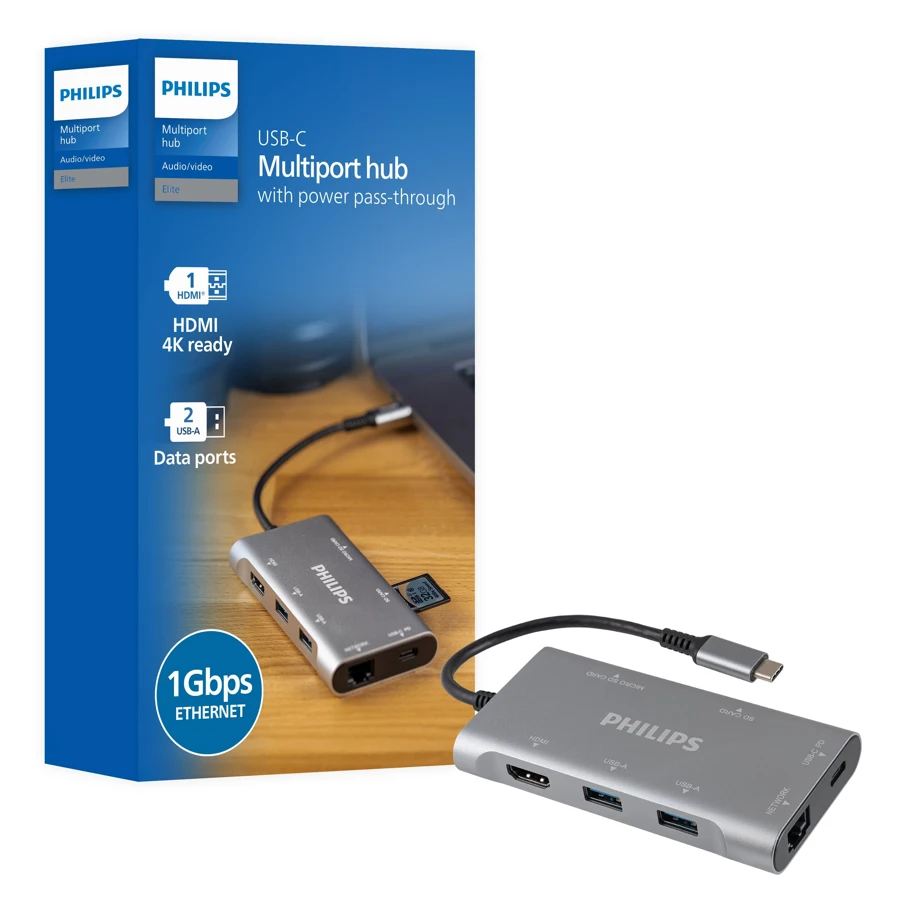
The Philips Elite DLK9120C/27 combines one HDMI connection, two USB-A data outputs, Gigabit Ethernet, SD and microSD slots and a USB-C power input. It suits a laptop setup where several different everyday connections matter more than a large count of identical USB ports.
Check the exact model number. The Philips Elite range includes other adapters, and a similar silver enclosure does not establish the same connections. This seven-function layout is useful when two Type-A devices are enough and a wired network or card reader would otherwise need another adapter.
Plan around the documented 4K30 screen mode
Jasco specifies one HDMI output at up to 4K30, with mirroring or adding a screen described for suitable hosts. That is a single-screen option, rather than evidence for 4K60 or two independent external desktops.
The computer must support the required native video function through USB-C. A data-only connection does not become video-capable because the adapter accepts the same plug. Check the host's specification alongside the monitor and cable before choosing the hub for a display arrangement.
Two Type-A ports have a shared data path
The two USB 3 outputs advertise 5Gbps capability. They can provide useful connections for ordinary peripherals and compatible storage, but they share the upstream connection to the computer. A pair of advertised ports is not a pair of independent full-bandwidth host links.
Consider the combined workload if a drive, network transfer and card reader will operate together. An interface specification does not establish a measured copying rate. A layout with more data outputs is also a better fit if two sockets would leave essential devices competing for space.
Bring the appropriate laptop power supply
The manufacturer describes the PD connection as charging devices requiring up to 60W, including suitable laptops, while an appropriate wall supply is not included. Match that stated scope to the computer and actual charger instead of assuming the hub replaces every part of the existing power setup.
Jasco specifically recommends connecting the laptop supply to the hub for best performance with a mobile hard drive. That makes the powered arrangement worth planning when storage is part of the daily workload. It is different from assuming a USB connection alone can supply every connected device without limits.
Keep the power input separate from peripheral data
The USB-C socket accepts PD power; it is not an additional downstream data connection for a Type-C drive. Allocate peripherals to the two Type-A sockets and choose another model if a spare Type-C data output is essential.
The card readers handle SD and microSD formats, but the reviewed description does not explicitly establish simultaneous access. If two mounted cards are necessary for your workflow, choose an arrangement with that function documented rather than inferring it from two openings.
Check the full working arrangement
The Ethernet connection advertises a 1Gbps link. Actual network transfers depend on the cable, network and computer as well as the hub; it does not guarantee a faster internet service. The compact design is intended to fit a laptop case or backpack, but connected plugs still need space beside the computer.
The maker lists Windows 7 and later and Mac compatibility without establishing an exact later-Apple-chip or software-permission matrix. Shortlist the DLK9120C/27 for one 4K30 display, two Type-A devices and its card/network mix within the stated charging scope. Choose a more specifically documented setup when a higher video mode, extra Type-C data, simultaneous cards or greater laptop power is essential.
Key details at a glance
| USB-A downstream data ports | 2 |
|---|---|
| USB-C downstream data ports | 0 |
| HDMI outputs | 1 |
| Full-size DisplayPort outputs | 0 |
| USB-C video outputs | 0 |
| Full-size SD slots | 1 |
| microSD slots | 1 |
| Advertised Ethernet link ceiling | 1Gbps |
| Maximum stated power available to host | 60W |
| Power adapter included | No |
| Host requirements | Type-C computer connection requiring supported native video for HDMI. Maker names Windows 7 and later and Mac, without an exact later Apple-chip compatibility matrix. |
| Power and charging | Maker describes supported charging of devices requiring up to 60W. An appropriate laptop power supply is separate; maximum PD input is not independently specified. |
| Data and device limits | Two Type-A USB 3.0 data outputs at advertised 5Gbps; the Type-C PD input is not an additional data output. SD and microSD presence does not establish simultaneous access. |
| Installation | One HDMI output at up to 4K30, Gigabit Ethernet and card readers. Original dimensions diagram shows approximately 107.95 × 57.15 × 15.24mm, excluding attached plugs. |
Use the exact model’s instructions for operating limits, supplied equipment and version differences.
Sources for this assessment
Find a hub or dock for your desk.
Match the computer, screens, devices and charging routine, then check the exact supported arrangement.