

Your needs, this model
Does it fit your priorities?
Can a suitable 10–32 mm desk edge keep four 5 Gbps USB-A sockets accessible without extra hub software?
Yes, with the original USB-A computer arrangement and a surface that actually fits the adjustable clip. The manufacturer documents the clip range and driver-free hub operation.
Explore this need in the finder →Will the documented host arrangement fit a USB-C-only computer directly?
No. The original input arrangement is USB-A; a suitable USB-C adapter is not established as included.
Explore this need in the finder →Can the same connection charge the laptop?
No. The complete original USB-A hub map establishes no laptop charging route.
Explore this need in the finder →QICENT MH4P-SV: a four-port hub that needs a suitable edge
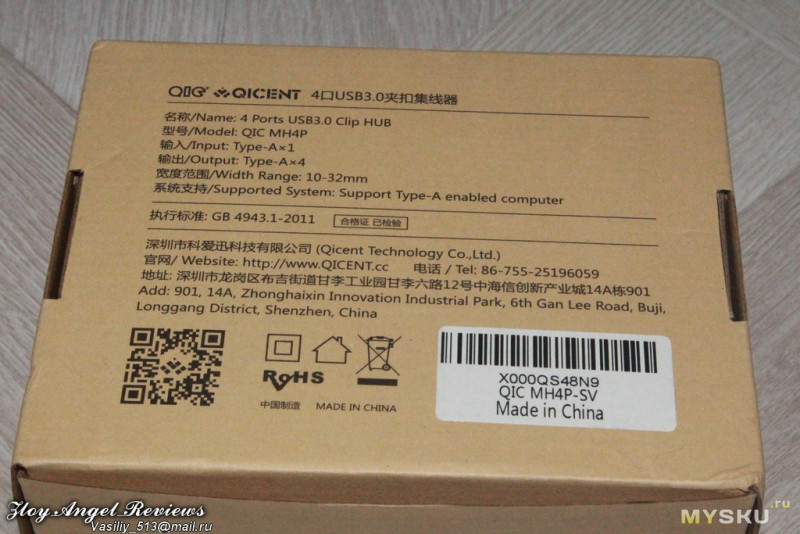
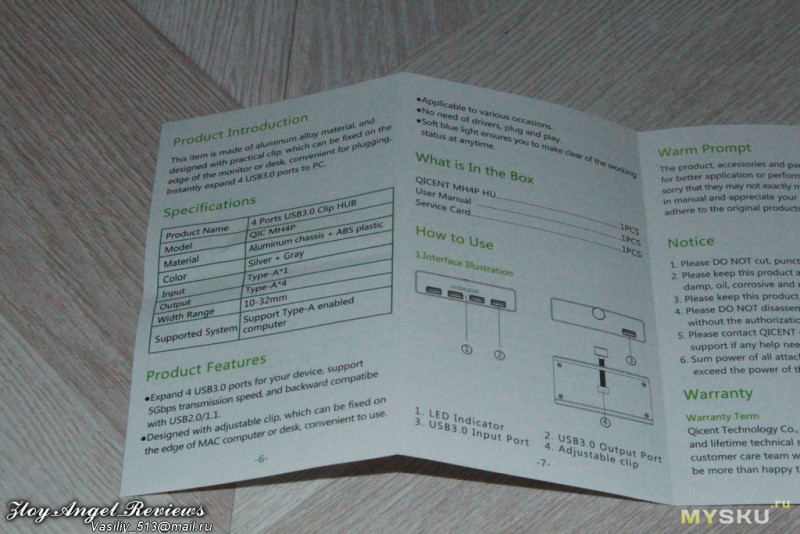
The MH4P-SV is useful when reaching a USB socket is the problem. Its adjustable clip can fix the hub to a suitable monitor or desk edge, leaving four USB-A sockets close to the hand. That is a more specific job than a loose hub sitting beside a laptop. The fit of the edge and the direction of the cables determine whether it makes sense. The original box and booklet give a 10–32mm mounting range; a desk outside that range should fail the selection even if four USB ports would otherwise be enough.
The original label resolves the silver version
The photographed manufacturer box identifies the base model as QIC MH4P and carries a QIC MH4P-SV label. The matching original booklet calls it a four-port USB 3.0 clip hub, with an aluminum chassis and ABS plastic and a silver/gray finish. That provides a direct identity link for the silver historical lead. This is an assessment of that earlier documented unit, without assuming that a present seller uses the same model or package.
The booklet specifically describes fixing the adjustable clip to a Mac computer edge or a desk. Its stated width range is a manufacturer specification, rather than a measurement made for this review. Check the actual supporting surface, clearance behind it and the route taken by the cables. A curved or tapering edge needs a physical fit assessment; the range alone does not describe every possible monitor shape. The source does not establish a special mounting kit for a particular iMac generation.
One USB-A computer connection, four USB-A outputs
The original connection table identifies one USB-A input and four USB-A outputs. The booklet's diagram separately labels the input socket, four output sockets, status light and adjustable clip. The input is a socket, so this is a detachable computer-cable arrangement. Use the proper cable for the designated input rather than treating a convenient output as an alternative computer connection. The actual original material reviewed here does not establish the cable's supplied length.
Four sockets can keep a keyboard, mouse, storage drive and another USB accessory available at the front of the workspace. The manufacturer advertises up to 5Gbps and backward compatibility with USB 2.0 and 1.1. That does not guarantee four independent maximum-rate transfers. The slower USB 2.0 computer arrangement remains a different data-rate class. A requirement for 10Gbps or an outward USB-C data socket is outside this documented layout.
The clip changes placement, not electrical capability
This hub does not acquire video, Ethernet or camera-card functions by being fixed to a monitor. Its complete original port map is a USB-A data arrangement. It cannot satisfy a display-output requirement, and it does not charge a laptop through the computer connection. Keep the computer's display and charging cables planned separately. There is also no documented USB-C adapter to make a USB-C-only laptop match the original USB-A host connection automatically.
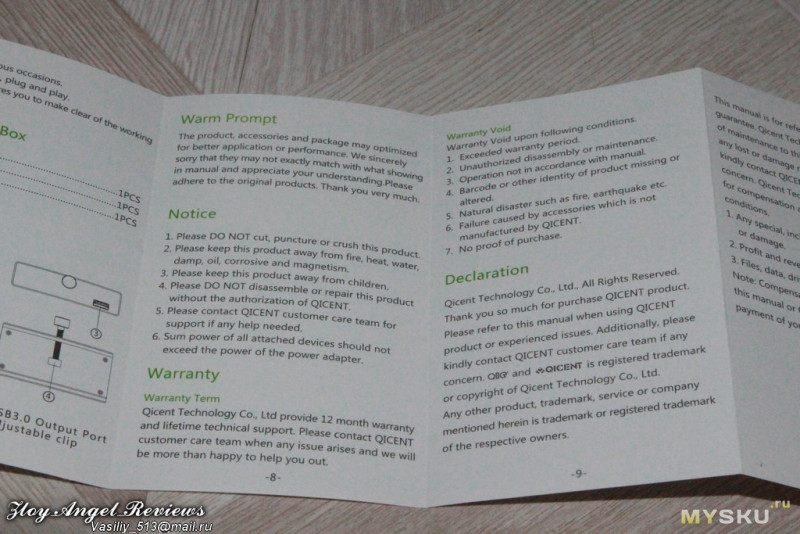
The original booklet says no additional driver installation is needed. It describes Type-A-enabled computers and specifically a Mac placement example, without giving an exhaustive operating-system list. The reviewed Mac profile reflects that original Intel-era scope; later Apple processors and particular OS releases are not inferred. Users of another computer can check its exact compatibility while evaluating the physical USB-A arrangement.
Respect the remaining power unknowns
The source gives no useful numerical combined or per-port power budget. Its operating notice says the sum of connected devices should not exceed the power source's capacity. That instruction is relevant when adding drives or other higher-draw accessories, but it is not a published charging rating. No separately powered high-current mode, fast-phone-charging protocol or laptop PD route is established by the original port table. The reviewed original package list names the hub, manual and service card, without a wall supply.
The MH4P-SV is therefore a good functional fit for a compatible USB-A workspace where four ports should remain accessible on a 10–32mm suitable edge. Its attractive point is placement. Check the clamp fit before choosing it, then check the accessory count and power needs. A larger data budget, a USB-C-only computer, a named iMac-specific mount or guaranteed device charging needs different evidence rather than an assumption based on the aluminum housing.
Key details at a glance
| USB-A downstream data ports | 4 |
|---|---|
| USB-C downstream data ports | 0 |
| HDMI outputs | 0 |
| Full-size DisplayPort outputs | 0 |
| USB-C video outputs | 0 |
| Full-size SD slots | 0 |
| microSD slots | 0 |
| Advertised Ethernet link ceiling | 0Gbps |
| Maximum stated power available to host | 0W |
| Maximum PD input | 0W |
| Power adapter included | No |
| Detachable host cable | Yes |
| Host requirements | Original Type A computer connection; no USB-C adapter or later Mac chip support established. Booklet describes Mac/desk edge mounting without exact OS list. |
| Screen arrangement | Complete original port map has only USB-A data connections, with no display output. |
| Power and charging | No net laptop power or quantitative peripheral budget is established. Combined devices must fit source capacity. Original box list names hub/manual/service card, without a wall supply. |
| Data and device limits | Four USB3.0 Type-A outputs up to 5 Gbps; USB2/1.1 backwards. No USB-C data output. No exact supplied cable length established. |
| Installation | Original box and booklet specify adjustable clip width 10–32 mm. Suitable monitor/desk edge and cable clearance must be checked. No named-iMac-specific kit established. |
Use the exact model’s instructions for operating limits, supplied equipment and version differences.
Sources for this assessment
Find a hub or dock for your desk.
Match the computer, screens, devices and charging routine, then check the exact supported arrangement.