
Your needs, this model
Does it fit your priorities?
Can I attach four USB-A tracker dongles through one computer port?
That is the maker’s documented four-port computer-host use; the compatible receivers are separate purchases.
Explore this need in the finder →Does this add an external desktop monitor?
No. Its documented role is USB data for tracker dongles, with no video output.
Explore this need in the finder →Can it charge the laptop through USB?
No. Its USB-A data connection does not supply laptop Power Delivery.
Explore this need in the finder →The Rebuff Reality Four-Port USB Hub is aimed at a real computer setup: connecting several VIVE Tracker wireless dongles through one PC USB port. Its main reason to exist is receiver organization and accessible upright sockets, rather than laptop charging or screen expansion. It is useful when the tracker setup already works and the remaining problem is the number and placement of USB connections.
What you actually receive
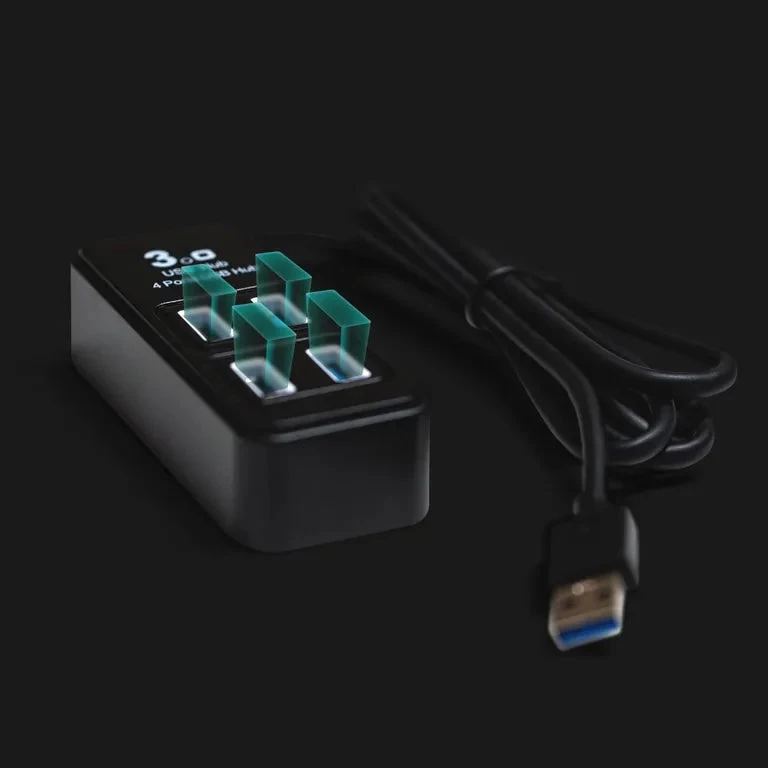
The manufacturer’s four-port option includes one USB hub. Trackers and their wireless dongles are sold separately. A photograph with receivers fitted is an illustration of the intended setup, not evidence that four receivers come in the box. Count the dongles already supplied with your trackers before deciding that this hub completes the system.
Rebuff Reality also offers a seven-port choice on the same page. This review covers the four-port product. The page’s separate answer about optional external power for the seven-port model is not carried over as a four-port power feature. A shared product page does not make the two hardware versions interchangeable.
A documented computer-host arrangement
The product connects to a computer USB port and supports up to four VIVE Tracker dongles. The exact manufacturer image shows an attached USB-A host plug and four USB-A peripheral sockets. That establishes a genuine computer data hub, despite its specialized VR purpose. It is not a vehicle-only accessory or a charging station being presented as a laptop dock.
The maker names original VIVE Tracker,2018Tracker and Tracker 3.0 dongles. Those are the generations documented here. The page also offers a chooser for other tracking systems, but a chooser option is not evidence that every receiver works with this specific four-port hub. Verify the tracker maker’s required receiver, software and host setup before treating another tracking family as equivalent.
Port capability and wireless behavior
Rebuff Reality describes USB 3.0 connectivity. The standard interface has a nominal 5Gbps ceiling, with all four ports sharing the upstream connection. That is useful data capability information, not a measurement of tracking latency, file transfers or simultaneous throughput. A tracking dongle’s actual data needs are separate from the hub’s maximum interface label.
The upright layout is intended to keep receivers organized and help reduce interference during setup. Treat that as the manufacturer’s design purpose. We have not measured radio interference, tracking accuracy or dropout rates for this hub. Receiver position, the rest of the USB setup and the tracking system’s own requirements still matter, so follow the tracker maker’s placement instructions when troubleshooting.
A hub cannot replace pairing or configure the tracking software by itself. Connect the host, add the correct receivers and verify recognition in the relevant tracker setup before assuming that adding more ports has completed the process. If a receiver fails, checking it individually at the computer can help separate a pairing problem from a shared connection problem.
Power and compatibility have limits
This four-port model is documented as a USB data hub. It does not add HDMI,DisplayPort, memory-card reading or a USB-C laptop-charging route. The manufacturer page does not give a clear four-port external-supply arrangement or a detailed peripheral charging budget. Choose a separately documented powered hub when running demanding USB equipment is the main requirement.
The page establishes a PC host without a precise operating-system or computer-chip support list. This review therefore does not manufacture a Windows-version or Mac-chip guarantee. The tracker software’s own supported system remains a separate check. The maker also does not settle cable length on the current page, so a retailer’s four-foot claim is not assigned to every unit.
Choose the four-port hub when its intended VIVE Tracker receiver arrangement is the task you need to organize. A general desk hub with a specified power supply, a different cable length or more ports may fit a broader accessory setup better. The extra ports are useful; the supported tracker system and actual host configuration remain the deciding requirements.
Key details at a glance
| USB-A downstream data ports | 4 |
|---|---|
| USB-C downstream data ports | 0 |
| HDMI outputs | 0 |
| Full-size DisplayPort outputs | 0 |
| Full-size SD slots | 0 |
| microSD slots | 0 |
| Maximum stated power available to host | 0W |
| Detachable host cable | No |
| Host requirements | The exact maker image shows an attached USB-A computer plug. Current maker material does not establish cable length or exact OS/chip profiles. |
| Data and device limits | Four USB-A USB 3.0 ports have nominal 5Gbps capability and share one computer connection. Upright receiver placement is the maker’s design purpose, not our interference test. |
Use the exact model’s instructions for operating limits, supplied equipment and version differences.
Sources for this assessment
Find a hub or dock for your desk.
Match the computer, screens, devices and charging routine, then check the exact supported arrangement.