
Your needs, this model
Does it fit your priorities?
Can a USB-A computer gain four advertised 5Gbps Type-A data connections?
Yes, through the documented USB 3 data route. They share one upstream link rather than each receiving an independent 5Gbps path.
Explore this need in the finder →Can the same layout work through the documented USB 2 fallback?
Yes. The fallback preserves the four data sockets, with USB 2 capability rather than a 5Gbps host path.
Explore this need in the finder →Will the optional hub-power input charge my laptop?
No. It supplies the hub and attached equipment; this model has no computer Power Delivery route.
Explore this need in the finder →A straightforward hub for four Type-A peripherals
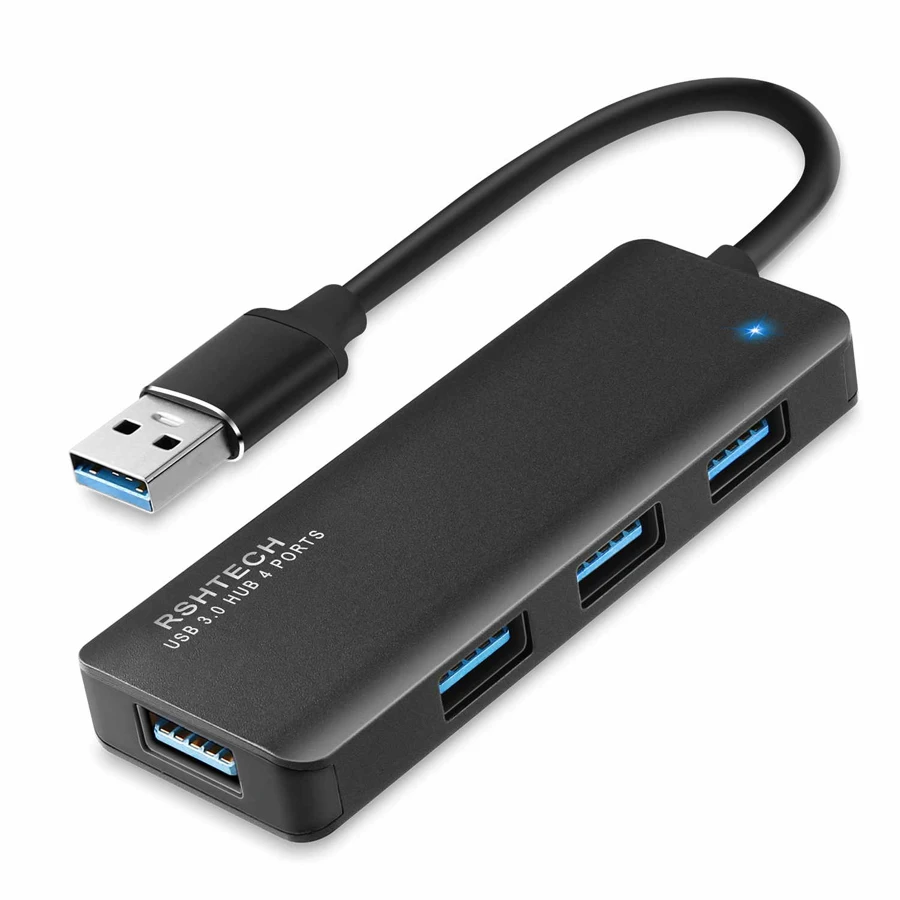
The RSHTECH RSH-336-B expands a Type-A computer connection into four Type-A data sockets. Its slim body and attached lead make it a simple choice when the missing feature is more ordinary USB connections rather than a complete docking station.
That narrow purpose is useful. A keyboard, receiver and storage device do not necessarily need a hub with unused display and charging sockets. Choose this layout when the computer already provides the other connections you need, and compare a different design when those functions must come through one cable.
Read four sockets as one shared data path
The manufacturer specifies USB 3 data operation at up to 5Gbps, with USB 2 compatibility. Those are interface capabilities. The four outputs share the connection back to the computer; the product does not provide four separate full-bandwidth links to the host.
Think about simultaneous work rather than just counting plugs. A mouse and keyboard beside one active drive are a different load from several drives copying large files at once. Your computer, cables and devices also affect transfer speed. This assessment does not claim a measured copying result.
The attached host plug is USB-A
The exact black-model manufacturer photograph shows an attached Type-A host plug. Check that your computer has the corresponding connection before choosing it for travel. A Type-C socket on a laptop does not accept that plug without a separately checked adapter arrangement.
An attached lead also fixes where the hub sits relative to the computer. Leave room for the hub and the connected peripheral plugs instead of allowing their weight to pull on the laptop socket. The model's slim shape is helpful only when its cable position suits the actual desk or travel setup.
Separate bus power from an optional hub supply
The maker describes normal bus-powered operation and provides a separate power-input option for a suitable 5V/2A adapter with a 3.5/1.35mm plug. The adapter is not included. Check the exact specified supply and the connected devices' requirements rather than substituting an adapter just because its plug appears to fit.
That extra supply is for the hub and its peripherals. It is not a laptop charger and does not create USB-C Power Delivery through the Type-A computer lead. If one-cable computer charging is essential, select a dock with a documented host-charging arrangement.
Wireless receivers deserve a little placement thought
RSHTECH specifically notes potential interference between nearby USB 3 equipment and 2.4GHz wireless devices, and mentions using a USB 2 connection for affected receivers. That makes receiver placement a practical consideration rather than an assumption that every small dongle will behave identically beside a busy storage device.
Keep the receiver arrangement in mind when deciding which sockets to use and where the hub will rest. If the keyboard or mouse behaves poorly, separate the receiver from the active USB 3 connection and check the device maker's own instructions. A faster interface label does not necessarily improve a low-bandwidth receiver's job.
Who should shortlist the RSH-336-B
The source names Windows, MacOSX, Linux and ChromeOS within its stated version scope and describes operation without an extra hub driver. Individual peripherals may still require their own software. A general operating-system statement also does not confirm every future computer chip or specialist device.
Shortlist this model for four Type-A data connections, a portable body and an existing Type-A host port. Choose another layout for Type-C data outputs, card readers, Ethernet, native displays or computer charging. If several power-demanding devices must work together, settle the hub-power arrangement before treating the socket count as a complete solution.
Key details at a glance
| USB-A downstream data ports | 4 |
|---|---|
| USB-C downstream data ports | 0 |
| HDMI outputs | 0 |
| Full-size DisplayPort outputs | 0 |
| USB-C video outputs | 0 |
| Full-size SD slots | 0 |
| microSD slots | 0 |
| Advertised Ethernet link ceiling | 0Gbps |
| Maximum stated power available to host | 0W |
| Power adapter included | No |
| Detachable host cable | No |
| Individual port switches | No |
| Host requirements | Attached Type-A computer lead, confirmed in the exact black-model original manufacturer photograph. |
| Power and charging | Bus-powered data hub; maker specifies a separate 5V/2A adapter with 3.5/1.35mm plug for suitable powered use. Adapter not included. Neither route supplies laptop Power Delivery. |
| Data and device limits | Four Type-A outputs support the advertised 5Gbps USB 3 route, with explicit USB 2 fallback. All four share the upstream link. |
| Installation | Slim portable aluminum data hub. Source specifically notes potential 2.4GHz wireless interference beside USB 3 devices; receiver placement and a USB 2 connection may matter. |
Use the exact model’s instructions for operating limits, supplied equipment and version differences.
Sources for this assessment
Find a hub or dock for your desk.
Match the computer, screens, devices and charging routine, then check the exact supported arrangement.