
Your needs, this model
Does it fit your priorities?
Can I add four Type-A data sockets to a USB-C computer?
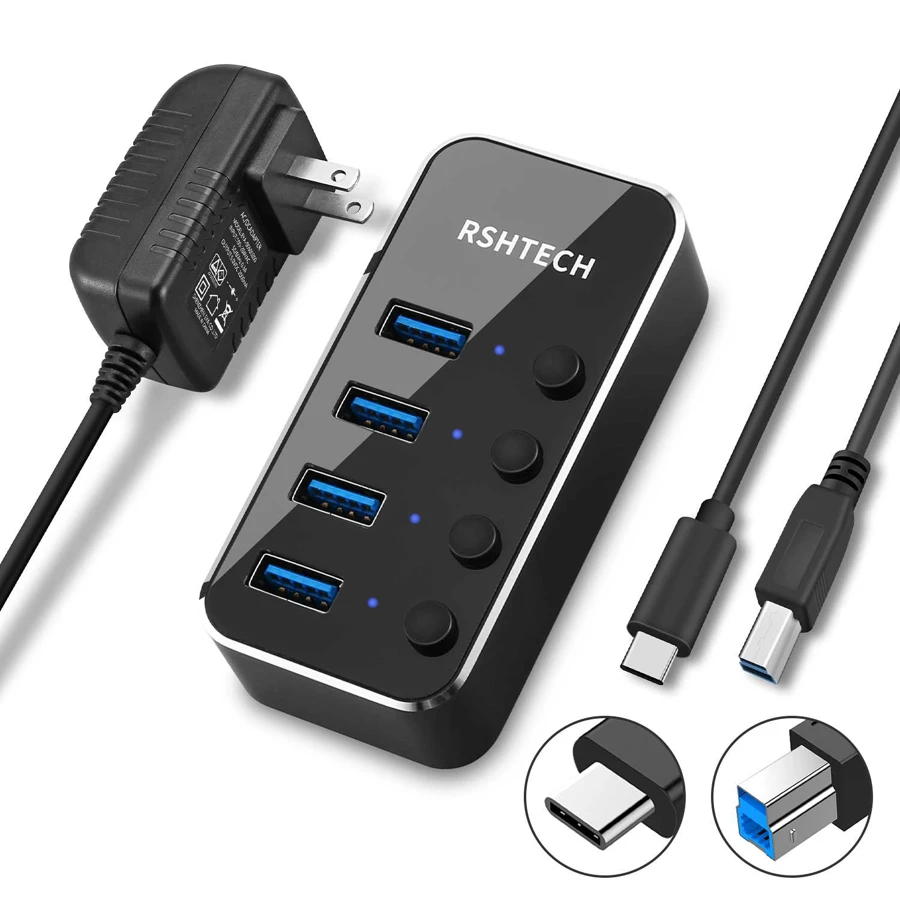
Yes. The exact RSH-516C overview provides four switched Type-A outputs and a Type-C-to-Type-B host cable. All four share the computer connection.
Explore this need in the finder →Can the documented USB 2.0 fallback keep four data sockets available?
Yes, at the slower nominal 480Mbps class. A USB 2.0 host route does not retain the faster USB 3.0 operating rate.
Explore this need in the finder →Does the included power adapter make it a laptop-charging dock?
No. The 5V/2A adapter powers this hub. The exact four-output layout does not establish laptop PD through the host cable.
Explore this need in the finder →Four switchable Type-A data ports from a Type-C host
The RSHTECH RSH-516C is a data hub for a computer with a USB-C connection. It adds four USB-A outputs, each with an individual switch, through a supplied Type-C-to-Type-B computer cable. Consider it when your peripherals still use rectangular Type-A plugs and you want to control their connections without repeatedly exchanging cables.
The exact manufacturer page identifies four outputs. A historical listing with a seven-port title is not a reason to add three sockets to this model. Match the RSH-516C name, the four-output arrangement and the supplied host cable when comparing packages.
The switches manage connections, not a storage workflow
Individual on/off controls can be convenient when an occasional peripheral should not remain active all the time. RSHTECH describes a status LED for each USB port, with a flickering indicator during data transfer. That activity description is not a diagnostic test of every attached device.
Treat turning off a connected drive as removing its connection. Finish file operations and follow the operating system's normal removal procedure before using the switch. The extra controls do not make it appropriate to cut power during a transfer or replace the requirements of the connected peripheral.
Four 5Gbps sockets share the upstream connection
The manufacturer advertises a 5Gbps USB 3.0 data capability and backward operation with USB 2.0 and1.1. This is an interface specification, not a copying result from our own testing. Four downstream ports do not create four independent full-speed links back to the computer.
The slower fallback is a different operating arrangement. A USB 2.0 host route can retain the socket count, but it cannot satisfy a requirement for all four outputs working through a 5Gbps host path. Choose the faster supported computer connection when that capability is essential.
The supplied adapter powers the hub
The exact package list includes a 5V/2A power adapter. Its 10W input rating belongs to this hub-power arrangement; it is not 10W promised independently to each of the four ports. Consider the power requirements of the devices actually used together rather than assuming that any four bus-powered drives will work because an adapter is supplied.
This is also different from charging the laptop through a Power Delivery dock. The listed Type-C-to-Type-B lead carries the host data connection, while the adapter supplies the hub. The exact layout does not document laptop PD. Check the actual regional plug package before ordering.
The detachable lead and supported systems
The supplied computer cable is two feet long. A separate cable can make routing more convenient than a rigid direct-attached bar, but its reach still needs to suit the intended position. Allow room for the bend at the hub, the computer socket and the peripheral plugs.
RSHTECH lists Windows 2003/XP/Vista/7/8/10, MacOS 10 and Linux 9, with Type-C Chromebook and iPadPro mentioned in its overview. It describes plug-and-play hub use without extra drivers. That does not eliminate peripheral-specific software or establish every current operating-system version and Apple chip.
When the RSH-516C is useful
Shortlist it for four switchable Type-A data connections, a compatible Type-C host and an appropriate hub-power package. The aluminum housing and separate lead suit a peripheral-focused setup. Choose another product for downstream Type-C data, laptop charging, native video, wired networking or card readers: none of those functions is provided by this exact four-data-port arrangement.
Key details at a glance
| USB-A downstream data ports | 4 |
|---|---|
| USB-C downstream data ports | 0 |
| HDMI outputs | 0 |
| Full-size DisplayPort outputs | 0 |
| USB-C video outputs | 0 |
| Full-size SD slots | 0 |
| microSD slots | 0 |
| Advertised Ethernet link ceiling | 0Gbps |
| Maximum stated power available to host | 0W |
| Included supply rating | 10W |
| Power adapter included | Yes |
| Detachable host cable | Yes |
| Individual port switches | Yes |
| Included host-cable length | 24 in |
| Host requirements | Supplied 2ft USB-C-male to USB-B-male 3.0 computer cable. Four Type-A downstream data ports; no downstream USB-C data socket. |
| Power and charging | Included 5V/2A hub-power adapter, equivalent to 10W input rating. It is not a USB-C laptop-PD source; check the actual regional plug package. |
| Data and device limits | Four USB 3.0 data ports advertised at 5Gbps, sharing the host connection. The maker separately lists USB 2.0/1.1 backward operation. |
| Installation | Aluminum housing with a removable protective film, individual port switches and status/activity LEDs. Supplied lead length 2ft. |
Use the exact model’s instructions for operating limits, supplied equipment and version differences.
Sources for this assessment
Find a hub or dock for your desk.
Match the computer, screens, devices and charging routine, then check the exact supported arrangement.