
Your needs, this model
Does it fit your priorities?
Can it supply three Type-A data sockets and one HDMI 4K30 display on a supported video-capable host?
Yes. That is its documented multimedia layout. Exact host support remains essential, and a data-only USB connection does not supply native HDMI.
Explore this need in the finder →Does the maker identify a specific M1 desktop connection?
Yes, Mac mini M1(2020) is named. This particular profile provides data and video rather than charging the desktop.
Explore this need in the finder →Is at least 100W available to the laptop established?
No. A100W input/pass-through headline does not establish 100W net computer output.
Explore this need in the finder →A portable layout that makes room for wired audio
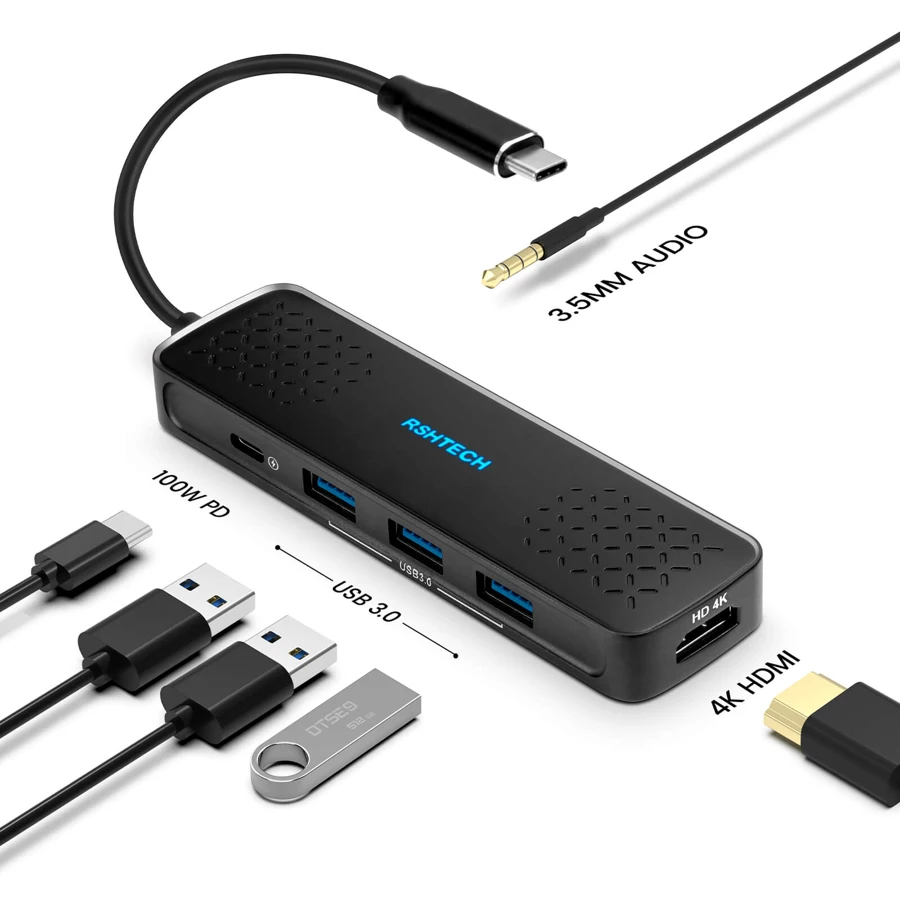
The RSHTECH RSH-T01 is a USB-C multimedia hub for a particular set of everyday connections: three USB-A data sockets, HDMI, a 3.5mm audio socket and a USB-C power input. It can suit a laptop that needs an external monitor, ordinary peripherals and wired headphones without a larger desktop dock.
The audio socket is a meaningful layout difference. If your computer lacks the connection, it avoids using another USB data socket for a separate audio adapter. Conversely, a card-reader or Ethernet requirement points toward another design because neither function is part of this model's documented port map.
Choose it around one documented HDMI display
The manufacturer specifies one HDMI output at up to 4K30. That can provide useful screen space for a compatible computer, but the documented limit is not a 4K60 or two-monitor promise. Choose the mode that matters to your actual monitor and daily work rather than selecting by the highest number in a broad dock category.
The host must supply native video through its USB-C connection. The plug fitting is insufficient evidence. The finder therefore separates ordinary USB data from the video-capable arrangement, and leaves the exact DisplayPort revision unclaimed when the source does not identify it.
Three data outputs and a different job for the PD socket
The three Type-A connections are advertised as 5Gbps USB 3 data ports. They share the path back to the computer; their individual interface labels do not guarantee three simultaneous full-speed transfers. Consider which drives and peripherals will be active together.
The extra USB-C socket is the power input. It is not a fourth data output or a spare connection for a USB-C drive. If a Type-C peripheral needs its own downstream socket, compare a model whose exact port map explicitly provides one.
Use the charging headline carefully
The maker advertises 100W PD pass-through. It does not establish the net wattage available at the computer in the material reviewed here. A suitable external charger, cable and compatible host are also necessary; the headline does not prove that a charger is included.
For a laptop with a firm minimum-power requirement, choose a configuration with a documented computer-side rating. For a desktop, the hub's PD input does not replace the computer's own power connection. Keeping those cases separate prevents a portable-laptop feature from becoming a false desktop-charging recommendation.
Check the named devices and exclusions
RSHTECH names several Windows and Mac computers, ChromeOS, Linux and particular iPads within its published scope. The M1 desktop entry is specifically MacminiM1(2020). That is useful information for that machine, rather than evidence that every M1 notebook or later Apple chip has the same supported arrangement.
The same page explicitly excludes Nintendo Switch, Apple SuperDrive and Samsung DeX. Do not treat a broad Android or Samsung-device reference elsewhere in the list as permission to ignore those limits. Match the intended function as well as the device's brand and connector shape.
Fit the hub into the working space
The stated body is 122 ×35 ×14mm and 110g, with an aluminum enclosure and attached host lead. Allow space around it for the HDMI plug, power cable, audio lead and three possible USB devices. A small body can still produce a crowded cable arrangement beside a laptop.
Shortlist the RSH-T01 for its particular mix of one 4K30 display, three Type-A peripherals and wired audio on a documented host. Compare another hub for cards, wired networking, a Type-C data output, higher confirmed video capability or a firm net laptop-power figure. Those differences determine whether the layout will actually reduce adapters in your own setup.
Key details at a glance
| USB-A downstream data ports | 3 |
|---|---|
| USB-C downstream data ports | 0 |
| HDMI outputs | 1 |
| Full-size DisplayPort outputs | 0 |
| USB-C video outputs | 0 |
| Full-size SD slots | 0 |
| microSD slots | 0 |
| Advertised Ethernet link ceiling | 0Gbps |
| Maximum PD input | 100W |
| Detachable host cable | No |
| Individual port switches | No |
| Stated product weight | 110g |
| Host requirements | Attached USB-C host lead. Native HDMI needs a video-capable host; the exact DP revision and MacBook lid conditions are not stated. |
| Power and charging | Maker lists 100W PD pass-through/input; available computer-side wattage and inclusion of an appropriate charger are not established. |
| Data and device limits | Three advertised 5Gbps USB 3 Type-A data outputs. Extra USB-C socket is PD input, not a downstream Type-C data socket. |
| Installation | Maker gives 122 ×35 ×14mm and 110g, with an aluminum portable enclosure. Switch, Apple SuperDrive and Samsung DeX are explicit exclusions. |
Use the exact model’s instructions for operating limits, supplied equipment and version differences.
Sources for this assessment
Find a hub or dock for your desk.
Match the computer, screens, devices and charging routine, then check the exact supported arrangement.