
Your needs, this model
Does it fit your priorities?
Can I keep one Type-C data peripheral beside two Type-A devices?
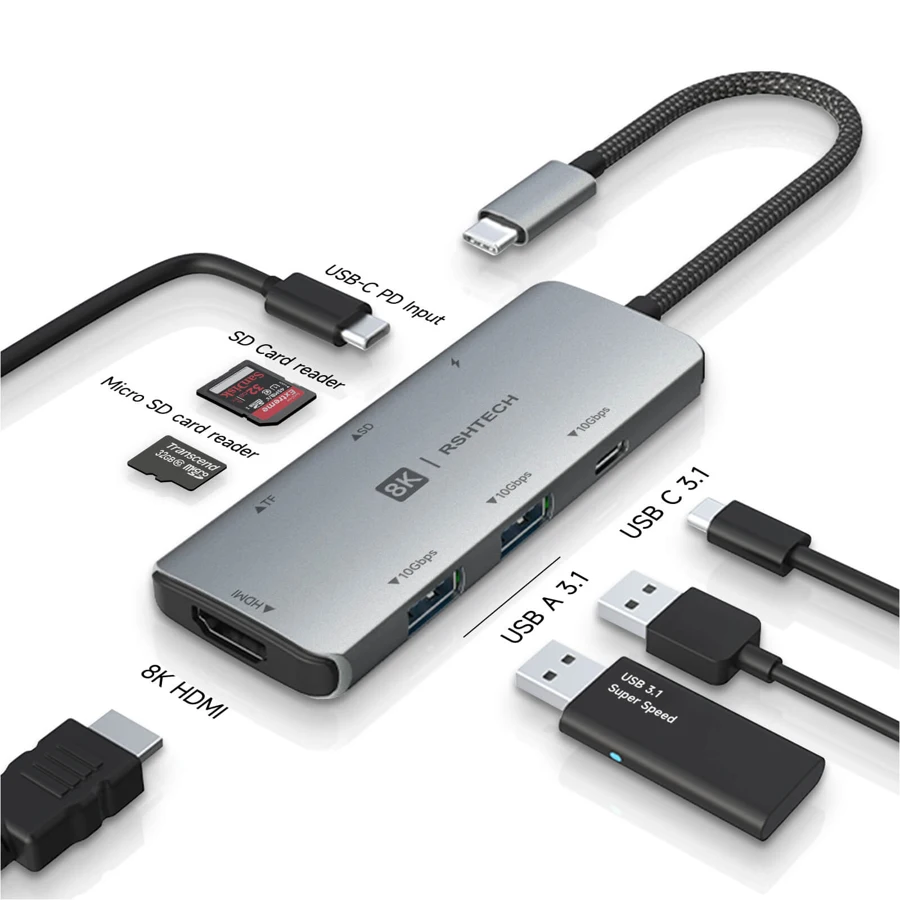
Yes. The exact original layout has two A and one C advertised 10Gbps data outputs; the other Type-C socket is PD input.
Explore this need in the finder →Is simultaneous SD and microSD use explicitly supported?
Yes. The exact-model manufacturer text specifically states simultaneous reading, rather than merely showing two card openings.
Explore this need in the finder →Does it supply two Type-C data outputs while charging?
No. There is one downstream Type-C data socket and a separate PD input. Two C data outputs are not documented.
Explore this need in the finder →A useful distinction between Type-C data and Type-C power
The RSHTECH RSH-T02 provides two USB-A data outputs and one USB-C data output, alongside HDMI, SD, microSD and a separate USB-C PD input. That makes it worth considering when a Type-C drive needs a real data connection rather than a socket whose only job is accepting charger power.
Count the connections by function. There is one downstream Type-C data socket, not two. The PD input cannot substitute for a second Type-C peripheral connection, even though both sockets have the same physical shape.
Three advertised 10Gbps data outputs share the host
RSHTECH advertises 10Gbps USB 3.1Gen2 data capability on the two Type-A outputs and the Type-C data output. That is a useful interface distinction from otherwise similar 5Gbps layouts, provided the computer and connected equipment support the appropriate route.
It is not a promise of three simultaneous 10Gbps transfers. All data must pass through the connection back to the host, and the actual workload, devices and cables matter. Choose the layout around which devices you will use together instead of multiplying the port labels into an invented total bandwidth.
Both card slots have a documented simultaneous role
The exact-model description explicitly supports simultaneous SD and microSD reading. This is stronger evidence for a two-card workflow than a photograph of two inserted cards. It makes the hub relevant when both card formats must remain available during the same working session.
The statement still does not establish a measured copying rate between cards or a specific card-speed class. Your cards and the overall shared connection remain relevant. Check the performance specification needed for the actual camera workflow rather than treating simultaneous access as a benchmark.
One HDMI output needs the right video-capable host
The maker lists HDMI modes including 4K60, with higher headline modes dependent on suitable equipment. The finder represents a documented single 4K60 option; it does not turn that into two external screens or assume every laptop with a Type-C connector can supply the same display mode.
Native video must come from the host's USB-C connection. A data-only port does not gain that signal through the hub. Check the computer, display, cable and intended mode together. The exact DisplayPort revision is not supplied in the reviewed source, so the questionnaire does not invent that compatibility detail.
Keep 100W input separate from laptop output
The product has a 100W PD input/pass-through headline, but the reviewed material does not establish net available wattage at the computer. It also does not establish that an appropriate charger is included. Both details matter if the aim is replacing the laptop's normal power connection.
Use a suitable source and cable for the actual host, and choose another documented arrangement when a firm minimum laptop-power figure is essential. The presence of PD does not mean that the card reader, display and peripherals can all be ignored in planning the powered setup.
Placement, support and the final choice
The manufacturer gives an 80g body measuring approximately 3.8 ×1.45 ×0.39in, with an attached host lead. Leave room for the full group of cables and inserted cards. The original photo shows the difference between the Type-C data socket and the PD input, which is worth checking before connecting equipment.
The support list covers stated Windows, MacOS, ChromeOS, Linux, Android and particular iPad configurations. Model years alone do not establish every Apple chip. A maker HDMI update download is available for support cases; this assessment has not installed or tested it. Shortlist the RSH-T02 for its mixed data outputs and confirmed two-card access, then verify the intended host video and charging arrangement before purchase.
Key details at a glance
| USB-A downstream data ports | 2 |
|---|---|
| USB-C downstream data ports | 1 |
| HDMI outputs | 1 |
| Full-size DisplayPort outputs | 0 |
| USB-C video outputs | 0 |
| Full-size SD slots | 1 |
| microSD slots | 1 |
| Simultaneous card slots | Yes |
| Advertised Ethernet link ceiling | 0Gbps |
| Maximum PD input | 100W |
| Detachable host cable | No |
| Individual port switches | No |
| Stated product weight | 80g |
| Host requirements | Attached USB-C lead. Native HDMI requires a full-featured video-capable host; exact DP revision and future Apple-chip limits are not established by a model-year list. |
| Power and charging | 100W PD input/pass-through headline; net available host charging watts and suitable charger inclusion are unknown. |
| Data and device limits | Two Type-A and one Type-C data outputs advertise 10Gbps USB 3.1Gen2. They share the upstream connection; the separate PD socket is excluded from data counts. |
| Installation | Portable 80g body, maker dimensions 3.8 ×1.45 ×0.39in. SD and microSD simultaneous reading is explicitly stated. HDMI update archive is a maker support option, not proof of general USB-graphics software. |
Use the exact model’s instructions for operating limits, supplied equipment and version differences.
Sources for this assessment
Find a hub or dock for your desk.
Match the computer, screens, devices and charging routine, then check the exact supported arrangement.