
Your needs, this model
Does it fit your priorities?
Can it bring ports to the front of my compatible Intel iMac?
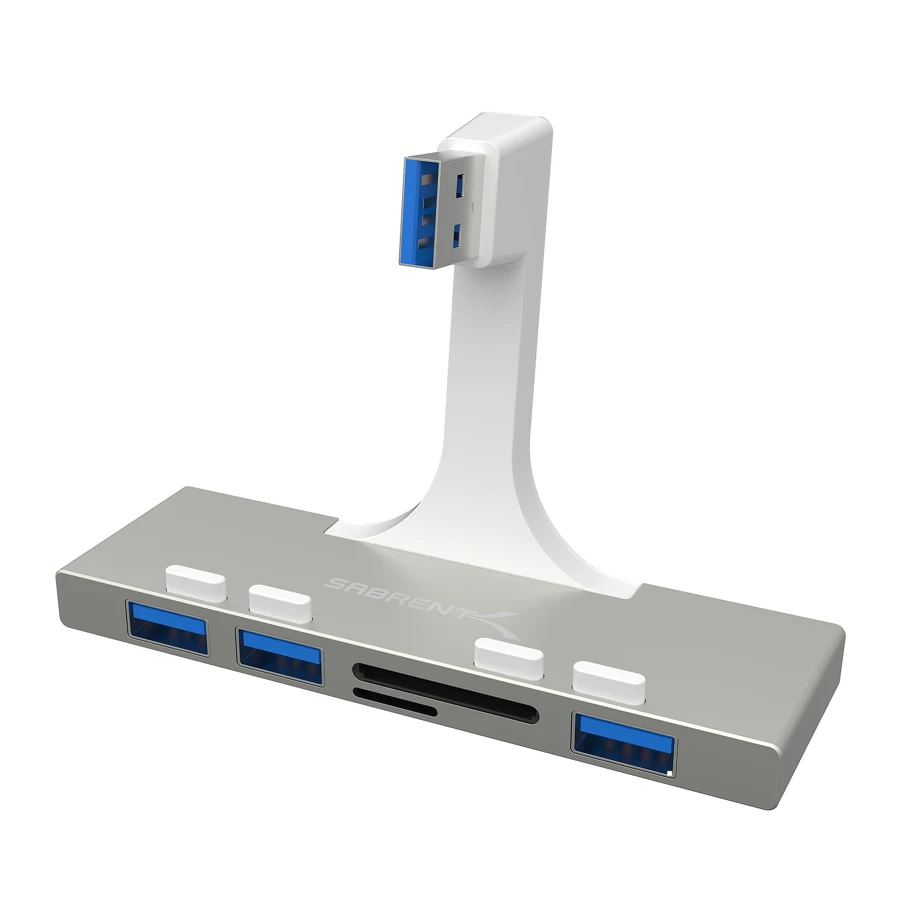
Yes, within the specifically supported slim-unibody chassis and connector placement. It offers three USB-A ports and SD/microSD access.
Explore this need in the finder →Can I treat the old “or later” description as support for an M1 iMac?
No. The exact mounting and port geometry of the redesigned 24-inch iMac is not established by this older chassis description.
Explore this need in the finder →Does it guarantee reading both cards together?
The maker establishes the SD and microSD slots but does not document independent simultaneous operation. It does not meet that explicit requirement.
Explore this need in the finder →Better access is the main feature
The Sabrent HB-IMCR is designed to bring three USB-A ports and SD/microSD access to the front of a compatible iMac. That solves a different problem from simply adding a loose hub to the desk. If you frequently reach behind an older slim iMac to insert a drive or card, the physical arrangement can matter more than a longer list of functions.
The maker identifies the supported design as the slim unibody iMac introduced in November2012, with21-inch,27-inch and5K references. Read that as a specific chassis and port-placement requirement. It is not a universal front-access accessory for every computer carrying the iMac name.
Match the chassis before counting ports
A hub that mounts against the computer depends on the shape of the enclosure and the location of the host socket. The product photograph shows a fixed arrangement reaching the rear USB-A connection and presenting the ports forward. A normal cabled travel hub is less dependent on those physical details.
The older wording “or later” should not be extended to a redesigned24-inch Apple-silicon iMac without exact fit documentation. Likewise, a laptop with an available USB-A port does not acquire the intended mounting arrangement merely because the electrical connector fits. Confirm the exact iMac body and rear connections first.
Three USB-A data ports and two card formats
Sabrent specifies three USB3.0 ports with an advertised maximum5Gbps rate, plus SD and microSD readers. The ports share their connection to the computer; the number is not a measured copying result or three independent full-speed links. For occasional storage access and familiar peripherals, easier reach can be the most useful improvement.
The card slots provide access to two physical formats. That is convenient when your devices use different card sizes, but the exact page does not establish that both readers operate independently at the same time. If you regularly copy between two cards together, make that a documented buying requirement rather than assuming two slots settle it.
What the product does not add
The HB-IMCR is not a display dock. It has no documented HDMI or DisplayPort output and does not supply a second independent screen. It also has no USB-C laptop-charging path or downstream USB-C data connection. Its purpose is moving and expanding familiar USB-A and card access on the supported desktop.
The published package does not list a separate power adapter. Check the needs of any demanding peripherals rather than treating a front-access installation as a powered charging station. A model chosen for a specific chassis can still be the wrong choice for a particular accessory-power requirement.
Who should shortlist it?
This is a good candidate for someone maintaining a compatible slim Intel iMac and wanting a cleaner way to reach USB drives, cards and ordinary peripherals. The maker describes plug-and-play setup for the supported arrangement. Individual devices can still have their own software needs, and the hub does not change the computer's own capabilities.
Choose a conventional cabled hub if you need freedom to position the ports, a current exact-fit accessory for a redesigned iMac, or a multiport dock if the missing functions include displays and networking. The HB-IMCR earns its place through the right physical fit and convenient front access. Without that fit, its most distinctive benefit disappears.
Key details at a glance
| USB-A downstream data ports | 3 |
|---|---|
| USB-C downstream data ports | 0 |
| HDMI outputs | 0 |
| Full-size DisplayPort outputs | 0 |
| USB-C video outputs | 0 |
| Full-size SD slots | 1 |
| microSD slots | 1 |
| Maximum stated power available to host | 0W |
| Power adapter included | No |
| Detachable host cable | No |
| Data and device limits | Three USB-A ports advertised at 5Gbps plus SD/microSD readers. Two slots do not establish simultaneous independent reads. |
| Installation | Maker specifies slim unibody iMac introducedNovember 2012, 21/27-inch/5K. Verify the exact chassis and rear-port placement; do not substitute a 24-inch redesign. |
Use the exact model’s instructions for operating limits, supplied equipment and version differences.
Sources for this assessment
Find a hub or dock for your desk.
Match the computer, screens, devices and charging routine, then check the exact supported arrangement.