
Your needs, this model
Does it fit your priorities?
Can it read an SD card and a microSD card together?
No. The original manual explicitly says the reader can read only one card at a time, even though it accepts both formats.
Explore this need in the finder →Will it add three fast USB-A accessory connections?
Yes. The manufacturer documents three USB 3.0 data ports on the USB-A computer connection.
Explore this need in the finder →Can it replace a monitor and charging dock?
No. It is a USB data hub and card reader, without a display or laptop-charging output.
Explore this need in the finder →A card reader for one job at a time
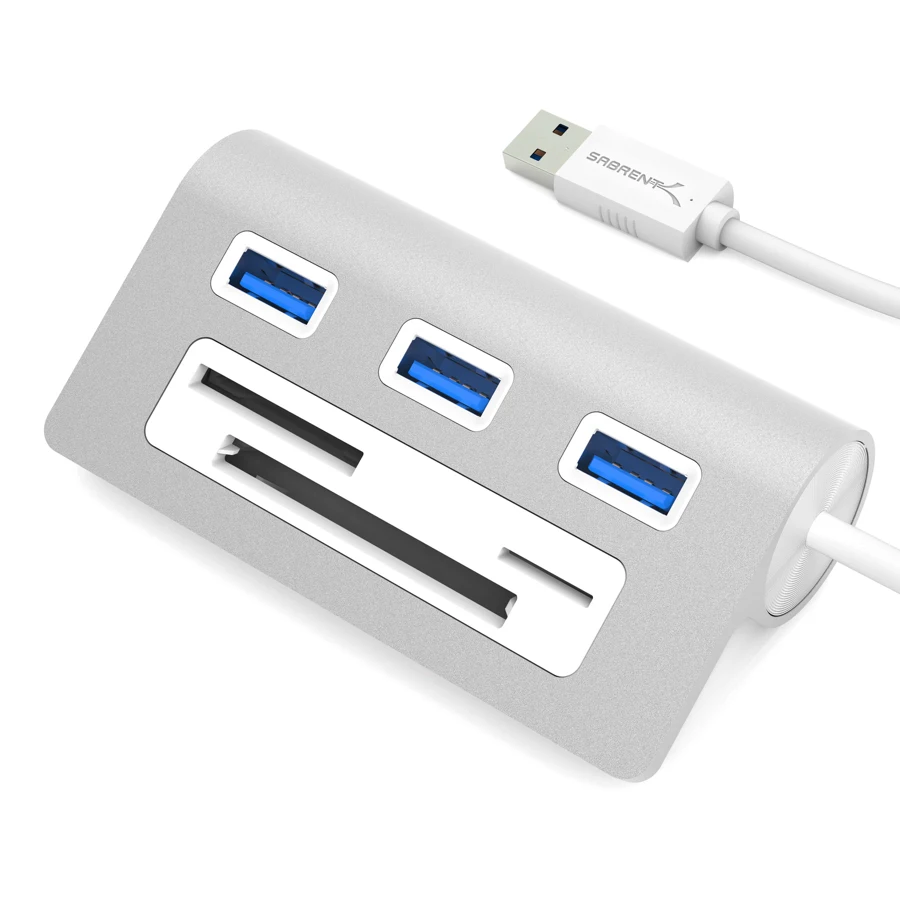
The Sabrent HB-MACR is useful when a computer needs both more USB-A ports and access to several kinds of memory card. Its aluminum desktop-style body combines three USB 3.0 data sockets with a multicard reader. That can simplify a desk shared by a camera, removable storage and ordinary peripherals.
The most important buying detail is easy to miss in the product photograph: the original user guide explicitly says the reader can read only one card at a time. The visible SD and microSD openings do not make this an independent dual-card reader. If your work involves copying between two cards directly, choose a reader with confirmed simultaneous operation instead.
Match the actual card formats to your workflow
The manufacturer's product page lists CF, SD, SDXC, SDHC, microSD, MMC and M2 among the supported formats. The manual illustrates SD, microSD and CF use. This broad legacy-card mix is the reason to consider the HB-MACR rather than an adapter that provides only USB sockets.
Supported format names are not a measured card-transfer speed or proof of every modern card capacity. In particular, the presence of a USB 3.0 connection does not establish a particular UHS card-reader class. If card performance is more important than convenience, check for the card standard and exact performance capability you need instead of treating the upstream USB speed as the card's speed.
The one-card limit also changes how the reader fits a camera workflow. It is suitable for importing from one card, removing it and then reading another. It is not the natural choice for keeping two cards mounted simultaneously or moving files directly between two inserted cards. Those are different needs even though the same card formats are involved.
Three traditional accessory ports
The three USB-A data ports use USB 3.0. They give you somewhere to connect devices such as a mouse, external drive or printer without reaching behind the computer repeatedly. Their advertised interface capability does not mean each accessory has a separate full-speed route to the computer; the hub and reader share the upstream connection.
The exact manufacturer gallery shows the USB-A computer plug on its attached cable. This is a conventional USB-A accessory, rather than a native USB-C laptop dock. A USB-C-only computer would need a separately suitable connection arrangement, which is not the included route reviewed here. The product's Apple-style design should not be mistaken for a special connector or an iMac-specific mounting system.
A simple desk connection, without laptop power
The manufacturer names Windows, Mac and Linux compatibility, and the original guide says no software drivers are needed to complete installation. Those are useful basic setup claims. They do not remove software requirements belonging to a connected peripheral, nor do they establish support for every later OS release or named Apple-chip family.
The listed package consists of the hub and user manual, without an external power supply. There is no USB-C Power Delivery input or laptop-charging output, and no HDMI, DisplayPort or Ethernet connection. The computer therefore keeps its own charger, monitor and network arrangement. The HB-MACR adds accessible data connections and card reading rather than replacing an entire dock.
Its listed body dimensions are 3.54×1.1×1.93in. Plan its position where cards and accessory plugs remain accessible, and leave room for the attached cable. We do not assign a cable length or a product weight from a different model in the same silver-aluminum range.
When to choose a different reader
Choose the HB-MACR for occasional access to varied memory-card formats alongside three USB-A accessories. Choose a dedicated independent-slot reader if simultaneous cards are essential, or a modern video and PD dock if the goal is one laptop cable for a screen, charging and peripherals. The correct decision turns on how you actually use the cards, rather than how many slots the front panel appears to offer.
Key details at a glance
| USB-A downstream data ports | 3 |
|---|---|
| USB-C downstream data ports | 0 |
| HDMI outputs | 0 |
| Full-size DisplayPort outputs | 0 |
| USB-C video outputs | 0 |
| Full-size SD slots | 1 |
| microSD slots | 1 |
| Simultaneous card slots | No |
| Advertised Ethernet link ceiling | 0Gbps |
| Maximum stated power available to host | 0W |
| Power adapter included | No |
| Detachable host cable | No |
| Host requirements | Exact manufacturer gallery shows the attached USB-A computer plug; this is not an iMac-specific clamp. |
| Power and charging | No laptop PD charging or supplied external adapter in the listed package. |
| Data and device limits | Three USB 3.0 data ports plus a multicard reader. The manual states that only one card can be read at a time. |
Use the exact model’s instructions for operating limits, supplied equipment and version differences.
Sources for this assessment
Find a hub or dock for your desk.
Match the computer, screens, devices and charging routine, then check the exact supported arrangement.