
Your needs, this model
Does it fit your priorities?
Can I add three USB-A accessories without another loose host cable?
Yes. Its integral rotating USB-A plug connects directly to the host and supplies three downstream USB-A sockets.
Explore this need in the finder →Will it also provide an HDMI screen?
No. The documented product is a three-port USB data hub, not a display adapter.
Explore this need in the finder →Does the current exact page establish 10 Gbps ports?
No. It identifies USB3.0 but does not document a 10Gbps ordinary USB mode.
Explore this need in the finder →A hub that sits at the computer port
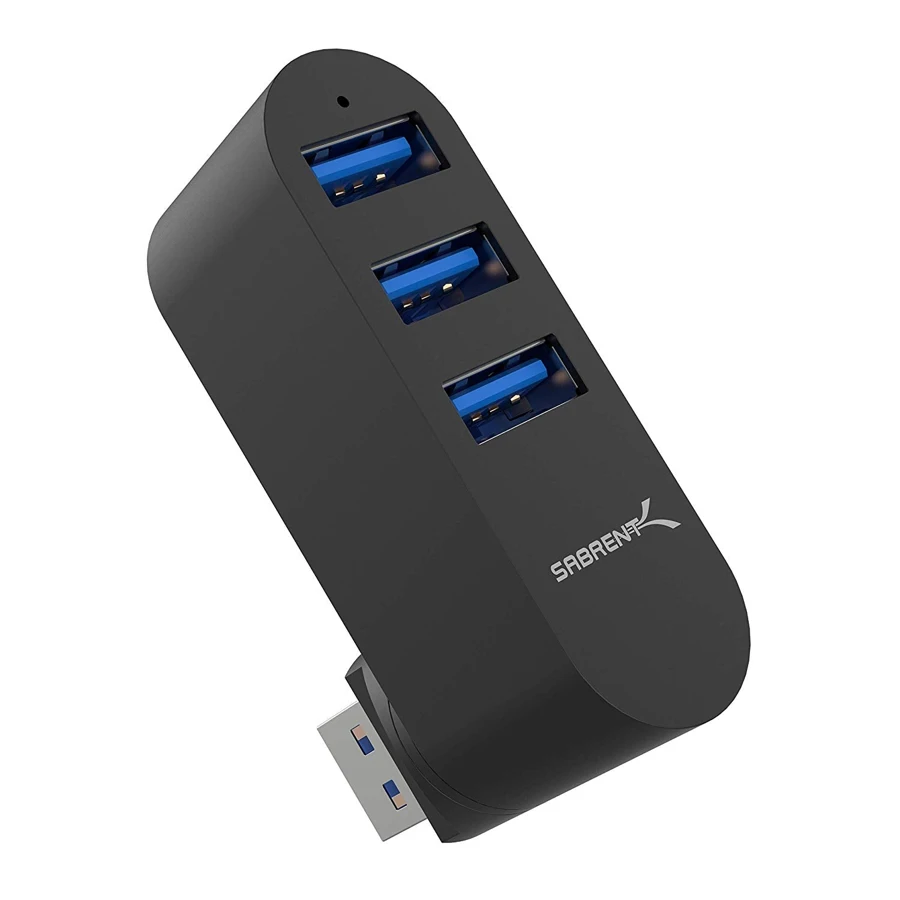
The Sabrent HB-R3MB takes a different approach from a hub on a short cable. Its USB-A host connector is built into the body and can rotate through the manufacturer's stated 90- and 180-degree positions. Three USB-A sockets then sit close to the computer. This is useful when a hinged plug gives you a neater arrangement than another cable lying across the desk.
That physical choice is the reason to consider this model. It is not a complete desk dock and does not provide a screen connection, network socket or card reader. If your setup is otherwise complete and you are simply short of three familiar USB connections, its limited role can be an advantage.
Check clearance before choosing a direct plug
A rotating connector can change how the body sits beside the computer, but it cannot move the entire hub to the other side of the desk. Look at the location of the host port, nearby power or display connectors, and the space available for the accessories you intend to insert. A directly attached body may occupy space that a cabled hub leaves clear.
This also changes how you handle the setup. Avoid using attached cables or large accessories as levers against the computer socket. Rotation is a positioning feature, not evidence that the joint or host port can support arbitrary weight. If you regularly connect heavier leads, a hub on a flexible cable may make a more comfortable arrangement.
Three data ports, not a charging station
Sabrent identifies the HB-R3MB as a three-port USB 3.0 hub. The exact maker photograph confirms the USB-A host plug and three downstream USB-A sockets. The practical use is connecting devices such as input peripherals and compatible USB storage through one computer connection.
The exact current page does not give a numeric line-rate specification. We therefore do not promote it into a 10 Gbps storage recommendation or substitute another Sabrent hub's figures. The important purchase decision is whether the documented USB generation and three-port arrangement fit the accessories, not an unsupported transfer benchmark.
There is no separately documented laptop-power path. A USB-A host connection does not become USB-C Power Delivery, and the product package does not list an external power adapter. If you need to support several demanding peripherals with their own documented power budget, start with a properly specified powered hub instead.
Computer support and practical limits
The manufacturer lists Windows, Mac and Linux support and describes plug-and-play setup. It names several Mac families, but does not give a current chip-by-chip compatibility table. That broad statement is useful for its ordinary hub role; it should not be converted into a promise about every specialist peripheral or later operating-system release.
A connected device can still need its own software. Likewise, adding this hub cannot supply video functionality absent from the product or turn a device requiring a different host connector into a native fit. Check the actual accessories rather than treating three USB sockets as three universal connections.
The right comparison is physical convenience
Choose the HB-R3MB when you want three USB-A sockets close to a USB-A computer port and the rotating body clears the surrounding connections. Choose a cabled model if you need to move the hub away from the computer, a powered model for an established peripheral-power requirement, or a multiport dock for displays and cards. Its appeal is a specific compact layout, not a long list of additional functions.
Key details at a glance
| USB-A downstream data ports | 3 |
|---|---|
| USB-C downstream data ports | 0 |
| HDMI outputs | 0 |
| Full-size DisplayPort outputs | 0 |
| USB-C video outputs | 0 |
| Full-size SD slots | 0 |
| microSD slots | 0 |
| Maximum stated power available to host | 0W |
| Power adapter included | No |
| Detachable host cable | No |
| Host requirements | The USB-A host connector rotates through the documented 90/180-degree positions. Check clearance around the computer socket. |
| Data and device limits | The exact page calls it USB3.0 but does not state a numeric line rate; no neighboring model’s number is substituted. |
Use the exact model’s instructions for operating limits, supplied equipment and version differences.
Sources for this assessment
Find a hub or dock for your desk.
Match the computer, screens, devices and charging routine, then check the exact supported arrangement.