
Your needs, this model
Does it fit your priorities?
Can a supported Windows setup combine one HDMI 4K 60 Hz screen, two 10 Gbps USB-A ports and 5 Gb Ethernet?
Yes, on the documented video-capable 10 Gbps host route. Use an appropriate power arrangement and keep the combined USB-device draw within the guide’s limit; these are interface capabilities rather than measured simultaneous transfer speeds.
Explore this need in the finder →Can a monitor use the hub’s USB-C data port for a Type-C video connection?
No. Sonnet expressly excludes display support from that data port. The built-in display route is HDMI.
Explore this need in the finder →Does the package include the charger needed for an 85 W laptop-charging arrangement?
No. The package contains the hub and documentation. The appropriate external PD source is separate, and 85 W is the maximum host allowance with a suitable source.
Explore this need in the finder →The Sonnet Echo 6 USB-C Multi Hub suits a supported computer that needs one HDMI display, two USB-A accessories, one USB-C data device and a faster wired network connection. Its 5 Gb Ethernet port is the main distinction from many similarly sized hubs. The deciding power constraint is in the quick-start guide: the attached USB devices share a budget, so three fast data sockets are not a promise to power three demanding drives.
Six functions do not mean six interchangeable USB sockets
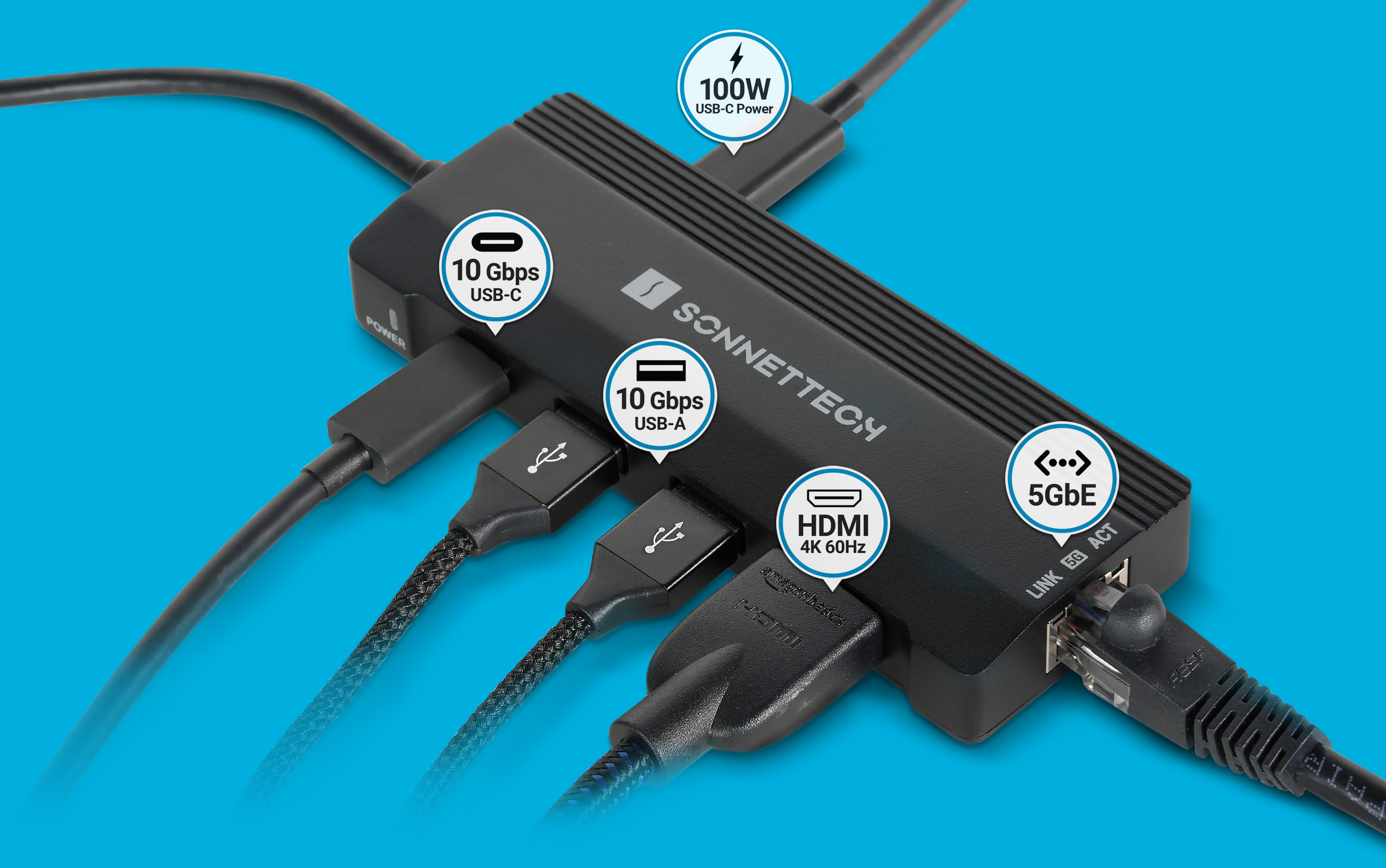
The ECHO-HB6-USBC has two USB-A data ports and one USB-C data port, all specified at up to 10 Gbps. A separate USB-C connection accepts power, and a captive Type-C lead connects the hub to the computer. Neither the power input nor the host lead is an additional data connection for another peripheral.
The downstream USB-C data port expressly does not support displays. Video uses the HDMI output, which supports the documented single 4K 60 Hz arrangement, as well as the lower-resolution timings in Sonnet's specifications. There is no DisplayPort output, second HDMI socket, SD reader or microSD reader. A camera workflow needing both card types must add readers and account for the ports they use.
Sonnet requires an appropriate Thunderbolt connection or a 10 Gbps USB-C host with DisplayPort Alt Mode for HDMI. The reviewed specification does not name a particular DisplayPort version for that USB-C route. Check the actual computer's video-capable port rather than treating any fitting Type-C socket as an HDMI source.
Check the network at both ends
The built-in network controller supports a 5 Gbps link over Cat 5e or better cabling, with lower supported link rates also documented. That can be useful for a suitable NAS or wired workspace whose existing equipment can operate above Gigabit Ethernet. It is not a promise that an ordinary Gigabit router or internet connection becomes five times faster.
Networking, USB storage and the other functions still depend on the shared host connection. The individual 10 Gbps USB port specifications are interface ceilings, not three measured file-copy results running alongside a fully saturated 5 Gb network. Sonnet's marketing examples are useful descriptions of intended work, but they are not our benchmark measurements.
The current technical page specifies macOS 15 or newer and Windows 11 25H2 or newer. It also lists supported iPad families and warns that USB data rates depend on the particular iPad port. Those statements do not establish the same 10 Gbps result on every tablet, or an exact Apple-silicon chip list for the Mac arrangement.
Choose the power arrangement before attaching drives
For laptop charging, connect an appropriate separate USB-C power source to the Power Passthrough port. The hub accepts up to 100 W and reserves up to 15 W for its operation, leaving up to 85 W for the computer, subject to power negotiation. The package contains the hub and documentation; it does not include that external charger.
The quick-start guide gives a separate USB-device power rule. With external power, or with a suitable 15 W Thunderbolt or USB4 host connection, all attached USB devices together must stay within 12 W. A suitable individual USB-C device can receive up to 7.5 W, but the shared total still applies. A collection of bus-powered storage devices needs its actual power requirements checked.
When using an ordinary USB-C host without external power, the guide says the USB ports share the computer port's available power, typically 5 W. Sonnet recommends low-power peripherals or self-powered devices in that arrangement. If a drive fails to mount or devices disconnect, adding the appropriate external power or reducing the bus-powered load is part of the documented setup process.
That creates materially different routines: a laptop-charging desk with a separate supply, a suitable Thunderbolt or USB4 bus-powered setup, or a more restricted ordinary USB-C bus-powered arrangement. Enter charging and included-supply requirements separately in the setup finder. A power inlet does not mean a charger is in the box.
Assess the captive cable and the complete daily setup
The hub weighs about 86 g and has a small external body with a short captive host lead. The technical page describes that lead as 0.2 m, while the US store describes 0.21 m. Both describe a short attached cable, but an exact reach requirement deserves confirmation. The lead cannot be replaced like a detachable dock cable.
Shortlist Echo 6 when one HDMI screen, three ordinary data connections and the documented 5 Gb network capability match your host and power arrangement. Choose another layout for a detachable host cable, built-in camera-card readers or several native display outputs. The Anker 556 A83A8 is an existing alternative with native HDMI plus DisplayPort, a different host route and Gigabit Ethernet; compare those actual configurations rather than treating every USB-C hub as equivalent.
Sources: Sonnet Echo 6 overview; exact ECHO-HB6-USBC specifications; official power and setup guide. This assessment does not claim hands-on speed, stability or durability testing.
Key details at a glance
| USB-A downstream data ports | 2 |
|---|---|
| USB-C downstream data ports | 1 |
| HDMI outputs | 1 |
| Digital DVI outputs | 0 |
| Analog VGA outputs | 0 |
| Full-size DisplayPort outputs | 0 |
| Mini DisplayPort outputs | 0 |
| USB-C video outputs | 0 |
| Full-size SD slots | 0 |
| microSD slots | 0 |
| Simultaneous card slots | No |
| Advertised Ethernet link ceiling | 5Gbps |
| Maximum stated power available to host | 85W |
| Maximum PD input | 100W |
| Power adapter included | No |
| Detachable host cable | No |
| Stated product weight | 86g |
| Host requirements | HDMI requires the documented Thunderbolt route or a 10 Gbps USB-C host with DisplayPort Alt Mode. No DP version is specified. The source lists Windows 11 25H2+, macOS 15+ and particular iPad families, but it does not establish every individual Mac chip or tablet data rate. |
| Screen arrangement | One HDMI 2.0 output supports the specified single-screen timings. The USB-C data port expressly does not carry video. The HDMI route leaves that data port available; there is no second built-in display output. |
| Power and charging | A separate suitable PD source can provide up to 100 W input and up to 85 W to the laptop, with power reserved for the hub. With external power or a suitable 15 W Thunderbolt/USB4 host, USB devices share a 12 W total limit. Ordinary USB-C bus power is more restricted. |
| Data and device limits | Two USB-A ports and one USB-C data port are specified at up to 10 Gbps on the qualified host route. Traffic shares the host link. A generic lower-capability fallback does not inherit that rate, and no USB 20 Gbps Gen 2x2 mode is claimed. |
| Installation | The 86 g hub has a short captive host lead. The technical page states 0.2 m while the US store states 0.21 m; exact reach is left unresolved. The package contains the hub and documentation, without an external charger. |
Use the exact model’s instructions for operating limits, supplied equipment and version differences.
Sources for this assessment
Find a hub or dock for your desk.
Match the computer, screens, devices and charging routine, then check the exact supported arrangement.