
Your needs, this model
Does it fit your priorities?
Can four USB-A accessories use this hub with a USB-A computer?
Qualifies: all four data sockets have an advertised 5Gbps capability on a suitable USB3 host.
Explore this need in the finder →Is a suitable external power adapter included?
Fails: this V2 model is bus powered and its package does not include one.
Explore this need in the finder →Can a USB-A host use the hub to drive an HDMI monitor?
Fails: this is a data hub with no documented display operating mode.
Explore this need in the finder →For the USB-A sockets a small laptop lacks
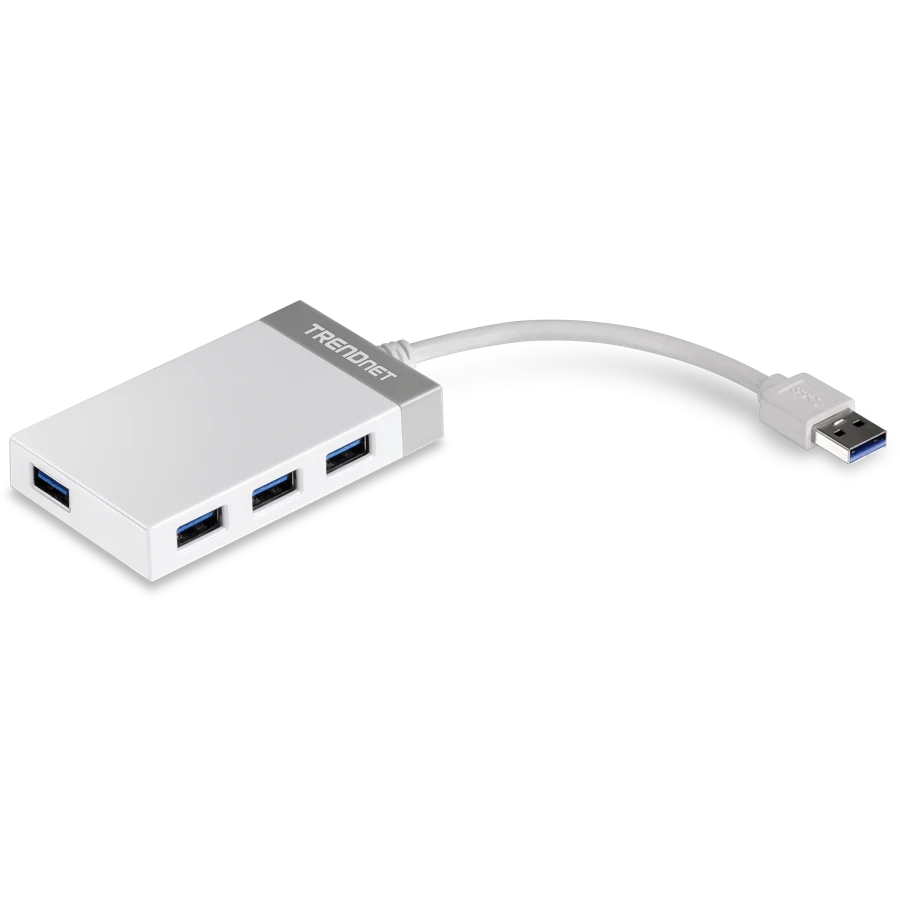
The TRENDnet TU3-H4E V2 is a straightforward choice when a computer needs four ordinary USB-A peripheral sockets and the bag should contain as little extra equipment as possible. Its four USB 3.0 ports are advertised at up to 5Gbps, and it takes power from the computer. There is no separate power brick to pack or plug into a wall. The corresponding limitation is the small, shared bus-power budget.
This review concerns the V2 revision named on TRENDnet's product page. The short model name also appears in other contexts, so the revision matters when checking a purchase or replacing an existing hub. The V2 specification describes a compact body with an integrated 14cm lead, rather than a detachable upstream cable or a dock with a separate USB-C charger input.
A short fixed lead shapes placement
The attached computer cable is about 5.5 inches long. That is convenient when the hub sits immediately beside a notebook, and the flexible section gives plugs some space instead of making the hub a rigid extension of the computer's socket. It is less convenient when the computer is under a desk or the available port is far behind a monitor. Measure the route before expecting the hub to reach the front of a workspace.
The body is 85 × 50 × 15mm and weighs 46g. Those dimensions suit carrying with a notebook or placing on a desk without a stand. The fixed lead also means it is part of the hub assembly: the package does not provide a separate host cable that can be swapped for a longer one.
Four data ports, one upstream link
All four USB-A data sockets are specified as 5Gbps USB 3.0 ports. That is a useful port-capability match for USB 3 flash drives and other peripherals, but each socket is not an independent 5Gbps connection back to the computer. Traffic from connected devices shares the hub's single upstream USB link. The quoted speed is an interface ceiling, not an observed copying result.
TRENDnet explicitly permits connection to older USB 2.0 host ports and older USB devices. That fallback is useful for reusing the hub across an older desktop and a newer notebook, but the older host connection limits speed. A 5Gbps drive cannot retain USB 3 performance when the hub is attached to a USB 2.0 computer port.
Power is the important planning limit
TRENDnet lists USB bus power at 5V, 0.9A, with a maximum consumption of 4.5W. Those are hub-level figures, not a promise of 4.5W for each of four accessories. A keyboard, mouse and modest USB devices fit the intended peripheral-expansion role more naturally than a collection of accessories each expecting substantial power.
If external storage or other equipment needs its own supply, follow that equipment's power requirements. This hub does not include an external adapter to increase its available budget. It also does not charge the notebook through the upstream cable. Anyone who needs laptop charging, HDMI or Ethernet should compare an appropriate multiport dock rather than treating additional USB-A sockets as those functions.
Compatibility and the complete package
The listed system scope is Windows 10, 8.1 and 8, plus macOS 10.9 through 10.13. TRENDnet describes installation without a CD. These are useful documented operating-system boundaries; they do not establish compatibility for every later Mac chip or software release. The package contains the TU3-H4E and a quick installation guide.
Choose this V2 model for its small size, fixed short lead and four ordinary USB-A data connections. Choose a powered hub if the peripheral-power plan is the unresolved part of the desk, and choose a longer-cable design if placement matters more than minimum bag space. That keeps the decision focused on the two limits most likely to change how this particular hub works in practice: reach and shared power.
Key details at a glance
| USB-A downstream data ports | 4 |
|---|---|
| USB-C downstream data ports | 0 |
| Maximum stated power available to host | 0W |
| Power adapter included | No |
| Detachable host cable | No |
| Included host-cable length | 5.5 in |
| Stated product weight | 46g |
| Power and charging | USB bus powered, 5V0.9A /4.5W maximum. No supplied external adapter. |
Use the exact model’s instructions for operating limits, supplied equipment and version differences.
Sources for this assessment
Find a hub or dock for your desk.
Match the computer, screens, devices and charging routine, then check the exact supported arrangement.