
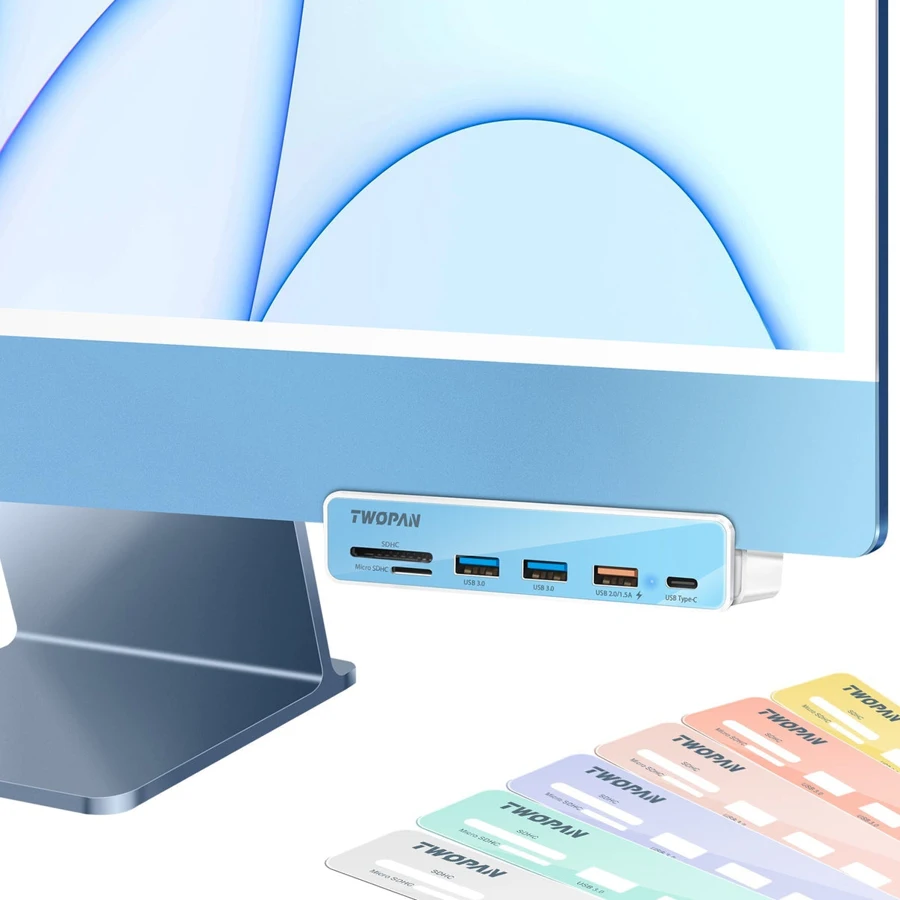
Your needs, this model
Does it fit your priorities?
Can an M4 iMac gain front-mounted USB-A ports?
The maker explicitly names the 2024 M4 iMac and provides the lower-edge mounting procedure.
Explore this need in the finder →Can I read SD and microSD at the same time?
No. The exact port diagram explicitly excludes concurrent use.
Explore this need in the finder →Are all three USB-A ports 5Gbps?
No. Two are USB 3.0 and the third is labelled USB 2.0.
Explore this need in the finder →The TWOPAN T7-M6 solves an access problem on a matching 24-inch iMac: it brings USB and camera-card connections to the front edge instead of making you reach behind the display. It is a mounted desktop accessory, with a supplied attachment mechanism and interchangeable color panels. The important limits are the mixed USB-A speeds and the explicit restriction against using both card slots at once.
Match the actual iMac chassis
TWOPAN’s current description specifically names the 2021 M1,2023 M3 and 2024 M4 iMac. Its gallery shows the 24-inch 2021-style body and a lower-edge mounting procedure. The same page also contains broad “2018 and later” wording, but that does not establish that every older iMac shape takes the same mounting hardware. Check the actual body and exact computer model rather than buying on the year range alone.
The six-step manufacturer diagram shows attaching a selected color panel, removing protective films, loosening the movable rear part counterclockwise, opening it slightly, then fitting the hub around the lower iMac edge and tightening it. This is evidence of a real supplied mounting arrangement. It should not be treated as a generic desk clamp for an arbitrary table, laptop or monitor.
Fit the hub with the computer supported securely and keep the cable free from strain. The mounting choice is useful when the hub will stay with that iMac. A portable hub on the desk is easier to move between unrelated computers and does not require checking a display-edge fit.
Three USB-A sockets at two speeds
The exact manufacturer port diagram identifies two USB 3.0 sockets and one USB 2.0 socket, with the latter also labelled 1.5A. The two USB 3.0 ports are the ones to choose for compatible storage devices when higher data capability matters. The slower port can serve a keyboard, receiver or other low-bandwidth accessory. Three physical USB-A connections do not satisfy a requirement for three 5Gbps ports.
The USB 3.0 speed claim is up to 5Gbps, while all attached traffic shares the host connection. That is a port-capability statement rather than a measured copying result. The third socket’s current label is also not a data-speed upgrade or evidence of USB-C laptop charging. Consider a separately powered USB hub if the peripheral load needs a clearly established external power budget.
The USB-C socket has a separate unknown
The gallery identifies a downstream USB-C port, and the page presents the product as a data-expansion hub. It does not establish a numerical ordinary USB rate for that socket strongly enough to promise 5Gbps or 10Gbps. The finder therefore retains the physical USB-C data connection while leaving its speed unconfirmed. Buyers whose USB-C SSD requires a specific line rate should settle that point before choosing this model.
The host lead is USB-C and connects to the iMac’s rear computer port. References to using a Thunderbolt-shaped computer connection do not turn the downstream sockets into Thunderbolt ports. This is an ordinary USB data hub for the stated iMac arrangement, with no documented video output or route to power the computer.
Both card formats, one at a time
The SD andmicro SD slots support common camera-card formats, with UHS-I and a 104MB/s headline in the product description. The exact gallery warning says SD andmicro SD are not supported at the same time. That restriction is decisive if your workflow involves reading one camera card while copying to another. Eject one card before changing the active card, or choose a documented concurrent reader for that job.
The color panels help match the visible front of thehub to the iMac, but they do not change any of these data or card limits. Choose T7-M6 when permanent front access on a specifically matching iMac is the goal. Choose another arrangement when all USB-A ports need USB 3.0 speed, the USB-C rate must be known, or both card formats must remain active together.
Key details at a glance
| USB-A downstream data ports | 3 |
|---|---|
| USB-C downstream data ports | 1 |
| HDMI outputs | 0 |
| Full-size DisplayPort outputs | 0 |
| Full-size SD slots | 1 |
| microSD slots | 1 |
| Simultaneous card slots | No |
| Maximum stated power available to host | 0W |
| Detachable host cable | No |
| Data and device limits | Two USB-A ports are USB 3.0 and one is USB 2.0/1.5A. The USB-C data socket has no confirmed numerical rate. SD and microSD explicitly cannot operate together. |
| Installation | The maker diagram shows fitting a color panel, removing protective films, loosening the rear part counterclockwise, opening it slightly, then mounting at the lower iMac edge and tightening. Check exact 24-inch iMac fit. |
Use the exact model’s instructions for operating limits, supplied equipment and version differences.
Sources for this assessment
Find a hub or dock for your desk.
Match the computer, screens, devices and charging routine, then check the exact supported arrangement.