
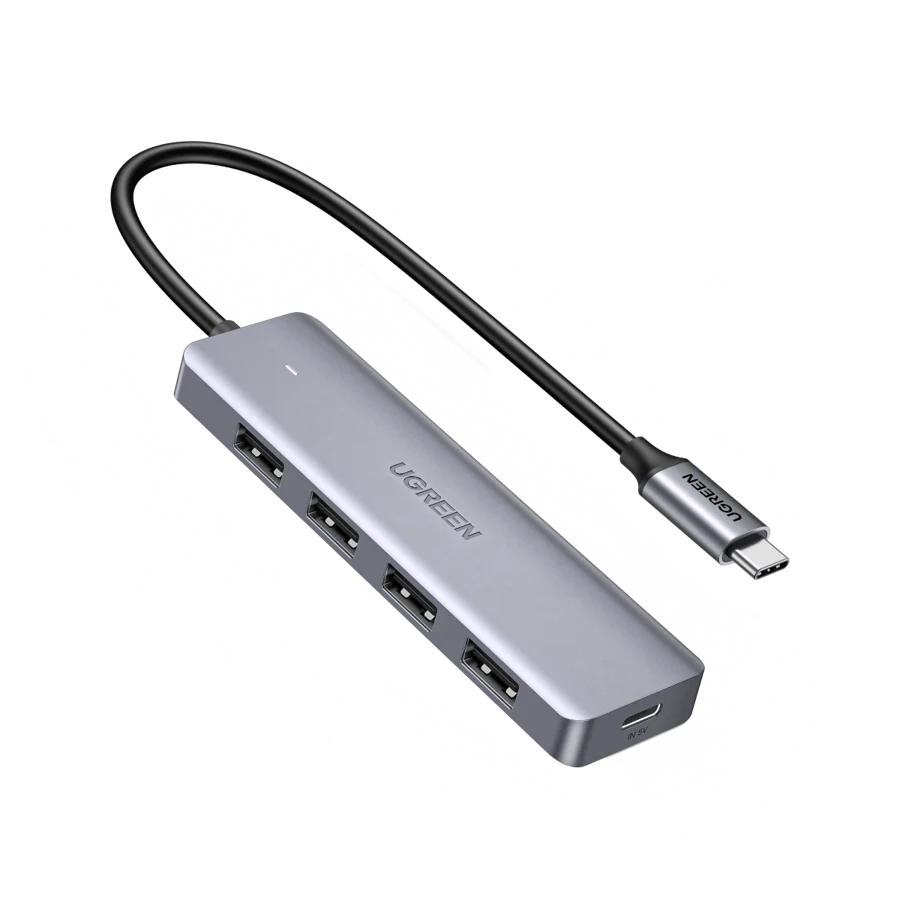
Your needs, this model
Does it fit your priorities?
Can it connect a keyboard, mouse and two USB drives?
It has four USB-A data connections. Their advertised 5 Gbps capability shares one upstream link, so four sockets do not promise four independent full-speed transfers.
Explore this need in the finder →Will the extra USB-C port keep my laptop charged?
No. UGREEN specifically assigns that socket to 5 V / 2 A hub power and excludes data and video. It does not meet a laptop-charging requirement.
Explore this need in the finder →Can I attach an HDMI monitor?
No. This is a four-port USB-A expansion hub, with no documented display output.
Explore this need in the finder →Four familiar sockets, without a miniature dock
The UGREEN 70336 is for the fairly common situation in which the computer has USB-C but the accessories still have USB-A plugs. A keyboard, mouse receiver, USB stick and another small peripheral can stay together on one hub. Its purpose is straightforward data expansion. It does not try to combine a monitor, network cable, memory cards and laptop charging into the same enclosure.
That narrow purpose is useful when your display and charger already have satisfactory connections. You avoid buying a larger dock simply to obtain extra rectangular USB sockets. The maker identifies this silver version by SKU 70336, an important detail when comparing UGREEN products that otherwise have almost interchangeable titles.
Count the USB-A ports, not the auxiliary input
There are four USB-A downstream data ports. UGREEN advertises USB 3.0 operation at up to 5 Gbps, suitable as an interface specification for ordinary USB storage and accessories. That figure is not a measured copying result. The computer connection, attached devices and work being performed determine useful throughput, and the ports share the upstream link.
A mouse or keyboard rarely needs a fast interface; a storage drive is more likely to expose the shared bandwidth. If you regularly copy between several fast external drives, buying four sockets does not remove that bottleneck. If your main problem is simply having somewhere to connect everyday accessories, the four-port layout directly addresses it.
The second USB-C socket is not a laptop charger
The most important distinction is the auxiliary USB-C power input. UGREEN specifies 5 V / 2 A power delivery for the hub and explicitly excludes data and video through that socket. The familiar connector shape can make it look like the charging input on a more elaborate laptop dock. It is not documented as that function here.
Keep the laptop charger connected to the computer separately. Connecting power to the auxiliary socket does not create an HDMI output, another USB-C data connection or pass-through laptop charging. This also means the 70336 is a poor choice if your computer has only one available USB-C port and you need that same port to supply charging at your desk.
What to check on a computer or tablet
The manufacturer names MacBook Pro and Air, Surface Book 2, XPS 15 and 17, and several iPad families among compatible devices. Its description also covers USB-C or Thunderbolt laptops, tablets and phones. For a computer, the practical requirement is a working USB data connection; this hub does not depend on a video-capable USB-C port because it has no video output.
A tablet introduces another decision: whether its operating system and the accessory you connect support the work you intend to do. A physically fitting USB plug is not a promise that every printer, specialist interface or software-controlled device will work on an iPad. The maker's broad family list also should not be read as a model-by-model endorsement of every later Apple chip.
Who should choose a different arrangement?
Choose a multiport dock instead if the same purchase must provide HDMI, Ethernet, memory-card access or laptop charging. Choose a hub with documented downstream USB-C data ports if your newer storage drives have USB-C plugs and you want to avoid adapters. Neither task is the 70336's role.
The 70336 makes most sense as a small companion to an otherwise complete setup: four USB-A accessories, one USB-C host connection and clear separation between peripheral power and laptop power. Its value is easy access to those ports. It should be selected for that fit, rather than for power or display functions it does not offer.
Key details at a glance
| USB-A downstream data ports | 4 |
|---|---|
| USB-C downstream data ports | 0 |
| HDMI outputs | 0 |
| Full-size DisplayPort outputs | 0 |
| USB-C video outputs | 0 |
| Full-size SD slots | 0 |
| microSD slots | 0 |
| Maximum stated power available to host | 0W |
| Detachable host cable | No |
| Power and charging | The auxiliary USB-C input is specified as 5 V / 2 A for the hub itself. It is not laptop USB Power Delivery. |
| Data and device limits | Four USB-A ports are advertised at up to 5 Gbps; they share the host connection. |
Use the exact model’s instructions for operating limits, supplied equipment and version differences.
Sources for this assessment
Find a hub or dock for your desk.
Match the computer, screens, devices and charging routine, then check the exact supported arrangement.