
Your needs, this model
Does it fit your priorities?
Can my listed Intel MacBook use three 5Gbps USB-A ports?
Yes. The exact 70406 port list establishes three USB 3.0 outputs; upstream bandwidth is shared.
Explore this need in the finder →Is 100W delivered to the laptop confirmed?
No. Host charging is supported, but the net host ceiling is not separately established.
Explore this need in the finder →Can a base M1 Mac use two independent external screens?
That arrangement is not established. The accepted two-output plan is limited to the listed Intel MacBooks.
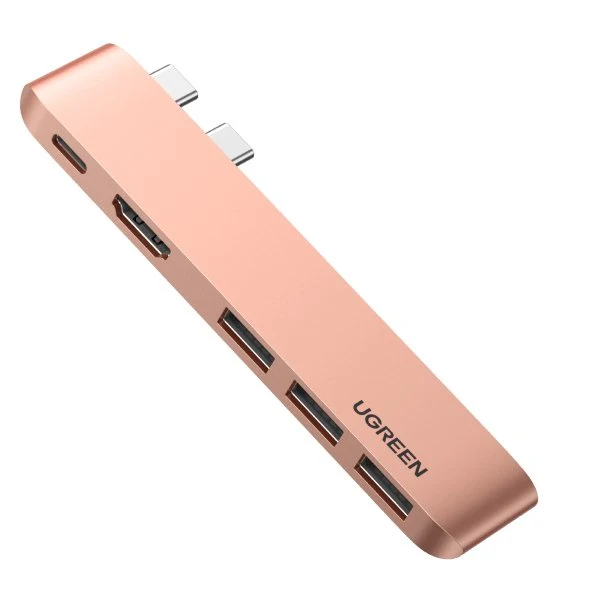
Explore this need in the finder →The UGREEN 70406 is a five-function hub for a particular kind of MacBook: one with two adjacent USB-C sockets in the position required by its fixed pair of plugs. Its strongest fit is an explicitly listed Intel MacBook whose owner wants three USB-A connections and HDMI while keeping the adapter flush against the computer. Check the physical fit before comparing port counts; this is a different buying decision from choosing a hub on a flexible cable.
Fit matters more than the connector shape
UGREEN’s exact-model FAQ lists MacBook Pro models from 2016 through 2020 and MacBook Air models from 2018 through 2020. It also says to remove a protective case. The body is designed to sit directly against the laptop, so a case that leaves the USB-C sockets visible can still prevent the plugs from seating properly. Do not force the adapter into place or assume that any laptop with two USB-C sockets has the correct spacing.
Two host sockets are occupied together. That can make the setup compact, but it uses more of the computer’s available connections than a single-lead hub. Place the laptop and adapter on a supported desk surface and arrange the attached monitor and peripheral cables so they do not pull the hub sideways. A cable-based hub is the more flexible choice when the laptop sits on a stand or needs to move while devices remain connected.
Use the exact five-port layout
The 70406 specification identifies three USB 3.0 ports, one USB-C port and one HDMI output. Its three USB-A connections are useful for a keyboard, mouse and storage device without another adapter. The maximum advertised USB data rate is 5Gbps. Simultaneous storage traffic shares the available upstream connection; three sockets do not create three independent full-bandwidth links.
UGREEN’s page contains a comparison section with neighboring hub layouts. For this model, use the exact 70406 port list rather than a comparison-row card-reader icon. SD and micro SD readers are not in that five-port list. If importing camera cards is central to your routine, plan a separate reader or choose a hub that explicitly includes the required slots.
HDMI and the multifunction USB-C connection
The HDMI output supports up to 4K at 30Hz. That can be sufficient for a reference screen or presentation, but a 4K60 primary monitor is a different requirement. The multifunction USB-C connection has a separately described Thunderbolt 3 passthrough role, including a higher-resolution display output. It is not another HDMI socket, and your display or cable must support that connection.
The manufacturer’s FAQ says the HDMI and multifunction port can output video at the same time, with different maximum modes. That is useful for an appropriately supported Intel MacBook, but the page does not provide a sufficiently precise common simultaneous resolution to turn it into a dual 4K60 promise. The two-output arrangement in this review also does not establish two independent external desktops on a base M1 Mac. The computer’s display engine remains part of the system.
Charging and peripheral power
The multifunction USB-C port is advertised with 100W Power Delivery support. The source does not separately settle the maximum net wattage delivered to the laptop, so a requirement for an actual 100W host output is unconfirmed. A suitable charger is sold separately. When every port is in use, UGREEN recommends connecting PD power and specifically says two 2.5-inch drives can be connected, subject to the complete powered arrangement.
That recommendation does not make the hub a general-purpose multi-device charging station. Check storage-device power requirements and use a drive’s own supply when required. UGREEN also explicitly excludes Apple SuperDrive. If that optical drive is essential, follow its supported direct connection arrangement instead of assuming that a USB-A socket guarantees compatibility.
Choose 70406 when its exact MacBook fit, three USB-A ports and HDMI arrangement match the desk you already have. Choose a hub on a lead for more placement freedom, a reader-equipped model for camera cards, or a dock with documented chip-specific display support for a newer multi-screen Mac setup.
Key details at a glance
| USB-A downstream data ports | 3 |
|---|---|
| USB-C downstream data ports | 1 |
| HDMI outputs | 1 |
| Full-size DisplayPort outputs | 0 |
| USB-C video outputs | 1 |
| Full-size SD slots | 0 |
| microSD slots | 0 |
| Maximum PD input | 100W |
| Power adapter included | No |
| Detachable host cable | No |
| Host requirements | Two fixed adjacent USB-C plugs require the listed MacBook chassis; remove its protective case. |
| Power and charging | The multifunction port is advertised with 100W PD support. A separate net host-output ceiling is not established. A suitable charger is sold separately. |
| Data and device limits | Three USB-A ports are advertised at 5Gbps. The multifunction USB-C connection has a separate Thunderbolt passthrough role; its ordinary USB data rate is unconfirmed. |
Use the exact model’s instructions for operating limits, supplied equipment and version differences.
Sources for this assessment
Find a hub or dock for your desk.
Match the computer, screens, devices and charging routine, then check the exact supported arrangement.