
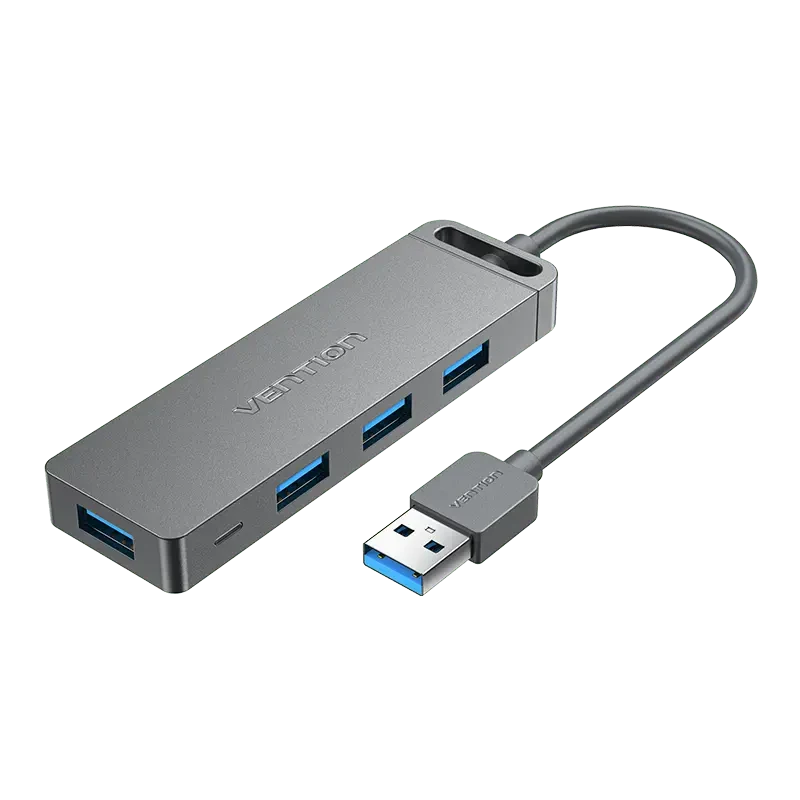
Your needs, this model
Does it fit your priorities?
Can it supply four 5Gbps Type-A data sockets to a Type-A computer port?
Yes. All four share the upstream connection rather than providing four independent computer links.
Explore this need in the finder →Is its Micro-USB input a fifth data output?
No. It is documented for auxiliary power.
Explore this need in the finder →Can the auxiliary supply charge the laptop through this hub?
No. The hub is a Type-A data expander without a documented laptop Power Delivery route.
Explore this need in the finder →Four peripheral outputs, with a separate power input
The Vention CHLBB expands a Type-A computer connection into four Type-A USB 3.0 data sockets. A Micro-USB input provides auxiliary power. That division is the key to understanding a product page that also uses a five-in-one headline: the fifth opening is not a fifth peripheral data output.
This is a straightforward choice to consider for ordinary USB accessories. It does not add HDMI, card readers, Ethernet or a Type-C data socket. Start with the connectors on the devices you actually use rather than the total number of functions in a title.
Use the short-lead model where it can sit safely
The exact CHLBB reference corresponds to a 0.15m lead. The broader CHL family is illustrated with 0.15m, 0.5m and 1m options, so a photograph of a longer cable is not enough to identify the short-lead package.
Before placing an order, compare the complete model and chosen length. A short lead may suit a laptop on a desk but can leave the hub hanging from a high desktop-computer socket. Give the enclosure a supported position and leave room for plugs instead of letting attached cables pull on the computer connector.
All four data sockets share the same upstream path
The original specification identifies USB 3.0 with an advertised 5Gbps interface. It does not promise a measured file-copying rate, and four sockets do not create four independent 5Gbps links to the computer.
Think about simultaneous activity. A keyboard, mouse and other light peripherals impose a different demand from several busy storage devices. Keep the shared upstream connection in mind when choosing where to attach a drive you use for sustained transfers. The device, cable and computer also affect the result.
Micro-USB helps power peripherals, not the laptop
The manufacturer's diagram lists a 5V/2A auxiliary power supply and shows its Micro-USB connection. This supports a powered hub arrangement for connected accessories; it is not laptop Power Delivery or an additional data connection.
Check the actual package for the correct supply and lead before relying on that arrangement, because inclusion is not established by the read material. Do not choose a supply just because its plug fits. A single adapter rating also should not be multiplied into a separate full allocation for each output.
A compact enclosure still needs a sensible location
The original technical diagram lists an ABS body approximately 100.4 × 30.1 × 11.1mm. Its gray finish can resemble metal in photographs, but the diagram's material specification is more useful than appearance when identifying the model.
The fixed computer lead simplifies carrying one small unit, while making cable length an important purchase choice. Leave access to the end socket and auxiliary power connection. Attached flash drives and bulky plugs need more room than the enclosure dimensions alone suggest.
Choose it for data expansion rather than a complete dock
Vention names Windows, macOS and Linux plug-and-play operation. That describes the hub connection, not a promise that every attached printer, audio device or other accessory works without its own software.
Consider the CHLBB when four Type-A data connections and a short lead suit your setup. Choose a separately documented dock for displays, networking, card transfer or computer charging. Confirm the exact length and power accessories in the seller's offer before purchasing; this review does not assert current stock, price or an unverified Amazon listing.
Key details at a glance
| USB-A downstream data ports | 4 |
|---|---|
| USB-C downstream data ports | 0 |
| HDMI outputs | 0 |
| Full-size DisplayPort outputs | 0 |
| Full-size SD slots | 0 |
| microSD slots | 0 |
| Maximum stated power available to host | 0W |
| Detachable host cable | No |
| Individual port switches | No |
| Included host-cable length | 5.91 in |
| Host requirements | Fixed Type-A host lead. CHLBB corresponds to the 0.15m reference, while CHL family diagrams also show 0.5m and 1m options. A historical three-foot listing is not bridged to this exact short-lead SKU. |
| Power and charging | Original technical diagram lists 5V/2A external supply for auxiliary hub power; inclusion is not established. This is not computer Power Delivery. |
| Data and device limits | Four Type-A USB 3.0 data outputs, advertised 5Gbps interface, shared upstream. Micro-USB is an auxiliary power input, not a fifth data output. |
| Installation | Original specification diagram lists ABS and approximately 100.4 × 30.1 × 11.1mm body. Windows, macOS and Linux plug-and-play are named; individual peripheral drivers may still be required. |
Use the exact model’s instructions for operating limits, supplied equipment and version differences.
Sources for this assessment
Find a hub or dock for your desk.
Match the computer, screens, devices and charging routine, then check the exact supported arrangement.