
Your needs, this model
Does it fit your priorities?
Does the four-port name mean four accessory sockets?
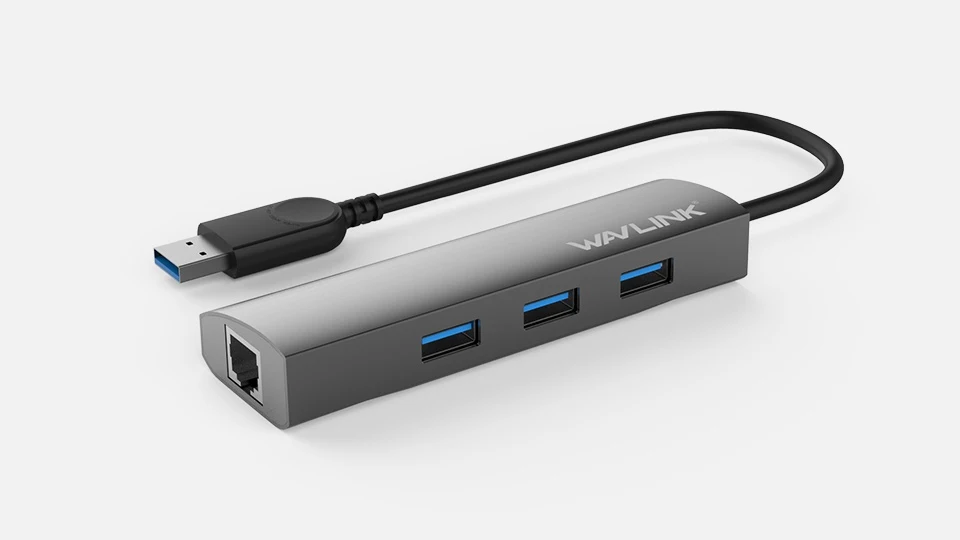
No. The exact port table gives three downstream USB-A sockets plus the upstream USB-A plug.
Explore this need in the finder →Can I connect three USB-A devices and Gigabit Ethernet?
Yes, on a suitable USB-A computer in the documented operating-system context. Check the network-driver requirements.
Explore this need in the finder →Is this the USB-C version?
No. The exact WL-UH3031G table specifies a male USB-A host connection. Similar names do not change that plug.
Explore this need in the finder →Three accessory ports and a wired network connection
The WAVLINK WL-UH3031G combines three USB-A data sockets with Gigabit Ethernet. It connects to the computer through USB-A, making it a useful arrangement for a machine that needs both extra familiar peripheral connections and a physical network cable. It does not provide display outputs, card slots or laptop charging.
The product's “four-port” title needs careful reading. The detailed table includes three downstream USB-A ports and one male USB-A connection going to the host. The host plug is not a fourth place to attach an accessory. Plan for three downstream data devices.
The exact model has a USB-A host
WAVLINK also uses closely related names across its hub range. This exact WL-UH3031G specification identifies the male USB-A upstream connection, and the manufacturer's photograph agrees. It should not be treated as a USB-C host product because another similar model uses that connector.
The integrated cable and narrow aluminium body suit a nearby position beside the computer. If the computer only has USB-C sockets, select a native arrangement that matches it rather than assuming the model name covers both plug types.
USB and Ethernet share the computer connection
The three USB-A ports are advertised at up to 5 Gbps. The Ethernet interface supports 10/100/1000 Mbps. Those numbers describe interface capabilities, not measured file-transfer results, and the functions share the upstream path to the computer.
A keyboard, receiver and occasional USB drive can coexist conveniently with wired networking. Heavy storage transfers and network traffic create a more demanding workload. Do not add the separate headline rates together and expect that sum as actual throughput through one USB connection.
Keep the driver and power requirements visible
The maker provides AX88179A Ethernet drivers and lists Windows 10 and Mac OS X in the operating-system table. The source does not establish that every network setup is automatically driver-free. If software installation is restricted, check the exact computer before relying on the network function.
The port list includes a DC power jack, but the package lists only the hub and manual. A power socket is not proof that the appropriate adapter is included. It also does not imply USB-C Power Delivery into the laptop; this product's upstream route is USB-A.
Where it makes sense
Choose the WL-UH3031G when three USB-A data connections and a wired Gigabit network are the missing functions on a suitable USB-A computer. Its focus is practical peripheral and network expansion rather than a one-cable display desk.
Choose a different model for four downstream devices, a USB-C-only host, an explicit no-install Ethernet requirement or laptop charging. Counting the upstream plug correctly is the most important first step: this is a three-device hub with a network port, regardless of the broader headline.
Key details at a glance
| USB-A downstream data ports | 3 |
|---|---|
| USB-C downstream data ports | 0 |
| HDMI outputs | 0 |
| Full-size DisplayPort outputs | 0 |
| USB-C video outputs | 0 |
| Full-size SD slots | 0 |
| microSD slots | 0 |
| Advertised Ethernet link ceiling | 1Gbps |
| Maximum stated power available to host | 0W |
| Power adapter included | No |
| Detachable host cable | No |
| Power and charging | A DC power jack is listed, but the package contains the hub and manual without a power adapter. No laptop charging route is documented. |
| Data and device limits | Three downstream USB-A ports are advertised at 5 Gbps; the fourth USB-A connection in the table is the male host connection. |
| Installation | The maker provides AX88179A network drivers. Automatic installation for every supported OS is not established. |
Use the exact model’s instructions for operating limits, supplied equipment and version differences.
Sources for this assessment
Find a hub or dock for your desk.
Match the computer, screens, devices and charging routine, then check the exact supported arrangement.