
Your needs, this model
Does it fit your priorities?
Can I control each of four USB-A ports separately?
Yes. The exact table lists four on/off buttons and the maker explicitly calls the switches individual.
Explore this need in the finder →Does switching make it a laptop charger?
No. It remains a USB-A data hub without a host Power Delivery path.
Explore this need in the finder →Can a Windows computer use four 5 Gbps USB-A ports without a hub driver?
That is the maker’s documented Windows 10 arrangement. The ports still share the upstream link and attached devices can need their own drivers.
Explore this need in the finder →Choose it for the switches
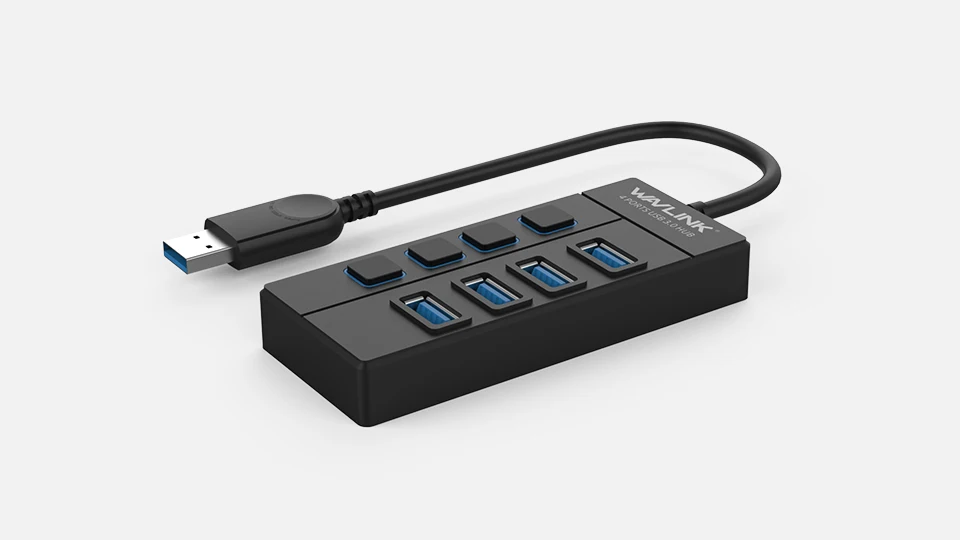
The WAVLINK WL-UH30414 adds four USB-A data connections and gives each one its own on/off button and indicator. That is useful when you want to disconnect a peripheral logically without repeatedly pulling its plug. The switch layout is the main reason to choose it over an otherwise simple four-port hub.
The manufacturer describes a vertical port arrangement intended to leave room around connected plugs. Its exact photograph shows a USB-A host lead. It is therefore a direct fit for a USB-A computer connection, rather than a native USB-C expansion hub.
Use the controls thoughtfully
A port switch is convenient for an accessory you want to turn off between uses. With storage, first use the operating system's safe-eject procedure and allow work to finish. Turning a socket off while data is being written is not a substitute for properly disconnecting a drive.
The lights indicate connection or power status, not measured throughput, device health or successful file completion. They are useful desk controls, but should not be treated as diagnostic instruments.
Four sockets share 5 Gbps
WAVLINK advertises USB3.0 operation at up to 5 Gbps and USB2.0 compatibility. That rate describes the interface, not an independently measured copying speed. All four devices share the single path to the computer.
The layout suits a keyboard, receiver, occasional storage and other ordinary peripherals. If several fast drives must transfer together, a greater number of sockets does not create separate full-bandwidth links. Assess the simultaneous workload as well as the plug count.
It is not a powered charging dock
The maker says no external supply is needed and lists the hub, warranty card and quick guide in the package. The individual switches do not increase the available peripheral power. Devices with demanding or specific power requirements still need an appropriate arrangement.
The hub does not document HDMI, Ethernet, cards or laptop Power Delivery. If you want a one-cable workstation with a charging laptop and external screen, start with a dock designed for those functions rather than trying to build them from this data-only model.
Match it to the actual computer
The exact operating-system table names Windows10 and MacOSX, and the maker says no hub driver is needed. That does not remove software requirements belonging to a connected peripheral or establish every later Apple chip.
Choose the WL-UH30414 when four USB-A ports and individual controls improve your everyday setup. Choose an externally powered model for a documented peripheral-power need, a USB-C host model for a USB-C-only computer, or a multiport dock for displays and charging. Here the useful feature is controlled access to four familiar data connections.
Key details at a glance
| USB-A downstream data ports | 4 |
|---|---|
| USB-C downstream data ports | 0 |
| HDMI outputs | 0 |
| Full-size DisplayPort outputs | 0 |
| USB-C video outputs | 0 |
| Full-size SD slots | 0 |
| microSD slots | 0 |
| Maximum stated power available to host | 0W |
| Power adapter included | No |
| Detachable host cable | No |
| Individual port switches | Yes |
| Power and charging | Maker says no external power supply is needed. Port switches are control features, not additional power sources. |
| Data and device limits | Four USB-A ports advertised at 5 Gbps, with four independent on/off buttons. Shared upstream bandwidth applies. |
Use the exact model’s instructions for operating limits, supplied equipment and version differences.
Sources for this assessment
Find a hub or dock for your desk.
Match the computer, screens, devices and charging routine, then check the exact supported arrangement.