
Your needs, this model
Does it fit your priorities?
Can a compatible Intel MacBook Pro use the lid closed?
The original manual documents that powered HDMI procedure, with the computer’s original charger connected.
Explore this need in the finder →Does the 4K headline establish 4K60?
No. The accepted exact sources do not establish a refresh ceiling.
Explore this need in the finder →Can I use two 5Gbps USB-A ports and one 5Gbps USB-C data port?
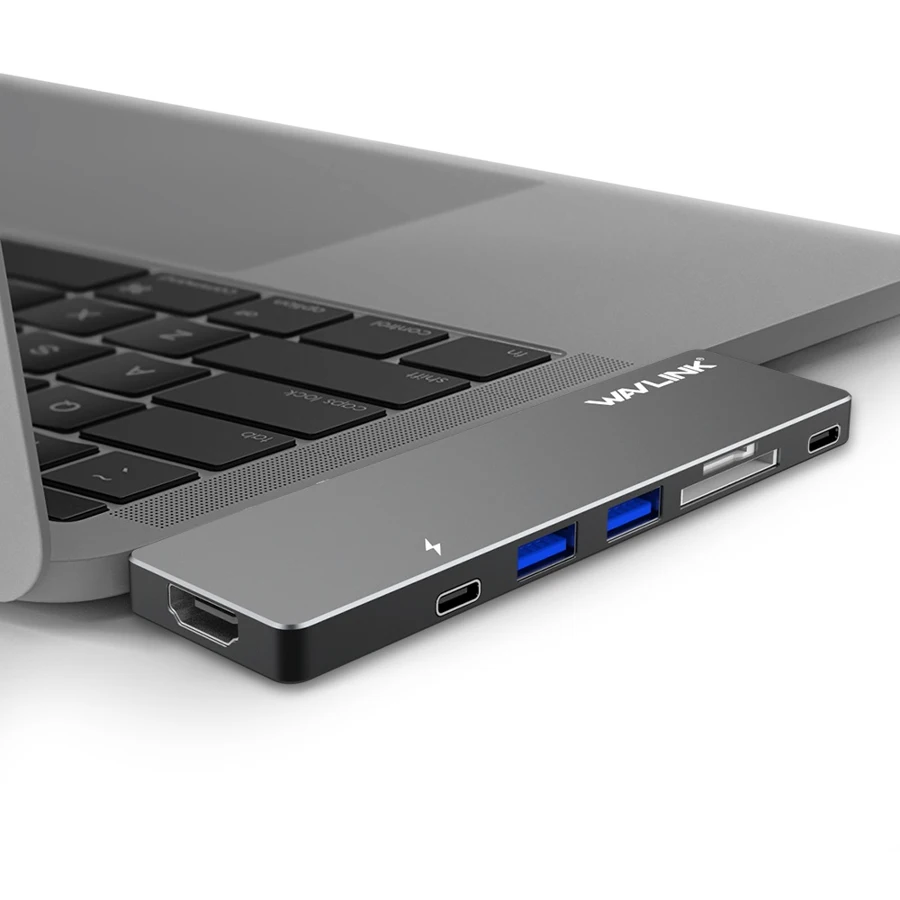
Those ports are explicitly listed, and the actual maker image distinguishes the separate power connection.
Explore this need in the finder →The WAVLINK UHP3405M is a dock for a specifically compatible MacBook Pro, with two fixed USB-C plugs that attach directly to the computer. It suits an Intel-era MacBook desk where a flush adapter,USB peripherals and an HDMI screen are useful. Its original manual also provides a real closed-lid procedure, with a power requirement that deserves attention before the hub is used as a permanent workstation.
Start with the physical MacBook fit
The original guide identifies MacBook Pro models from 2016 and later in the product’s contemporary design context. That does not make the fixed plug spacing universal across newer MacBook s or other USB-C laptops. Check the exact chassis, the position of the two adjacent sockets and any protective case before connecting it. A general connector-shape match is insufficient for a body that sits directly against the computer.
The rigid connection can keep the adapter close to the laptop, but it offers less placement freedom than a dock on a flexible lead. Give the connected HDMI and peripheral cables room to rest on the desk. Do not let their weight pull against the computer sockets. A cable-based dock is often easier to place when the laptop sits high on a stand or needs to move while the peripherals stay connected.
Data ports and charging have distinct roles
WAVLINK’s exact specification lists two USB-A ports and one USB-C data output at 5Gbps. The manufacturer photograph separately shows the lightning-marked connection used for power. That distinction matters: a power connector should not be counted as another downstream data port simply because its shape is USB-C.
The 5Gbps figures describe advertised USB interface capability. They do not represent measured file-copying speed or independent full-rate bandwidth for every attached device simultaneously. A keyboard, mouse and occasional USB-C storage device fit the layout better than an expectation of several isolated high-speed storage links. The hub also provides SD andmicro SD slots, while simultaneous access to both cards is not explicitly settled in the accepted material.
HDMI is documented; the refresh ceiling is not
The product page advertises 4K HDMI output and the original manual shows connecting an HDMI display. The reviewed exact sources do not establish a refresh rate strongly enough to promise 4K30 or 4K60 in the finder. A buyer whose monitor requirement includes a specific refresh rate should choose a documented mode or obtain exact confirmation before purchase.
The manual’s diagrams are not a substitute for a simultaneous independent-display table. This review accepts one direct HDMI workspace and does not turn the other USB-C connection into an additional verified display output. It also does not infer support for individual Apple Silicon chips from an older Mac OS X compatibility line.
The actual closed-lid procedure
For closed-lid HDMI use, the manual tells the user to connect the dock to a compatible MacBook Pro, connect the computer’s original power adapter to the marked power port, attach the peripherals, and establish the HDMI desktop while the computer is turned on with the lid open. The lid is closed after the external desktop appears. Power is part of that supported configuration, rather than an optional detail to omit.
The same guide warns against disconnecting the power adapter during data transfer because that can interrupt attached storage and risk data loss. Finish transfers and safely eject storage before changing the power arrangement. Although host charging is documented, the exact net wattage delivered to the laptop is not established, so a minimum-wattage purchase requirement remains unconfirmed.
Package and alternatives
The box contains the aluminum mini dock, a pouch and quick start guide. The computer’s power adapter remains separate. The pouch is useful for carrying the rigid adapter, while the hardware fit still needs to be checked each time a different computer is considered.
Choose UHP3405M for an exact compatible Intel MacBook Pro when its USB mix and powered single-screen arrangement are sufficient. Choose another dock when you need a confirmed 4K refresh rate, a specified charging ceiling, flexible host-cable placement or verified multi-screen behavior on a newer Mac chip.
Key details at a glance
| USB-A downstream data ports | 2 |
|---|---|
| USB-C downstream data ports | 1 |
| HDMI outputs | 1 |
| Full-size DisplayPort outputs | 0 |
| Full-size SD slots | 1 |
| microSD slots | 1 |
| Power adapter included | No |
| Detachable host cable | No |
| Screen arrangement | 4K HDMI is advertised without a confirmed refresh ceiling. The original manual explicitly documents powered closed-lid HDMI use on a compatible MacBook Pro. |
| Power and charging | Host charging is documented with the original computer charger, but no net numerical ceiling. Do not disconnect power during data transfer. |
| Data and device limits | The exact page lists two 5Gbps USB-A ports and one 5Gbps USB-C data port. The actual maker photograph distinguishes the separate lightning-marked power connection. |
Use the exact model’s instructions for operating limits, supplied equipment and version differences.
Sources for this assessment
Find a hub or dock for your desk.
Match the computer, screens, devices and charging routine, then check the exact supported arrangement.