
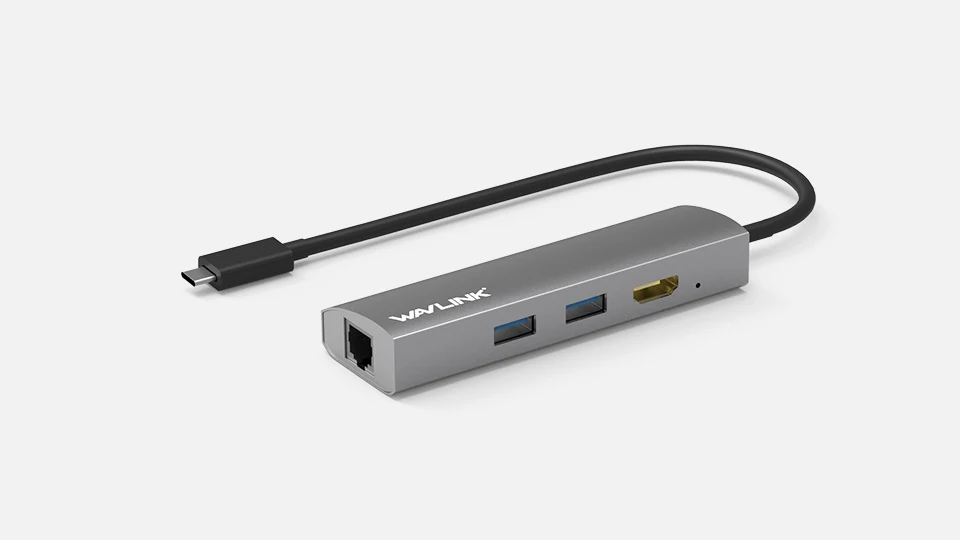
Your needs, this model
Does it fit your priorities?
Can I connect one 4K60 HDMI screen and wired Ethernet?
The maker supports that single-screen arrangement on a suitable USB-C video host; actual host capability remains necessary.
Explore this need in the finder →Will this dock replace my laptop charger?
No. It is bus powered and has no host charging path.
Explore this need in the finder →Does it provide two 5Gbps USB-A data ports?
Yes. Both downstream USB-A ports have that advertised capability, sharing the host connection.
Explore this need in the finder →The WAVLINK UHP 3408 is a useful choice when your travel setup needs a monitor, two USB-A accessories and a wired network, while the laptop keeps using its own charger. Its distinction is the combination of those four connections with a relatively long attached lead. There is no charging input to occupy or confuse with another data socket, and no card-reader bundle to pay attention to if your work does not involve memory cards.
Plan the computer connection first
The attached USB-C cable connects to the computer. For the HDMI socket to work, that computer connection must provide video through USB-C DisplayPort Alternate Mode. A USB-C socket that supports only charging and ordinary data is insufficient. WAVLINK advertises one HDMI output up to 3840 by 2160 at 60Hz. Treat that as the adapter’s ceiling with a suitable source, screen and cable, rather than a promise that every USB-C laptop supplies it.
The maker lists Windows and Mac OS support. Its Ethernet driver area names Windows 7, 8, 10 and 11 and Mac, but does not name individual Apple Silicon chips. An older general Mac compatibility statement is useful for understanding the product’s history; it does not establish every later MacBook model. Confirm your exact computer’s USB-C video capability before choosing it for a new system.
A practical arrangement for one screen
There is one HDMI socket, so the straightforward desk arrangement is the laptop’s internal screen plus one external monitor. It is a native video adapter rather than a way to generate additional desktops using USB graphics software. Buyers looking for two independent external monitors should choose a dock whose simultaneous display arrangements are documented for their computer. Adding an HDMI splitter would repeat the same signal and would not give this model another independent desktop.
A 4K60 display can make a useful difference for text movement and pointer motion compared with a 30Hz setup, but check the complete path. If the laptop’s video output, cable or monitor cannot sustain the requested mode, the port label alone cannot resolve that limitation. Connect and select a supported resolution in the operating system before building the rest of your workspace around it.
Two USB-A ports and a network connection
The two downstream USB-A ports are advertised at USB 3.0’s 5Gbps maximum line rate. That suits a keyboard and mouse, or a storage device alongside an input accessory. It is not a measured file-copying result, and both ports use the same upstream connection. Ethernet traffic and connected USB devices also rely on the laptop connection, so the separate port labels do not promise isolated bandwidth for every task at once.
The RJ 45 socket supports 10, 100 and 1000Mbps Ethernet. A Gigabit link requires compatible network equipment and cabling, and internet downloads remain limited by the service and remote source. WAVLINK offers an RTL 8153 Ethernet driver separately. Its plug-and-play positioning should therefore be read alongside that support information; a managed work computer may require help from IT if network recognition needs additional software.
Power and placement
This is a bus-powered dock. The specification’s 15W downstream full-load consumption line describes the dock’s power demand, not power delivered to a laptop. The box lists the UHP 3408 and its manual, with no wall supply. Keep the computer’s charger connected separately and consider the power requirements of peripherals before attaching several demanding devices. A storage device that requires its own supply still needs that supply.
The 55cm attached cable gives more freedom to place the adapter beside a laptop stand than a very short dongle lead. The aluminum housing and portable format suit a bag or temporary desk, but the cable still determines where it can sit. This model makes sense for a simple HDMI-and-network routine. Choose a charging dock for a single-cable powered workstation, or a data hub with more USB ports if the screen and Ethernet sockets would mostly sit unused.
Key details at a glance
| USB-A downstream data ports | 2 |
|---|---|
| USB-C downstream data ports | 0 |
| HDMI outputs | 1 |
| Full-size DisplayPort outputs | 0 |
| Full-size SD slots | 0 |
| microSD slots | 0 |
| Advertised Ethernet link ceiling | 1Gbps |
| Maximum stated power available to host | 0W |
| Power adapter included | No |
| Included host-cable length | 21.65 in |
| Host requirements | Native USB-C video capability is required; maker does not specify a DisplayPort version for this exact page. |
| Screen arrangement | One HDMI output, advertised up to 4K60 via video Alt Mode; the host and display must support the requested mode. |
| Power and charging | Bus powered; package contains dock and manual. The 15W full-load consumption line is not laptop charging. |
Use the exact model’s instructions for operating limits, supplied equipment and version differences.
Sources for this assessment
Find a hub or dock for your desk.
Match the computer, screens, devices and charging routine, then check the exact supported arrangement.