
Your needs, this model
Does it fit your priorities?
Can my DP1.2 Windows laptop run three Full HD screens at 60Hz?
No. The table limits the DP1.2 triple mode to 1600x 900 at 60Hz.
Explore this need in the finder →Can I use two USB-A ports at 5Gbps and charge at 85W?
Yes in a supported host plan, with an adequate separate PD supply. Two otherAports are only USB 2.0.
Explore this need in the finder →Does this give an Intel Mac three independent external desktops?
No. macOS uses one independent external desktop with the dock’s other outputs mirroring it.
Explore this need in the finder →The WAVLINK UMD09 suits a Windows desk where the computer’s graphics capabilities are known and several external screens matter more than a minimal travel setup. Two HDMI sockets and one full-size DisplayPort provide useful connection choices. The deciding detail is WAVLINK’s display table: the number of sockets does not tell you which resolution and refresh rate the computer can sustain across them.
Choose a complete display arrangement
For a Windows computer with DisplayPort 1.4 and DSC 1.2, the table supports two independent 4K screens at 60Hz, or three independent 1920 by 1080 screens at 60Hz. DSC is a specific compression capability in the host’s video path. Knowing only that a USB-C socket supports video, or even that it uses DisplayPort 1.4, does not establish this highest-bandwidth arrangement. Confirm both capabilities with the laptop maker.
Without DSC, a DisplayPort 1.4 Windows host has lower simultaneous limits: dual 4K at 30Hz or triple Full HD at 30Hz. One screen can still reach 4K60. This is why a single-screen maximum cannot be copied into a three-screen promise. For a computer with DisplayPort 1.2, WAVLINK lists single 4K30, dual 1080p 30, or three 1600 by 900 displays at 60Hz.
The host GPU must also support enough displays at once. WAVLINK specifically warns that the laptop panel plus three external screens requires a four-display-capable GPU. Check whether your computer can keep its internal screen active in the intended configuration. The published dual-display table does not separately identify every connector pair, so an essential requirement for two simultaneous HDMI connections deserves a model-specific check before purchase.
Mac behavior is different
The UMD09 uses native Multi-Stream Transport for its Windows expansion. WAVLINK explains that macOS does not use that MST route to create several independent external desktops: the connected dock displays repeat one external desktop. A Mac can therefore use the adapter for an external workspace, but three physical monitor connections do not become three independently arranged Mac workspaces.
The page gives general macOS support rather than a list of individual Apple Silicon chips. This review keeps that distinction visible instead of treating an old operating-system line as confirmation for every newer Mac. If two or three independent Mac displays are the purchase reason, choose a dock with an exact documented arrangement for your Mac chip and any required software or lid condition.
Four USB-A sockets at two speeds
Two USB-A ports are advertised at 5Gbps and two at 480Mbps. Put a compatible external storage device on a 5Gbps port and use the slower pair for low-bandwidth peripherals such as input devices. Requiring four 5Gbps USB-A ports rules this model out. All attached data devices still share the computer connection, so the interface rates are capabilities rather than measured simultaneous file-transfer results.
The Gigabit Ethernet socket, SD and micro SD slots, and audio connection help consolidate a desk. The network socket supports up to a 1000Mbps link; internet service and network equipment set further limits. Both card formats are supported, but the source does not establish concurrent card access strongly enough to promise it. A workflow that must copy between both cards simultaneously needs that point settled separately.
Power and the actual package
Host charging reaches up to 85W with a suitable separately supplied USB-C PD adapter. The package lists the dock and quick start guide. It does not provide the charger that makes a powered workstation possible. Check the laptop’s charging requirement under load, and allow for the difference between a charger’s input rating and the dock’s stated host output.
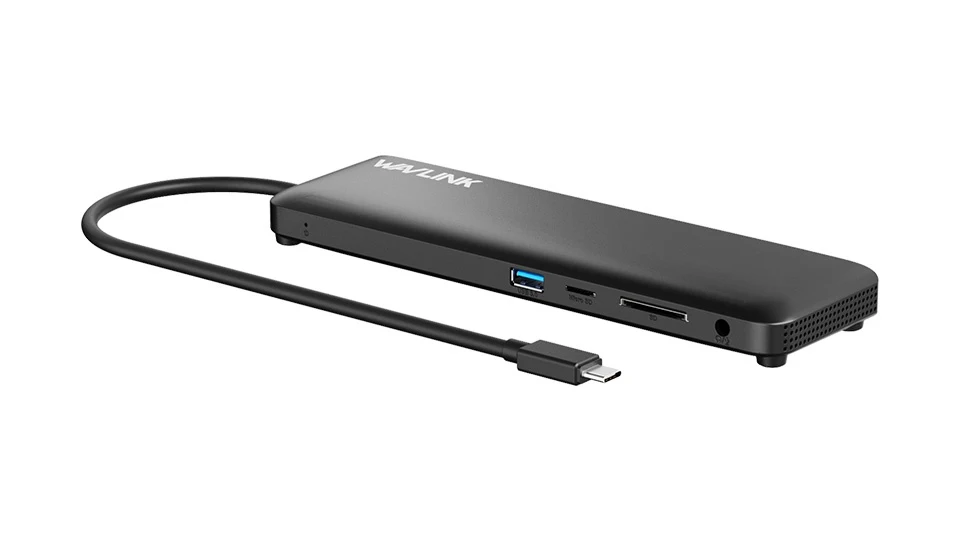
The 55cm host lead and silicone feet suit placing the adapter on a desk with several cables attached. The computer needs native USB-C data and video support; WAVLINK explicitly rejects a USB-A adapter as a substitute host route. Choose the UMD09 after matching a real Windows display arrangement and power source. A simpler hub is easier to justify when you need only one monitor, while a different video technology may be necessary for several independent Mac screens.
Key details at a glance
| USB-A downstream data ports | 4 |
|---|---|
| USB-C downstream data ports | 0 |
| HDMI outputs | 2 |
| Full-size DisplayPort outputs | 1 |
| Full-size SD slots | 1 |
| microSD slots | 1 |
| Advertised Ethernet link ceiling | 1Gbps |
| Maximum stated power available to host | 85W |
| Power adapter included | No |
| Included host-cable length | 21.65 in |
| Screen arrangement | Windows limits vary with DP1.2, DP1.4 and DSC1.2. macOS dock outputs mirror one external desktop. The table does not separately settle every dual-screen connector pair. |
| Power and charging | Up to 85W reaches the host with a suitable separately supplied PD charger. The box contains the dock and quick start guide. |
| Data and device limits | Two USB-A ports are 5Gbps and two are 480Mbps; all share the host connection. |
Use the exact model’s instructions for operating limits, supplied equipment and version differences.
Sources for this assessment
Find a hub or dock for your desk.
Match the computer, screens, devices and charging routine, then check the exact supported arrangement.