
Your needs, this model
Does it fit your priorities?
Can a documented Windows USB-A setup provide four 5 Gbps-capable data ports without an extra hub driver?
Yes. The other four outlets are charging-only, and all data sockets share the computer link.
Explore this need in the finder →Does the eight-port headline provide eight computer data connections?
No. Only four sockets transfer data; the remaining four are charging-only.
Explore this need in the finder →Can the included 36W adapter satisfy laptop charging through the hub?
No. It supplies the hub and attached accessories, not the USB-A computer.
Explore this need in the finder →WENTER eight-port powered hub: four data sockets and four charging outlets
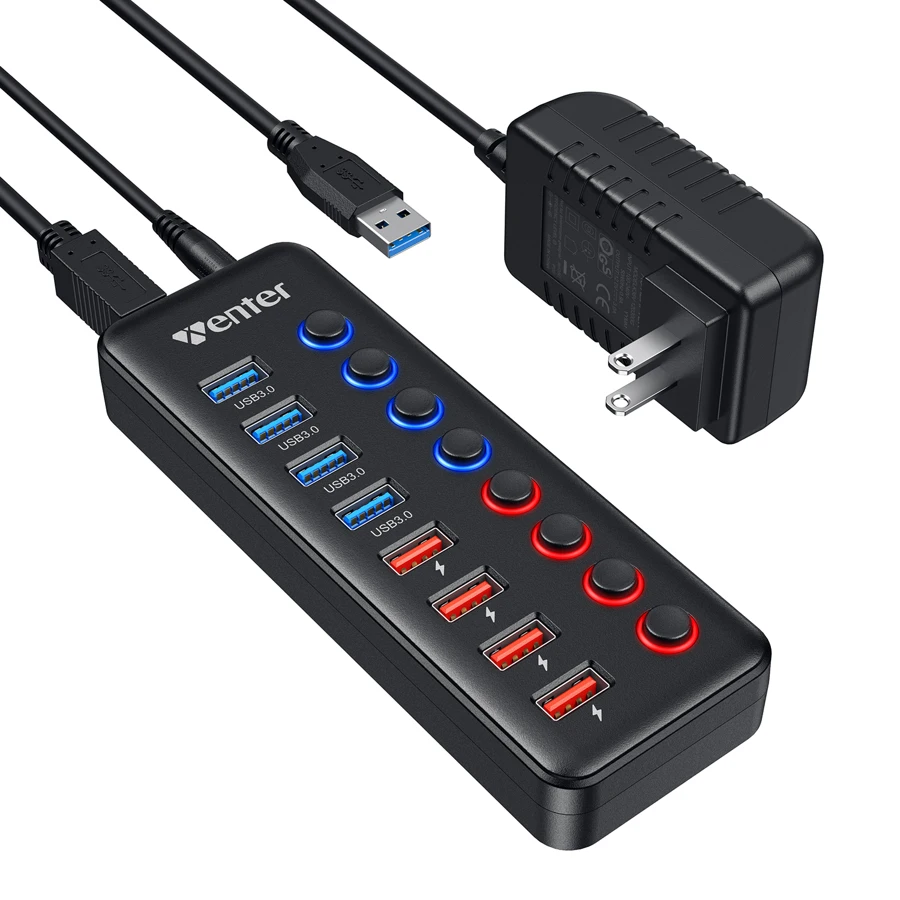
This WENTER eight-port version is for a desk that needs both USB data connections and separate accessory charging. Its allocation is four USB 3.0 data ports plus four smart charging ports, each with its own switch and indicator. The four charging outlets do not communicate with the computer. If your eight devices all need data, this particular eight-port arrangement is the wrong count.
Check the four-plus-four layout
The original WENTER product page identifies the four-data/four-charge version in its title, description and specification. Its matching original photograph shows four blue USB-A data sockets and four red charging outlets. The included computer cable has a USB-A plug. This is the configuration assessed here, rather than another WENTER product selected only because its total port number or generic model field looks similar.
The four data sockets advertise up to 5Gbps on a suitable USB 3.0 connection, with USB 2.0 and older backward compatibility. They share the computer connection, so simultaneous storage activity competes for the same upstream path. Treat 5Gbps as an advertised interface ceiling, not a measured file-copy rate or a separate full-bandwidth guarantee for every socket.
The USB-A computer cable and rectangular accessory sockets also define what the package connects directly. A USB-C-only computer is not a supplied USB-C host route, and an outward charging socket is not an upstream connection. Keep those roles separate when laying out a desk with a mixture of newer USB-C devices and older USB-A peripherals.
Read the supply rating correctly
WENTER lists an included 12V, 3A AC adapter, equivalent to 36W at its stated DC output. Its original photograph shows a US-style plug version. Verify the actual regional package before ordering. The supply powers the hub and its accessories; it is not a 36W USB-C Power Delivery charger for a notebook.
The smart charging outlets advertise up to 2.4A per port and can be used for devices such as phones or tablets. A device determines what it can accept, and the per-port maximum should not be multiplied into an unlimited simultaneous total. The source does not give a detailed current allocation covering every combination of four charging devices and four data peripherals. Allow for the connected devices' actual demands rather than assuming every outlet can provide its maximum at once.
For a laptop that must charge through the same docking cable, select a product with an expressly documented host-charging function. This WENTER version keeps the accessory-power supply and USB-A data connection separate. Charging-only outlets can reduce desk clutter for small devices while still leaving the laptop on its own charger.
Arrange cables and switches around the desk
The product page specifies a 100cm, approximately 3.3-foot USB cable and a 150cm, approximately 5-foot power cable. Those lengths help place the hub within reach while keeping the adapter nearer a wall outlet. Check the route from the computer as well as the route from mains power; a desk layout can be limited by either lead.
Every port has an individual switch and LED indicator, allowing an accessory to remain physically connected when it is not in use. Use the appropriate data socket for a device that needs to be recognized by the computer, and make sure its switch is on before troubleshooting software. Finish file operations and safely remove storage before turning its port off. A light indicates a powered port, not that a drive has finished writing.
Choose for the documented computer scope
WENTER lists Windows XP, Vista, 7, 8 and 10, Mac OS and Linux 9 or later, and says no extra hub driver is required. The general Mac wording is retained as Intel-era compatibility; it does not establish every later Apple chip. Attached peripherals may still have their own drivers or operating-system requirements, even when the hub itself is plug and play.
Choose the four-plus-four WENTER version when four computer data connections and four separate charging outlets match the devices on your desk. Choose a different layout for more data positions, USB-C accessories, monitor outputs, wired networking or a built-in card reader. The appeal here is a clear division between data and accessory charging, supported by the supplied power arrangement and individual controls.
Key details at a glance
| USB-A downstream data ports | 4 |
|---|---|
| USB-C downstream data ports | 0 |
| HDMI outputs | 0 |
| Full-size DisplayPort outputs | 0 |
| USB-C video outputs | 0 |
| Full-size SD slots | 0 |
| microSD slots | 0 |
| Advertised Ethernet link ceiling | 0Gbps |
| Maximum stated power available to host | 0W |
| Maximum PD input | 0W |
| Included supply rating | 36W |
| Power adapter included | Yes |
| Detachable host cable | Yes |
| Individual port switches | Yes |
| Included host-cable length | 39.6 in |
| Host requirements | Original photo confirms supplied detachable USB-A computer cable. Exact four-data/four-charge eight-port version only. |
| Screen arrangement | Exact original complete layout has no video, Ethernet or memory-card sockets. |
| Power and charging | Included 12V/3A adapter equals 36W for hub/accessories; original photo shows US plug. Up to 2.4A per smart outlet is not an all-port simultaneous guarantee. No host PD charging. |
| Data and device limits | Four blue USB-A data ports up to 5 Gbps with documented USB2/older fallback; four red outlets charge only and are excluded. Shared upstream connection. |
| Installation | 100 cm/3.3 ft data cable and 150 cm/5 ft power lead. Eight individual switches and LED indicators; safely eject storage before interrupting its data port. |
Use the exact model’s instructions for operating limits, supplied equipment and version differences.
Sources for this assessment

Find a hub or dock for your desk.
Match the computer, screens, devices and charging routine, then check the exact supported arrangement.