
Your needs, this model
Does it fit your priorities?
Do all four USB-A sockets qualify for 10 Gbps devices?
No. Three ports advertise 10 Gbps and the remaining rear USB-A port is 5 Gbps. Four faster-port requirements are not met by the total socket count.
Explore this need in the finder →Can a supported M5 Pro run three Type-C 4K 60 Hz screens and still leave a direct Type-C data port?
No. Three directly connected screens occupy all three downstream Thunderbolt sockets. There is no separate dedicated USB-C data port.
Explore this need in the finder →Can a supported M5 Pro combine two Type-C 4K 60 Hz screens, one remaining Type-C data connection and 2.5 Gb Ethernet?
Yes. The two screens leave one of the three downstream Thunderbolt sockets available, and the separate Realtek USB Ethernet route supports 2.5 Gb links with compatible network equipment.
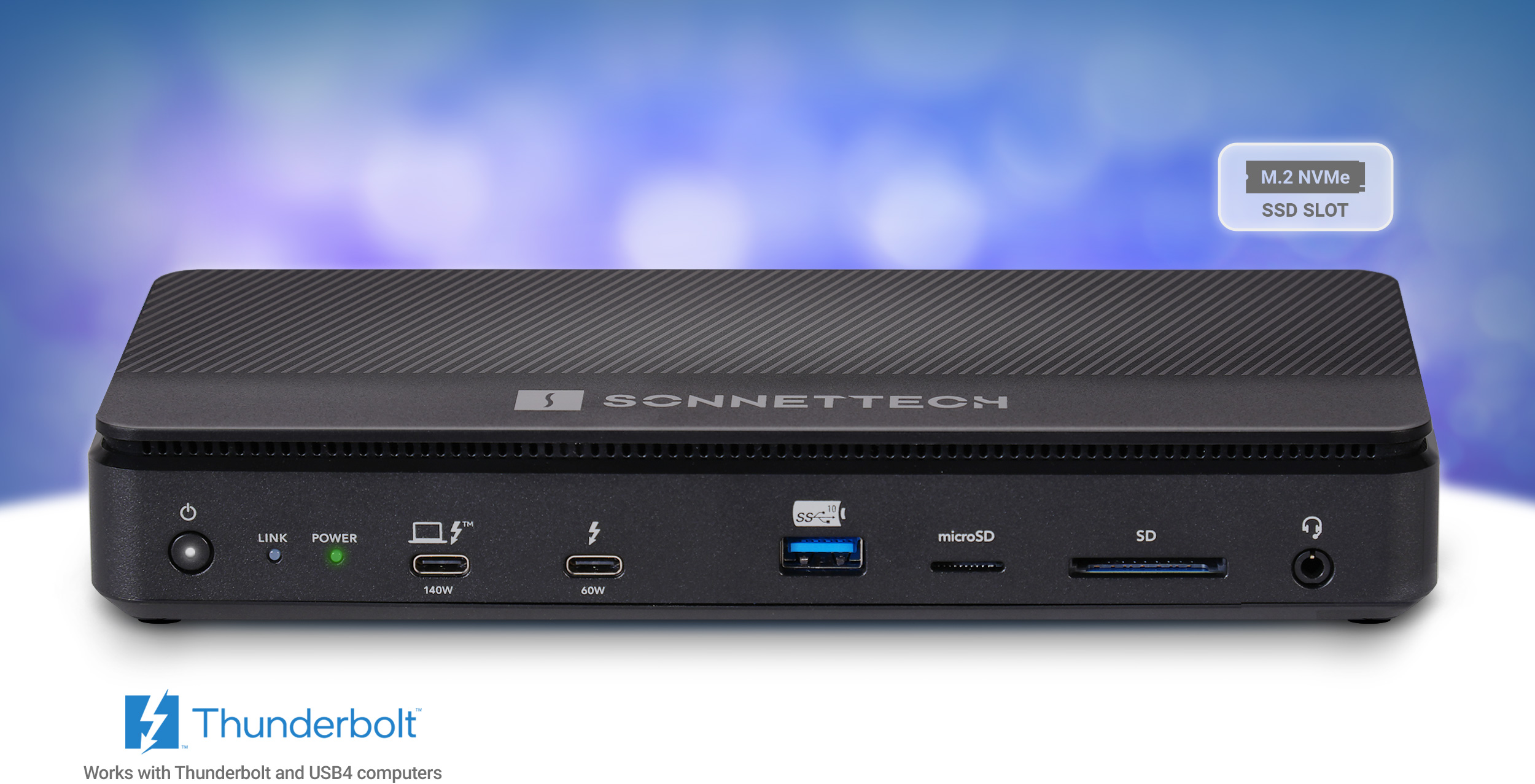
Explore this need in the finder →The Sonnet Echo 13 Thunderbolt 5 SSD Dock suits a supported workstation that puts internal storage and downstream Thunderbolt connections ahead of built-in HDMI or DisplayPort. This assessment covers the current US ECHO-DK13-0TB5 package: you add the SSD yourself. It is a useful way to keep a drive with the desk, but its three downstream Type-C sockets must also serve any directly connected monitors, and one of its four USB-A ports is slower than the other three.
Buy the correct SSD edition and check its serial number
The US listing identifies the add-your-own-drive package by ECHO-DK13-0TB5. It contains the dock and power/cable equipment, rather than a preinstalled SSD. Sonnet's global technical page also lists 1 TB, 2 TB and 4 TB equipped models; those are separate storage packages and should not be silently substituted for this US configuration.
Serial number matters as well as capacity. Sonnet says currently shipping B-series docks accept a broad range of standard M.2 NVMe drives without heatsinks, including single- and double-sided designs. Earlier A-series docks supplied with an SSD have a narrower upgrade compatibility list, and some retail Kingston NV3 revisions are incompatible. A recommendation for the current empty B-series dock is therefore not a blanket upgrade recommendation for an older equipped unit.
For this DIY model, Sonnet describes removing the top cover and included heatsink to install a compatible drive, then restoring them. Follow the current installation material for the exact revision. The reviewed quick-start guide also contains instructions for factory-preinstalled SSDs; its statement that those drives ship formatted is not evidence that this empty package arrives ready to store files.
Sonnet advertises up to 8 TB capacity and up to 6600 MB/s transfers with a suitable SSD and TB5 host, with lower ceilings on older connections. Those are manufacturer maxima, not our measurements. Host CPU, drive, file system and workload affect the result. The current specification warns that some Core Ultra 1 and 2 hosts may limit a 4 TB drive to about 800 MB/s. The dock includes a cooling fan, so a buyer requiring a fanless desk should choose a different design.
Three Type-C peripheral ports, with different power budgets
There are three downstream Thunderbolt ports in addition to the computer connection. The front peripheral port provides up to 60 W for a compatible device; the two rear ports provide up to 15 W each. A powered tablet or accessory can therefore share the desk without taking another charger, provided its power needs and the dock's overall budget fit.
These same sockets carry supported Thunderbolt, USB4 and USB peripherals or suitable displays. They are not three separate dedicated USB-C data ports plus three additional monitor ports. One Type-C display leaves two direct Type-C data sockets free; two leave one; three leave none. The advertised TB5 transport speed does not establish 20 Gbps USB 3.2 Gen 2x2 for a USB drive, and the ordinary USB line rates of these three sockets remain unassigned in our facts.
The USB-A arrangement is clearer: three ports advertise 10 Gbps, while the remaining rear USB-A port is 5 Gbps. The slower port is a sensible place for a keyboard or another modest-bandwidth accessory. A requirement for four 10 Gbps USB-A devices is not met by counting all four sockets together.
Displays need the computer, cables and remaining ports to agree
There are no built-in HDMI or DisplayPort sockets. A monitor with the correct Thunderbolt or USB-C video connection can connect directly; an HDMI or DisplayPort monitor needs an appropriate separately purchased Thunderbolt-compatible adapter. Buying that adapter changes the physical arrangement and consumes a downstream Type-C connection.
The documented native display count depends on the exact computer. Base M1 and M2 Macs remain single-display hosts through the dock; compatible base M3 MacBooks have a closed-lid dual-display exception. Sonnet's matrix specifically establishes triple 4K 60 Hz for M5 Pro and Max, while the M5 Max four-screen arrangement needs a compatible display chain because the dock has only three direct peripheral sockets.
Current Sonnet guidance also names M5 Ultra for four screens and M6 for two, but their exact joint timing is not supplied by the reviewed older matrix. M4 Max three-screen guidance conflicts with Apple's current per-port statement; confirm the exact computer before relying on the extra screen. Windows TB5 with a discrete GPU can have a different limit from an integrated-GPU host, so the Windows label alone is not a three-screen guarantee.
Networking, charging and the final fit
The 2.5 Gb Ethernet connection uses a Realtek USB controller and suitable Cat 5e or better cabling. It does not inherit the PCIe-only network requirement of Sonnet's 10 GbE docks. Access to an installed internal NVMe drive is a separate PCIe function, however: a generic USB4 host must support the required tunneling before that storage route is established. Supported operating systems include the standard Ethernet drivers; Sonnet recommends the latest Windows Realtek driver rather than describing it as a mandatory separate display driver.
The US package includes a universal 180 W supply, regional cord and detachable 0.8 m TB5 cable. Host charging is up to 140 W, with peripheral demand able to reduce the available amount. The front power button switches the whole dock, and turning it off stops charging at all ports. SD and microSD slots are present, but simultaneous independent card access is unconfirmed in the reviewed material.
Choose this model when internal SSD expansion and three flexible Thunderbolt connections are the point of the purchase. Compare the CalDigit Element 5 Hub for a different port balance without internal storage. The DockAndPort finder can check the exact host, screens, remaining Type-C sockets and the three faster USB-A ports as one arrangement.
Key details at a glance
| USB-A downstream data ports | 4 |
|---|---|
| USB-C downstream data ports | 3 |
| HDMI outputs | 0 |
| Digital DVI outputs | 0 |
| Analog VGA outputs | 0 |
| Full-size DisplayPort outputs | 0 |
| Mini DisplayPort outputs | 0 |
| USB-C video outputs | 3 |
| Full-size SD slots | 1 |
| microSD slots | 1 |
| Advertised Ethernet link ceiling | 2.5Gbps |
| Maximum stated power available to host | 140W |
| Included supply rating | 180W |
| Power adapter included | Yes |
| Detachable host cable | Yes |
| Individual port switches | No |
| Included host-cable length | 31.5 in |
| Host requirements | Use an exact supported Thunderbolt or qualified USB4 computer and current OS. USB Ethernet is separate from the optional PCIe SSD route, which additionally needs host PCIe tunneling. Current facts cover the US empty-SSD ECHO-DK13-0TB5 package. |
| Screen arrangement | No built-in HDMI or DisplayPort output. All direct video uses one of three downstream Thunderbolt sockets; separately purchased adapters do not create supplied native sockets. Four-screen configurations need a confirmed compatible chain. |
| Power and charging | The universal included supply is 180 W; laptop charging is up to 140 W and can decrease with peripheral load. The front Thunderbolt peripheral port provides up to 60 W; the two rear ports up to 15 W each. Turning off the whole-dock switch removes charging from all ports. |
| Data and device limits | Three USB-A ports advertise 10 Gbps and one rear USB-A port 5 Gbps. Three downstream Thunderbolt data/video sockets have unspecified ordinary USB rates. TB5 or USB4 v2 peripheral compatibility does not prove USB 20 Gbps Gen 2x2. |
| Installation | SSD is not included. Current B-series compatibility differs from older A-series equipped docks; check the exact drive and serial number. The US package includes a detachable 0.8 m TB5 cable, regional cord and 180 W supply. Dock has an active cooling fan; published mass includes the power supply. |
Use the exact model’s instructions for operating limits, supplied equipment and version differences.
Sources for this assessment
- Sonnet Echo 13 Thunderbolt 5 SSD Dock overview
- Sonnet ECHO-DK13-0TB5 current technical specifications
- Sonnet Echo 13 Thunderbolt 5 SSD Dock Quick Start Guide
- Sonnet Echo TB5 display support matrix, 7 August 2026
- Sonnet US Echo 13 Thunderbolt 5 SSD Dock, Add Your Own SSD
- Apple current M5 Ultra Mac Studio specifications
- Apple current M6 and M5 Ultra release
- Apple current MacBook display support
Find a hub or dock for your desk.
Match the computer, screens, devices and charging routine, then check the exact supported arrangement.