
Your needs, this model
Does it fit your priorities?
Can a supported M2 Pro use two Type-C 4K 60 Hz screens and still keep four dedicated 10 Gbps USB-C data ports?
Yes. The two screens use both downstream Thunderbolt ports while the four dedicated USB-C data ports remain available. An additional USB 3 hub would need one of the occupied Thunderbolt ports, so that is a separate limitation.
Explore this need in the finder →Can those two Type-C screens also leave five USB-C data ports free?
No. Both downstream Thunderbolt ports are occupied by the screens, leaving four dedicated USB-C data ports. The HDMI-plus-Type-C arrangement has a different remaining-port count.
Explore this need in the finder →Does this dock provide native SD and microSD slots that work as two independent readers?
No. It has one SD slot. A microSD adapter uses that same reader and does not add another independently usable slot.
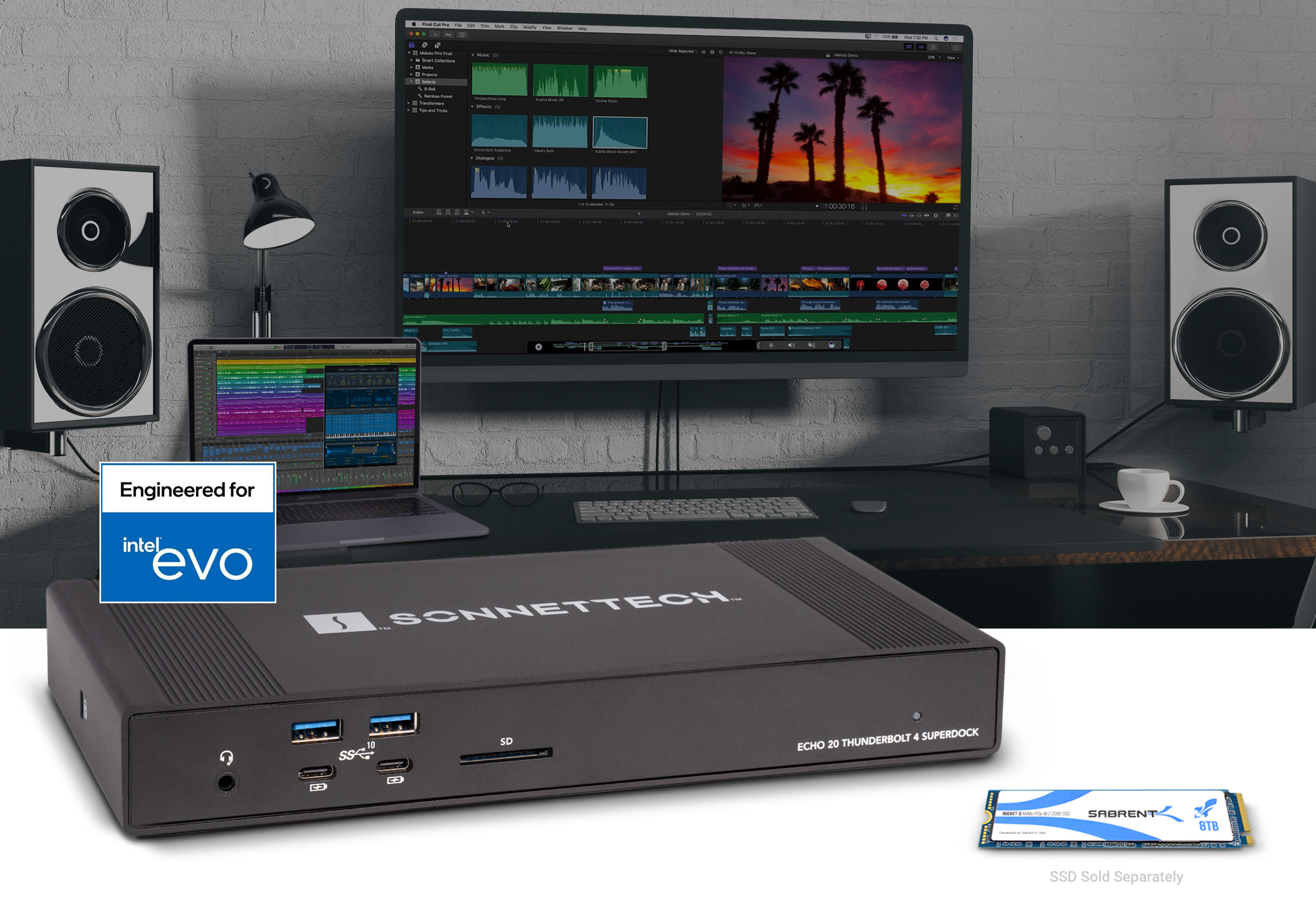
Explore this need in the finder →The Sonnet Echo 20 Thunderbolt 4 SuperDock suits a desk that needs many ordinary USB connections, native HDMI and space for an internal SSD in one powered dock. Its four 10 Gbps USB-A ports and four dedicated 10 Gbps USB-C ports are the main attraction. Choose it for that combination and its documented host support; the internal SSD slot has a much lower advertised transfer ceiling than newer Thunderbolt 5 storage docks.
Eight USB ports, with a rule for adding another hub
The ECHO-DK20-T4 has two USB-A and two USB-C data ports on the front, with another pair of each on the rear. A camera cable, removable drive and phone can stay accessible while less frequently touched connections remain behind the dock. Sonnet specifies 10 Gbps for all eight of these USB ports. That is an advertised connection rate, rather than a copying result or eight independent upstream connections running at that speed together.
There are also two downstream Thunderbolt 4 ports. They accept supported Thunderbolt, USB4 and USB devices and provide up to 15 W each. The third Thunderbolt socket is the computer connection, so it does not add another peripheral port. Sonnet does not establish 20 Gbps USB 3.2 Gen 2x2 operation merely by advertising 40 Gbps Thunderbolt transport.
One less obvious restriction matters if your desk already has a USB hub, KVM switch or keyboard with a built-in hub. Sonnet says an external USB 3 hub must connect to a Thunderbolt port because the dock's USB hub architecture reaches the USB 3 hub limit. Plan that connection before assigning both downstream Thunderbolt ports to displays. A physically empty dedicated USB-C socket does not remove this particular expansion restriction.
HDMI and Thunderbolt form alternative two-screen arrangements
The built-in HDMI output saves an adapter when the monitor already uses HDMI. A supported two-screen arrangement uses HDMI plus one downstream Thunderbolt port, or both downstream Thunderbolt ports. These are alternatives: the three available display routes do not establish three independent external desktops.
Using HDMI plus one Type-C display leaves the four dedicated USB-C data ports and one downstream Thunderbolt port free. Using two Type-C displays leaves the four dedicated USB-C data ports free. If one remaining Thunderbolt connection must serve that extra USB hub, the HDMI arrangement can therefore be more useful than the larger connector count initially suggests.
Computer limits still apply. Sonnet lists one external display for base M1, M2 and M3 Macs, with a separate closed-lid exception for compatible base M3 MacBooks. Its older display matrix establishes dual 4K 60 Hz for the named M1/M2 Pro and Max arrangements. The current technical page names additional chips for two displays, including M6 and M5 Ultra, but a newer chip's screen count is not a reason to invent an exact shared refresh rate. HDMI itself is specified up to 4K 60 Hz on macOS; the higher Windows HDMI headline is a separate single-output limit.
The internal SSD is optional and needs installation
The dock includes an M.2 NVMe slot rather than an SSD. Sonnet advertises capacity up to 8 TB and transfers up to 800 MB/s for this slot, whose documented connection is PCIe x1. That can make sense for a desk library or backup drive that stays with the dock. It is a poor reason to buy a particularly fast SSD while expecting the dock to reproduce the drive's own headline performance.
The manual describes removing the bottom cover, securing a compatible 2280 SSD and restoring the cover with its thermal pad in contact with the drive. Check the current compatibility document for the precise SSD before purchase. Formatting is a separate setup step. Eject the installed drive and any attached storage before unplugging the computer cable. Windows users enabling the manual's optional write-caching setting also take on its explicit safe-removal requirement.
The network socket supports 2.5 Gb Ethernet with suitable multi-gigabit equipment and Cat 5e or better cabling. It uses a Realtek USB Ethernet controller, unlike the PCIe-based 10 GbE route in Sonnet's newer docks. The SD reader accepts microSD through an adapter; there is no second native microSD slot. Stereo RCA line outputs, a headset connection and a separate microphone input add useful audio options, although the connected speakers or amplifier remain separate equipment.
Power, host requirements and the final choice
The current specification lists a universal 150 W supply, a power cord, a detachable 0.8 m Thunderbolt cable and a ThunderLok-B retainer. Maximum laptop charging is 100 W, and Sonnet says the charging rate varies with total power use. A laptop designed around a higher-powered charger may still need that charger during demanding work. Desktop Macs use their own power supply; the dock's laptop-charging claim does not change that.
Sonnet also lists a certified refurbished ECHO-DK20-T4-RF package with a one-year warranty and a stated 0.7 m Thunderbolt cable. That shares the functional dock design but differs from the new package described here. Check the condition, included cable and warranty when comparing those offers.
Current requirements include macOS 15 or later and Windows 11 25H2 or later, with the exact supported Thunderbolt or USB4 computer. A generic USB-C data or charging port is insufficient. Supported operating systems include the required standard dock drivers, but a generic USB4 label does not guarantee the richest display configuration or access to PCIe storage.
Choose this model when its eight dedicated faster USB ports and optional modest-speed internal storage solve a specific desk problem. Compare the CalDigit TS4 if the USB and card-reader balance matters more than an internal SSD. Use the DockAndPort finder to check the actual host, monitor connections, remaining data ports and charging needs together.
Key details at a glance
| USB-A downstream data ports | 4 |
|---|---|
| USB-C downstream data ports | 6 |
| HDMI outputs | 1 |
| Digital DVI outputs | 0 |
| Analog VGA outputs | 0 |
| Full-size DisplayPort outputs | 0 |
| Mini DisplayPort outputs | 0 |
| USB-C video outputs | 2 |
| Full-size SD slots | 1 |
| microSD slots | 0 |
| Simultaneous card slots | No |
| Advertised Ethernet link ceiling | 2.5Gbps |
| Maximum stated power available to host | 100W |
| Included supply rating | 150W |
| Power adapter included | Yes |
| Detachable host cable | Yes |
| Individual port switches | No |
| Included host-cable length | 31.5 in |
| Host requirements | Requires a documented Thunderbolt or qualified USB4 host and supported OS. Generic USB-C data or charging ports are not supported. Optional internal PCIe SSD access needs a host that carries PCIe. |
| Screen arrangement | Two-screen routes use HDMI plus one downstream Thunderbolt port, or both downstream Thunderbolt ports. Every mode records the remaining USB-C data ports; the four dedicated USB-C data ports are separate from video. |
| Power and charging | Current specification includes a universal 150 W supply and states up to 100 W of laptop charging, varying with total use. A laptop requiring more power may still need its own charger. |
| Data and device limits | Four USB-A and four dedicated USB-C ports advertise 10 Gbps. Ordinary USB rates on the two downstream Thunderbolt ports remain unknown. External USB 3 hubs, including hubs inside KVMs or keyboards, must connect to a Thunderbolt port under Sonnet Technical Note 4. |
| Installation | The new US package includes a detachable 0.8 m Thunderbolt cable and ThunderLok-B retainer. SSD is separate and installs beneath the bottom cover; the one SD reader needs an adapter for microSD. Published mass includes the power supply, so dock-only weight is unknown. |
Use the exact model’s instructions for operating limits, supplied equipment and version differences.
Sources for this assessment
- Sonnet Echo 20 Thunderbolt 4 SuperDock overview
- Sonnet ECHO-DK20-T4 current technical specifications
- Sonnet Echo 20 Thunderbolt 4 SuperDock User Guide
- Sonnet Thunderbolt 4 display compatibility matrix
- Sonnet NVMe SSD compatibility document
- Sonnet US Echo 20 Thunderbolt 4 SuperDock
- Sonnet US ECHO-DK20-T4-RF refurbished package
- Apple current M6 and M5 Ultra release
Find a hub or dock for your desk.
Match the computer, screens, devices and charging routine, then check the exact supported arrangement.