
Your needs, this model
Does it fit your priorities?
Can the HDMI and DisplayPort sockets provide two independent screens together?
No. The manual permits only one of those native outputs at a time. A supported second screen must use a downstream Thunderbolt connection instead.
Explore this need in the finder →Can a supported M5 Pro run three Type-C 4K 60 Hz screens and retain five dedicated 10 Gbps USB-C data ports?
Yes, with a confirmed compatible Thunderbolt display chain. Both physical downstream Thunderbolt sockets are occupied by the screen arrangement; the five dedicated USB-C data sockets remain available.
Explore this need in the finder →Does generic USB4 without PCIe tunneling establish the 10 Gb Ethernet connection?
No. The Marvell network route requires PCIe tunneling. USB data and charging alone do not establish that network capability.
Explore this need in the finder →The Sonnet Echo 21 Thunderbolt 5 SuperDock is a strong fit for a supported workstation that needs 10 Gb Ethernet, many dedicated USB ports and an optional internal NVMe drive. Its useful distinction is the combination of those functions through one computer cable. Buy it after checking the exact computer and display arrangement: the HDMI and DisplayPort outputs are alternatives, and the four-screen headline needs a specifically supported Mac and a confirmed display chain.
A storage dock for a busy desk
The ECHO-DK21-T5 has an empty M.2 NVMe slot beneath its bottom cover. Sonnet specifies a PCIe 4.0 x2 connection and capacity up to 8 TB, with a current list of recommended drives without their own heatsinks. Storage is optional: the dock works without installing a drive, and the SSD is an additional purchase.
That arrangement is useful when a media library or working drive should stay attached to the desk rather than occupy another external enclosure and cable. It is less convenient if the drive must regularly travel between computers. The manual describes securing a compatible 2280 SSD, restoring the thermal-pad cover, then formatting the drive in the operating system. An installed drive must be ejected before disconnecting the dock, just like an external drive.
Sonnet's overview contains both 3300 MB/s and 3400 MB/s storage claims. Treat those as manufacturer ceilings, with a small unresolved difference, rather than a measured result or a reason to buy one capacity over another. The current specification also warns that some Intel Core Ultra 1 and 2 computers may limit 4 TB and 8 TB drives to about 800 MB/s. A faster SSD cannot fix a host restriction. If internal storage is unwanted or prohibited, the separate Echo 20 Thunderbolt 5 SecureDock omits the slot.
Count the usable USB sockets and network route
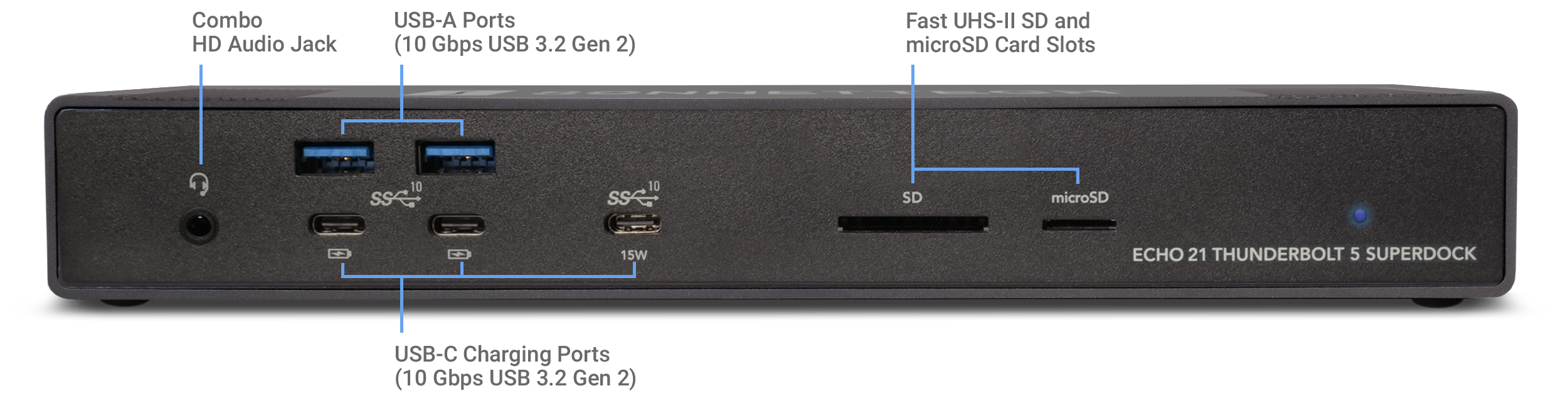
Four USB-A and five dedicated USB-C ports advertise 10 Gbps USB 3.2 Gen 2. The dedicated Type-C ports are data and charging connections, rather than monitor outputs. One front Type-C port provides up to 15 W; the other four provide up to 7.5 W each. This is a generous selection for several drives and everyday accessories, although all traffic ultimately shares the connection to the computer.
Two additional downstream Thunderbolt ports support compatible Thunderbolt, USB4 and USB peripherals and provide up to 15 W each. Their high transport rating does not establish 20 Gbps USB 3.2 Gen 2x2 for an ordinary USB drive. If a display occupies one of those ports, it is no longer also a free independent data socket. The five dedicated Type-C data ports remain available in that arrangement.
The 10 GbE socket is especially relevant to a fast local NAS or production network. Reaching a 10 Gb link requires compatible network equipment and suitable cabling: Sonnet specifies Cat 6 for up to 55 metres or Cat 6A for up to 100 metres. Slower multi-gigabit links are also supported. Internet service, the NAS drives and other traffic can still limit an actual transfer. The Marvell network controller uses the Thunderbolt/PCIe route; generic USB4 without confirmed PCIe tunneling does not establish its availability. Windows users must install Sonnet's linked Ethernet driver.
Choose HDMI or DisplayPort before adding screens
The rear panel has HDMI and full-size DisplayPort sockets, but the manual permits only one of them at a time. A two-screen desk can use that chosen socket plus one downstream Thunderbolt connection, or use the two downstream Thunderbolt connections. Do not plan an HDMI-plus-DisplayPort pair as two independent outputs from the dock.
Sonnet distinguishes Windows HDMI up to 8K 60 Hz from macOS HDMI up to 4K 60 Hz. DisplayPort is specified up to 4K 144 Hz. Those individual limits are separate from the exact computer's simultaneous-screen limit. Base M1 and M2 Macs remain limited to one display through this dock; compatible base M3 MacBooks have a closed-lid two-display exception. The current page names newer supported Mac chips, but it does not make every chip a four-screen host.
For suitable M5 Max arrangements, four screens require a compatible Thunderbolt display chain. With a native HDMI or DisplayPort monitor plus three Thunderbolt-connected screen endpoints, both physical downstream Thunderbolt sockets are occupied and one screen is chained. Confirm the actual monitors, cables, selected resolution and refresh rate before choosing this configuration. M5 Ultra is also named for four screens on the current page, but the reviewed older matrix does not establish its exact joint timing. Conflicting M4 Max guidance should be resolved with the exact computer before relying on a third display.
The supplied power and the buyer who should choose it
The US package includes a universal 240 W supply, region-specific cord, detachable 0.8 m Thunderbolt 5 cable and ThunderLok-A cable lock. Maximum host charging is 140 W, rather than the entire supply rating. A high-powered laptop can still need its own charger under load, and attached bus-powered devices affect the power budget. The dock follows the connected computer's power state and has no manual power switch.
SD and microSD readers, RCA line outputs, a headset jack and a separate microphone connection round out the desk functions. The reviewed material does not establish simultaneous independent use of both card slots, so a workflow requiring that should be checked separately. Current requirements include macOS 15 or later or the specified Windows 11 25H2 host; an ordinary USB-C data or charging port is insufficient.
Choose the Echo 21 when 10 GbE and internal storage both have a job. Compare the CalDigit TS5 Plus for a different USB and power arrangement. Enter the computer, screen connections and remaining data-port needs in the DockAndPort finder before treating a large port count as a complete workstation plan.
Key details at a glance
| USB-A downstream data ports | 4 |
|---|---|
| USB-C downstream data ports | 7 |
| HDMI outputs | 1 |
| Digital DVI outputs | 0 |
| Analog VGA outputs | 0 |
| Full-size DisplayPort outputs | 1 |
| Mini DisplayPort outputs | 0 |
| USB-C video outputs | 2 |
| Full-size SD slots | 1 |
| microSD slots | 1 |
| Advertised Ethernet link ceiling | 10Gbps |
| Maximum stated power available to host | 140W |
| Included supply rating | 240W |
| Power adapter included | Yes |
| Detachable host cable | Yes |
| Individual port switches | No |
| Included host-cable length | 31.5 in |
| Host requirements | Requires the exact supported Thunderbolt or qualified USB4 computer and OS. PCIe tunneling is required for the Marvell network route and optional PCIe SSD; an ordinary USB-C data or charging port is unsupported. |
| Screen arrangement | Only one native output may be used: HDMI or full-size DisplayPort. Additional displays use the two downstream Thunderbolt sockets. Four-screen plans require a confirmed compatible display chain, and every mode reserves occupied Type-C data sockets. |
| Power and charging | The included universal 240 W supply supports up to 140 W of host charging. Actual laptop acceptance and attached peripheral power matter; demanding laptops may still need their own charger. Each downstream Thunderbolt port supplies up to 15 W. |
| Data and device limits | Four USB-A and five dedicated USB-C sockets advertise 10 Gbps USB 3.2 Gen 2. The two downstream Thunderbolt ports add data connections with unspecified ordinary USB rates. Neither TB5 transport nor USB4 v2 peripheral compatibility proves USB 20 Gbps Gen 2x2. |
| Installation | US package includes a detachable 0.8 m TB5 cable, region-specific cord and ThunderLok-A lock. Install an optional compatible heatsink-free 2280 NVMe drive beneath the thermal-pad bottom cover; SSD is separate. Published weight combines dock and supply. |
Use the exact model’s instructions for operating limits, supplied equipment and version differences.
Sources for this assessment
- Sonnet Echo 21 Thunderbolt 5 SuperDock overview
- Sonnet ECHO-DK21-T5 current technical specifications
- Sonnet Echo 21 Thunderbolt 5 SuperDock User Guide
- Sonnet Echo Thunderbolt 5 dock display matrix, 7 August 2026
- Sonnet US ECHO-DK21-T5 package
- Apple M5 Ultra Mac Studio specifications
- Apple current M6 and M5 Ultra release
- Apple current MacBook display support
- Marvell scalable multi-gigabit Ethernet controllers
Find a hub or dock for your desk.
Match the computer, screens, devices and charging routine, then check the exact supported arrangement.